How to Debug CI/CD Pipeline Failures Without Redeploying
May 15, 2023 / Updated: Oct 14, 2026

A CI/CD pipeline can deploy an AWS CDK stack, pass every stage, and still boot production at a fraction of the capacity it needs, because a case-sensitive config lookup silently fell back to defaults. This article covers the five most common pipeline failures, why dashboards can’t prove root cause, and how to confirm one with live runtime evidence, no redeploy required.
Key Takeaways
- A pipeline stage exits the moment it finishes, so the evidence that would explain a failure or a slowdown is usually gone by the time anyone starts investigating.
- Most pipeline failures trace back to five causes (flaky tests, environment and config drift, dependency and cache problems, faulty deploy scripts, and health checks that pass too early), and each one can leave every stage green while production breaks.
- Lightrun’s State of AI-Powered Engineering 2026 report found that 43% of AI-generated code changes still need debugging in production, adding an average of three redeploy cycles before a fix actually holds.
- Pipeline dashboards from tools like Datadog, Splunk, and Dynatrace show which stage failed and how long it ran. They don’t show what the code inside that stage did with the inputs it actually received.
- Adding runtime context, in the form of dynamic logs, snapshots, and metrics captured without a redeploy, turns “the pipeline is green” into “here is the exact line and value that broke it”.
What Are the Most Common Reasons CI/CD Pipelines Fail or Slow Down?
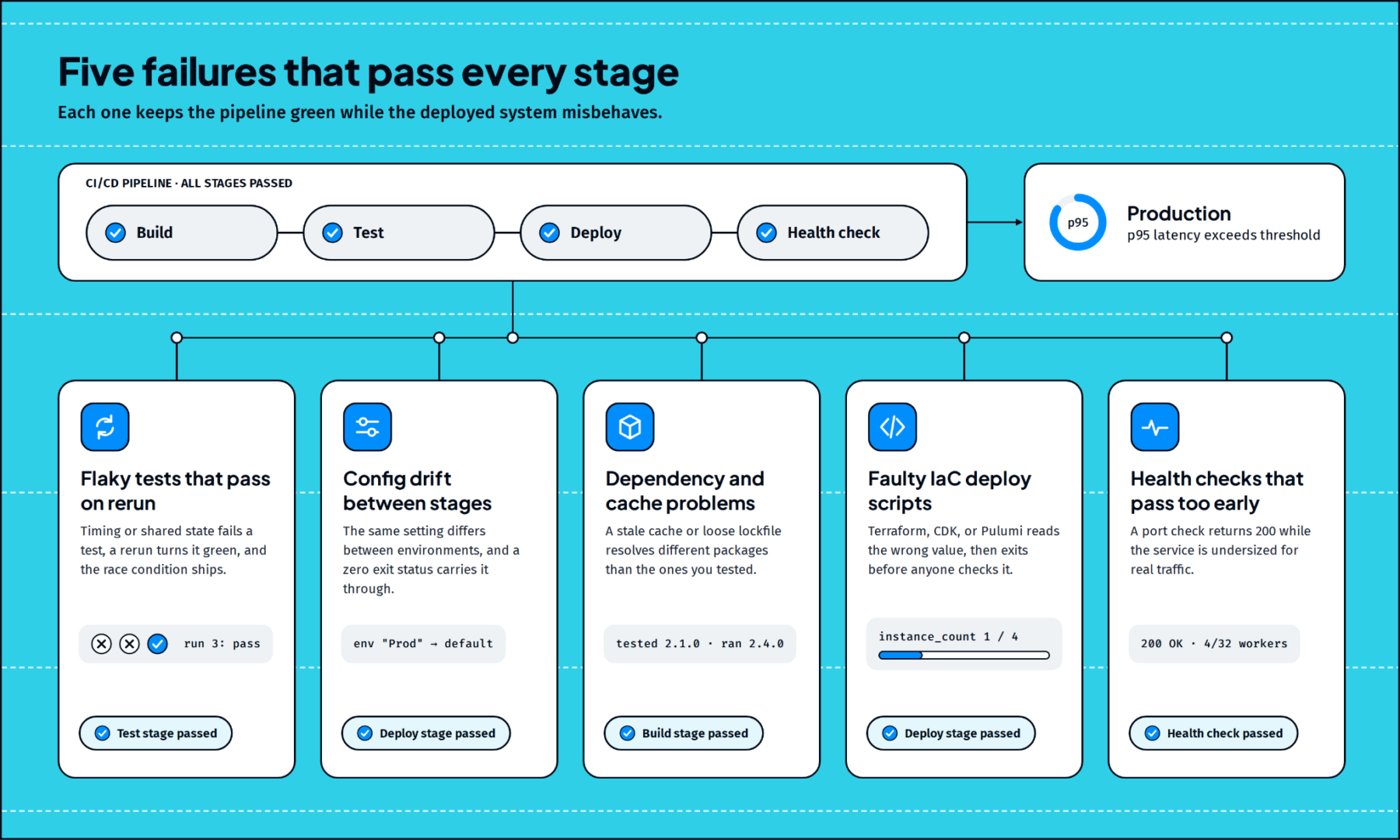
Most pipeline failures fall into five categories: flaky tests, environment and config drift, dependency and cache problems, faulty infrastructure-as-code scripts, and health checks that pass too early. Each one can leave every stage green while the deployed system misbehaves.
Flaky tests that pass on rerun
A test that fails intermittently, usually because of timing, shared state, or an inconsistently mocked external call, gets rerun until it passes. The pipeline goes green and the underlying race condition ships with it. Quarantining these tests keeps the board clean while the bug stays in the codebase.
Environment and config drift between stages
Config drift happens when the same setting differs between environments: a variable cased differently, a feature flag on in staging and off in production, or a secret scoped to the wrong environment. A pipeline that only checks for a zero exit status passes all three. A mismatched variable name between a CI runner and a Kubernetes secret is a common version; the config fallback walkthrough below is another.
Dependency and cache problems
Dependency drift happens when a build resolves different packages than the ones you tested: a stale build cache, a transitive dependency that updated between runs, or a loosely pinned lockfile. The build passes in CI and behaves differently in production. These failures are hard to reproduce locally because the developer’s machine resolves its own set of versions.
Infrastructure-as-code deploy scripts
Terraform, AWS CDK, and Pulumi scripts fail the same way application code does: a wrong key lookup, an off-by-one in a loop over availability zones, or resources created in the wrong order. A CDK stack that looks up “Prod” in a dictionary keyed “prod” and silently falls back to a default instance count is a typical example. These scripts run once per deploy and exit, so the values they used are only visible if logging was added ahead of time.
Health checks that pass too early
A health check that confirms a process is listening on a port will pass a deploy that is up and undersized. Checks that confirm the service can reach its dependencies and handle expected load catch far more of these cases.
How Does A Silent Config Fallback Slip Through a Green Pipeline
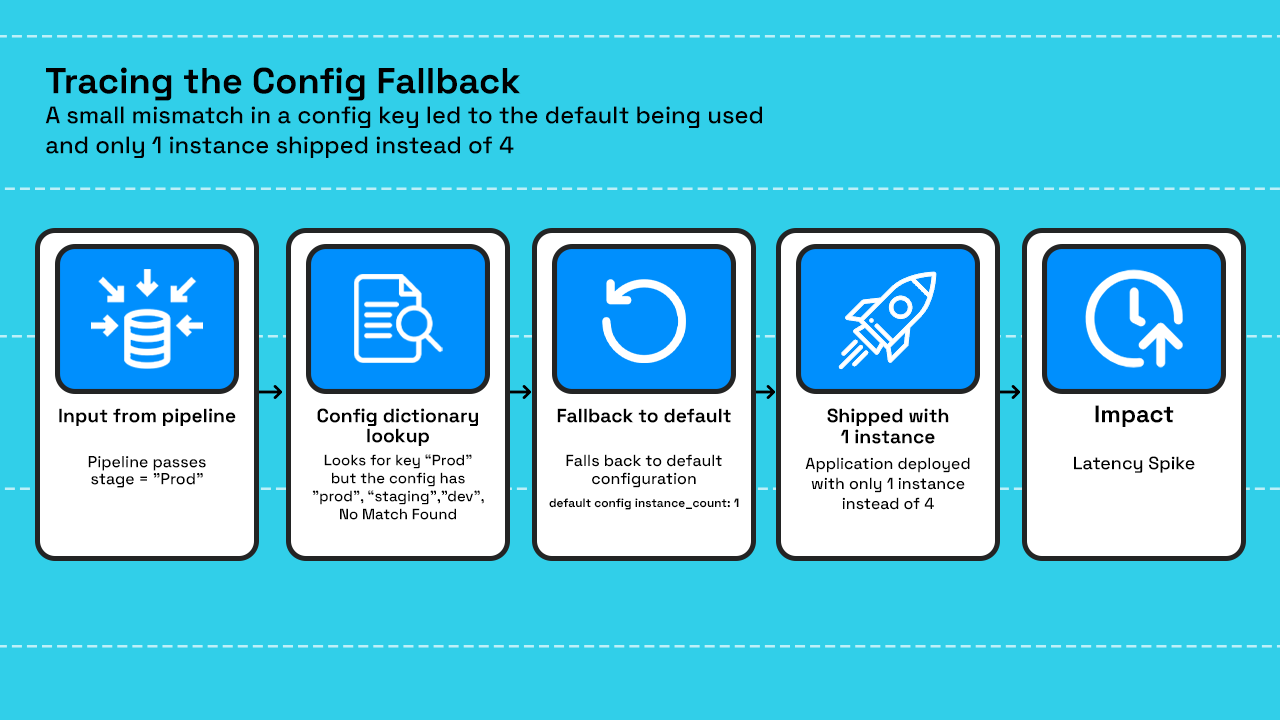
A silent fallback happens when a config lookup misses its key, swaps in a default, and keeps running. Nothing crashes and nothing gets flagged, so the wrong configuration ships looking exactly like a healthy deploy.
Take a deploy stage built on AWS CDK, defined in deploy_stack.py, that calls get_environment_config(stage) to pull instance counts and scaling rules for the environment being deployed. The pipeline passes stage=”Prod”, but the configuration dictionary inside the script only has a key for “prod” in lowercase. The lookup misses, falls back to a default configuration, and the stack deploys with instance_count: 1 instead of the 4 the production environment needs.
Every stage passes, the build succeeds, and the deploy exits cleanly, with the post-deploy health check returns 200 because four workers easily handle a few synthetic requests. Two hours later in real us-east-1 traffic pushes past what a single instance can handle and p95 latency climbs past the alert threshold. A pipeline running the same script for eu-west-1, which happens to pass its stage name in lowercase, never triggers the fallback at all, which is what makes this class of failure so hard to catch from pipeline logs alone: it depends on runtime input, not on anything the pipeline itself validates.
Why Pipeline Observability Tools Show the Symptom, Not the Proof
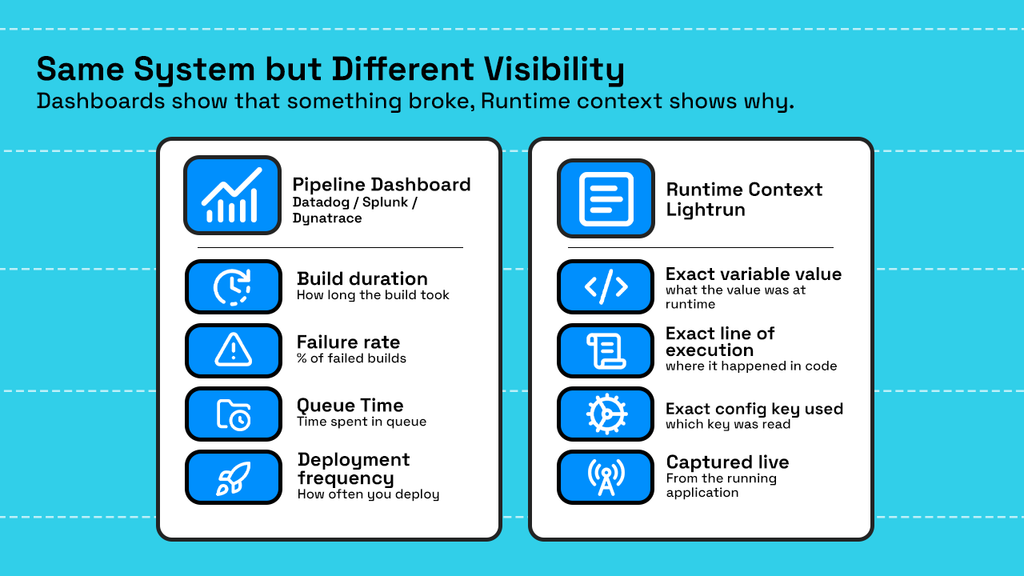
Most teams already have a monitoring layer sitting on top of their pipelines, whether that’s Datadog, Splunk, Elastic, or Dynatrace. These tools excel at pipeline-level signals: build duration, failure rate by stage, queue time, and deployment frequency. They’ll show that a deploy stage ran four minutes longer than usual or that a stage failed for the third time this week.
Proving root cause takes the value of a variable held at the moment of failure. Getting it the traditional way means one of two things: logging it in advance, which requires guessing what you’ll need before anything breaks, or reproducing the failure locally, where conditions rarely match production closely enough to trigger it.
AI-assisted development raises the stakes. Google’s 2025 DORA report found that AI adoption continues to correlate with lower software delivery stability, and Lightrun’s 2026 report found developers spend 38% of their weekly time debugging and verifying AI-generated code. More pipeline runs now carry changes nobody reviewed line by line, and fewer of those changes come with logging aimed at the lines that will matter later.
How Does Runtime Context Close the Gap Between a Green Pipeline and a Working System?
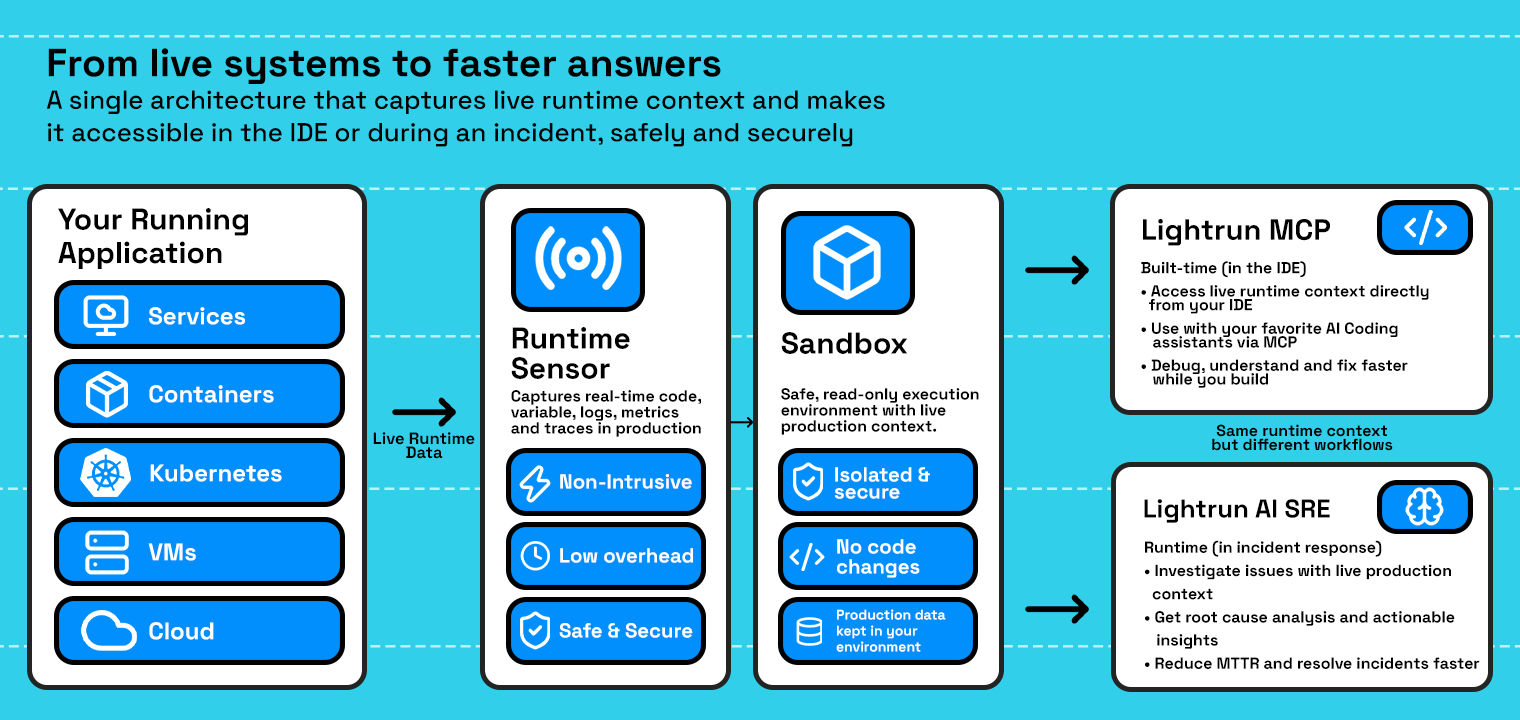
Runtime context makes the running system itself the source of evidence. The Lightrun Runtime Sensor adds dynamic logs, snapshots, and metrics to live code with zero restarts, so the value of any variable at any line is available on demand.
Evidence is collected through sandboxed, read-only instrumentation that leaves application state and control flow untouched. That makes it safe to add a snapshot to a production service in the middle of an incident.
The same evidence powers two kinds of agents. AI SRE agents triage alerts, prove root causes, and validate fixes against live system behavior before they’re promoted. Coding agents such as Cursor, GitHub Copilot, and Claude Code connect to the Runtime Sensor while code is being written, so changes are checked against real production behavior before they ever reach the pipeline.
Hands-On: Confirming a Silent Config Fallback Without Redeploying
Going back to the deploy_stack.py scenario, an engineer investigating the latency spike opens the Lightrun AI SRE against the running production service and asks one question: what value did get_environment_config(stage) return the last time this deploy ran?
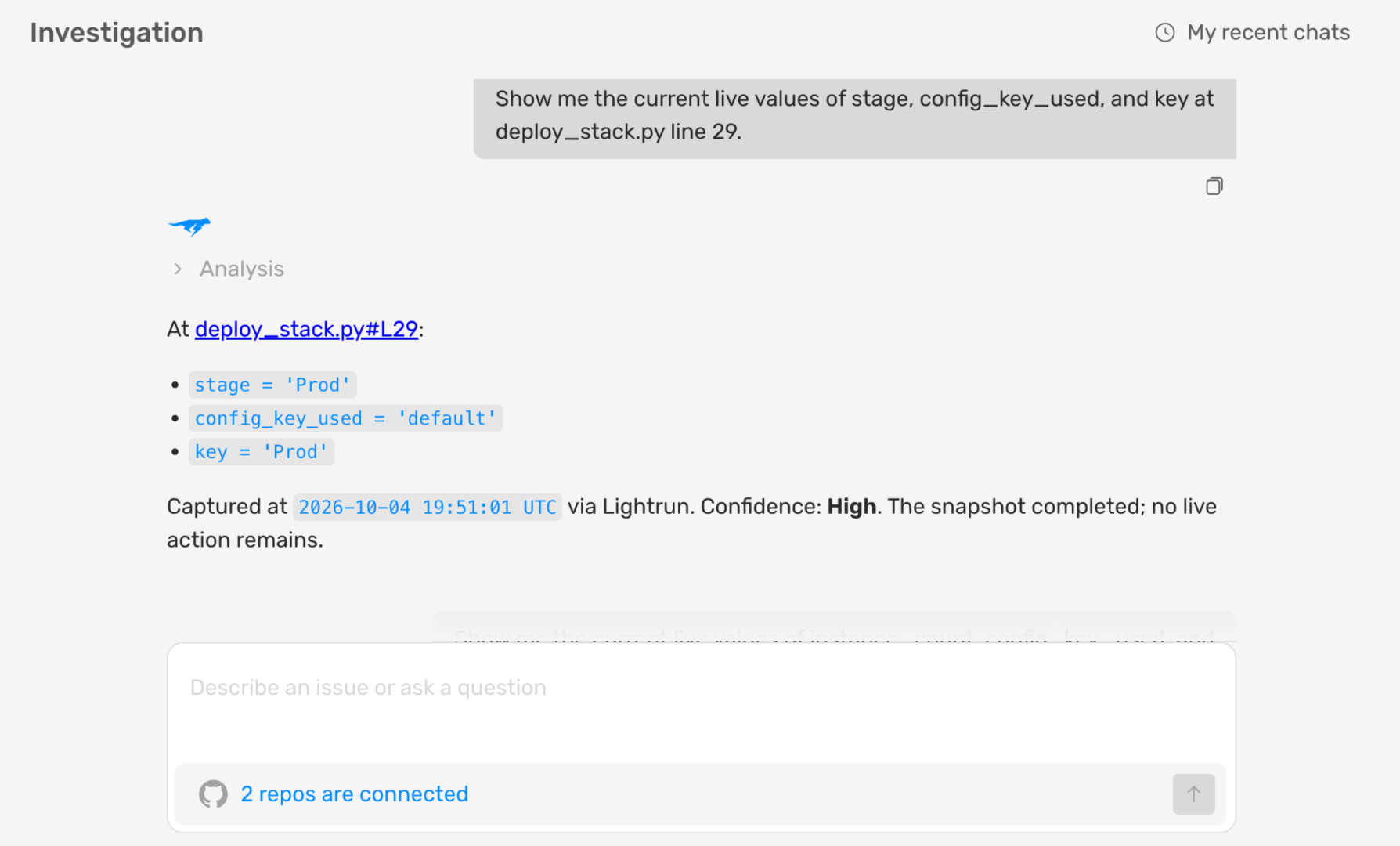
As you can see in the screenshot above:
- The snapshot confirms stage was received as “Prod” while the config dictionary only defines a “prod” key, which is the exact mismatch causing the fallback.
- config_key_used shows “default” instead of “prod”, proving the lookup missed rather than the value being wrong somewhere upstream.
With the mismatch confirmed at the line level, the next question is whether the same fallback affected instance_count for the current deployment.
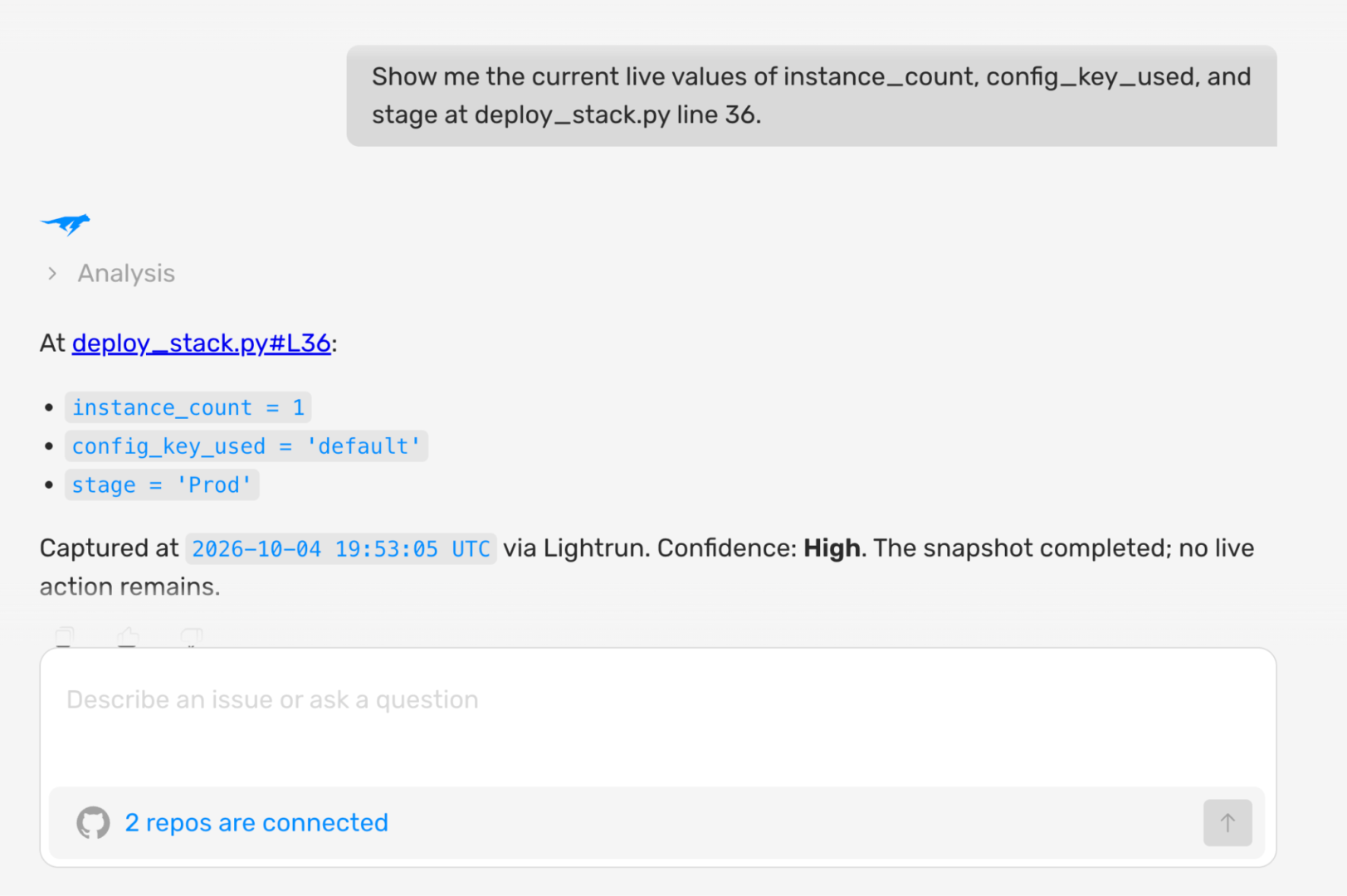
As you can see in the screenshot above:
- instance_count is confirmed at 1 for every deploy since the config change went in, matching the timeline of the latency alert.
- No other production values changed, which rules out a code regression and narrows the fix to the case-sensitive key lookup.
How to Add Lightrun to Your CI/CD Pipeline Images
Install the agent and enable it at the start of your service’s main() function, as Lightrun’s Python documentation recommends. Lightrun actions apply to functions called after the action is placed, so evidence comes from functions that main() calls, such as request handlers like process_order(). The current Python agent supports Python 3.8 to 3.11.
| pip install lightrun
def main(): |
For containerized pipelines, bake the same agent into the image so every deploy carries it automatically rather than relying on a manual install step per environment. Lightrun’s documentation covers the Docker setup, along with install guides for Java, Node.js, and .NET agents for teams running a mixed stack across pipeline stages.
How Lightrun Addresses Each Pipeline Debugging Challenge
| Pipeline Problem | How Lightrun Resolves It |
| Flaky test masking a real race condition | Dynamic logs on the suspect code path confirm the actual execution order across runs without adding permanent logging |
| Config or environment drift between stages | A conditional snapshot at the config lookup line shows the exact key and value used on the failing deploy |
| Dependency or cache issue that only shows in production | Metrics and snapshots captured against the live service confirm which dependency version is actually running |
| Infrastructure-as-code script using the wrong value | Runtime evidence at the script’s execution point proves what value it read, rather than what it was supposed to read |
| Health check passing on an undersized deployment | Live metrics on instance count and load confirm capacity independent of what the health check reports |
How Runtime Evidence Closes the Pipeline Debugging Gap
A case-sensitive key lookup in deploy_stack.py shipped instance_count: 1 instead of 4, and every stage still passed, the same way a flaky test, a stale cache, or a health check that only confirms a port is listening would pass too. None of those checks were ever built to catch what the code does once it’s running against real traffic.
That’s an architectural limit of telemetry captured in advance: it can only answer the questions someone thought to log before the failure. Runtime context answers new questions on demand, straight from the running system. That’s how config_key_used and max_workers confirmed the fallback above in minutes, with no redeploy.
The Runtime Sensor captures that evidence through sandboxed, read-only instrumentation. AI SRE agents put it one question away during an incident, and coding agents use it to catch issues before they ship.
See how Lightrun builds reliability into custom software
A pipeline stage runs once and exits, so the process, memory, and variable values that could explain a failure are gone by the time anyone starts investigating. Application code that’s continuously running can be inspected while it’s live, but a pipeline job typically has to be rerun with extra logging added, which means guessing in advance what evidence will matter.
Flaky tests, environment or configuration drift between stages, dependency and cache mismatches, errors in infrastructure-as-code deploy scripts, and health checks that pass without confirming real capacity account for most of the failures teams chase in production pipelines.
Adding runtime instrumentation, such as conditional snapshots, dynamic logs, or metrics that can be attached to a running service without a redeploy, lets you capture the exact value or code path involved in a failure directly from the live environment instead of reproducing the failure through a new pipeline run.
Pipeline observability typically covers build duration, failure rate by stage, deployment frequency, and mean time to recovery, usually surfaced through tools like Datadog, Splunk, or Dynatrace. These metrics show which stage is slow or failing, but they don’t show what the code running inside that stage actually did with the inputs it received.
Monitoring tools report on the pipeline from the outside: timing, failure counts, and trends over time. Lightrun adds evidence from inside the code itself, capturing variable values and execution behavior in the live environment without redeploying, which confirms the specific cause behind a failure that a dashboard can only flag as having happened.