7 Common Python Debugging Challenges and How to Fix Them
Mar 14, 2024 / Updated: Aug 18, 2026


Python has no compile-time type checker. So, bugs like type mismatches, race conditions, and mutable default arguments surface only when that exact code path runs in production. In this guide we cover the 7 most common debugging challenges, their cause, and how you can solve each without redeploying.
Key Takeaways
- Python’s interpreted nature means type errors, race conditions, and mutable default argument bugs surface only at runtime, never at compile time.
- Global variable mutation and shared in-memory state cause race conditions under concurrent requests, especially on threaded WSGI servers like Gunicorn.
- Deadlocks happen when two code paths acquire the same locks in opposite order; the fix is consistent lock ordering or timeout-based acquisition.
- Race conditions in database writes (read-modify-write on a balance field, for example) require row-level locking (
with_for_update()) or transactional commits, not just careful code review. - Missing
awaiton an async function call is a silent bug: the code runs without error but returns a coroutine object instead of the expected result. - With Lightrun Runtime Sensor, an AI coding agent like Cursor, Claude Code, or GitHub Copilot can inspect variable state, call stacks, and exception context in a live production process directly from a natural-language prompt. No manual snapshot setup is required.
What is Python and Why Is it So Popular?
Python is a high-level, general-purpose programming language known for readable syntax and a design philosophy that favors simplicity over cleverness. Guido van Rossum first released it in 1991, and it has grown since into one of the most widely used languages in the world.
According to the PYPL PopularitY of Programming Language index, Python holds a 47.49% worldwide share as of July 2026. That’s up 16.5 percentage points over the past year, more than four times the share of second-place Java. Java sits at 11.44%, down 4.2 points over the same period.
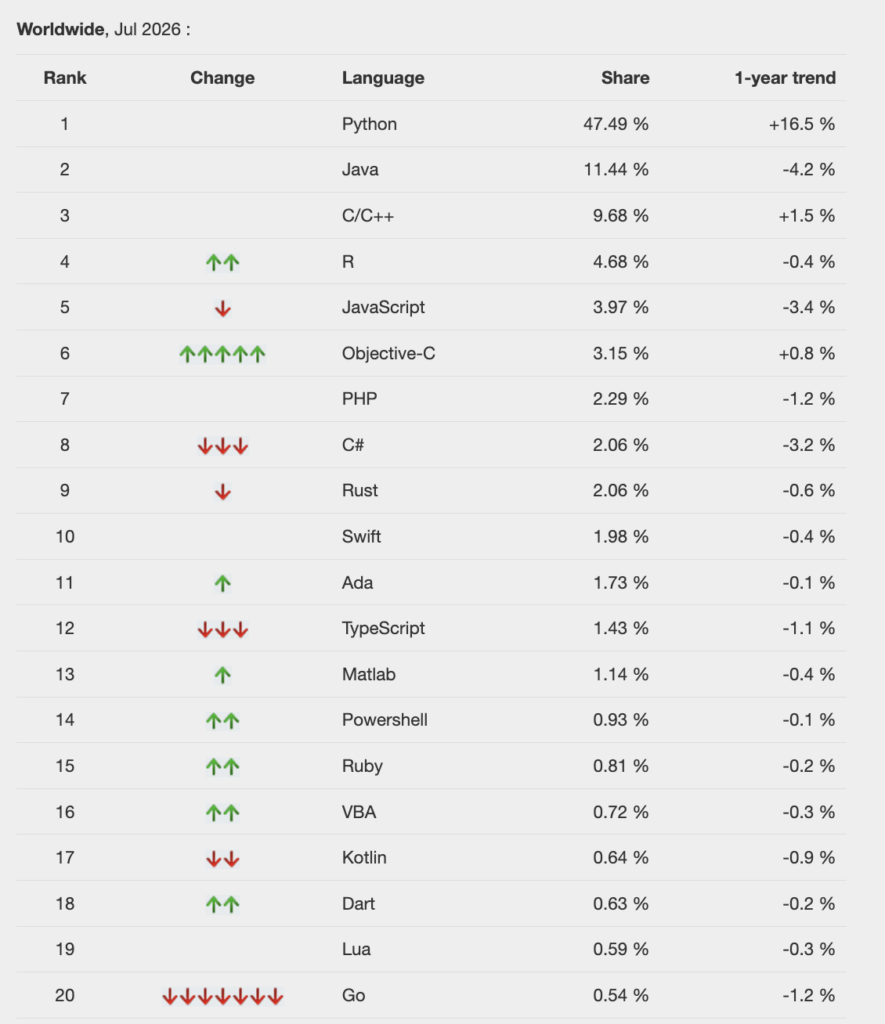
PYPL worldwide ranking, July 2026
Python’s versatility is a big part of that popularity. It spans API development, AI/ML, data science, IoT, and DevOps. NASA uses Python’s Astropy package for astronomical data analysis on the James Webb Space Telescope, alongside NumPy and matplotlib.
That popularity comes with a tradeoff. Python doesn’t perform as well as compiled languages like C and C++ in terms of speed.
Why Do Python Bugs Hide Until Runtime?
Python doesn’t perform compile-time type checks the way many other languages do. Type mismatches, undefined names, and logic errors only surface when that exact code path executes.
The chief bottleneck is that Python is an interpreted language. An interpreter reads and executes source code line by line at runtime. A compiler, instead, translates the whole program into machine code ahead of time. That translates directly into slower execution times for CPU-intensive work.
Compiled languages work differently. A compile step catches many errors and produces optimized machine code before the program ever runs.
Running Python as an interpreted language enhances the developer experience and increases development flexibility. It also brings its own set of problems, debugging chief among them. Many Python issues only become apparent once the code is actually executing.
The code examples below use Flask and FastAPI. Each one strips away extra detail to isolate the specific bug pattern.
1. Handling Global Variable Modification
Global variables in a web application cause race conditions. Multiple requests can read, modify, and write the same value in overlapping windows. This doesn’t apply to constants, which stay safe since nothing ever reassigns them.
######################################
# Global variable modification issue #
######################################
counter = 0
@app.route('/increment', methods=['GET'])
def increment_global_counter():
    global counter
    counter += 1
    return f"Counter is now: {counter}"
This looks fine for a script, but breaks down in a real web server. Threaded or async servers (a Flask app running on Gunicorn, for example) handle requests in parallel.
When two requests increment the counter at the same time, they can read the same starting value. Each one increments it separately, then overwrites the other’s result. The final count ends up lower than expected.
Database systems or in-memory stores like Redis handle concurrent writes safely. They should replace ad hoc global state in production code.
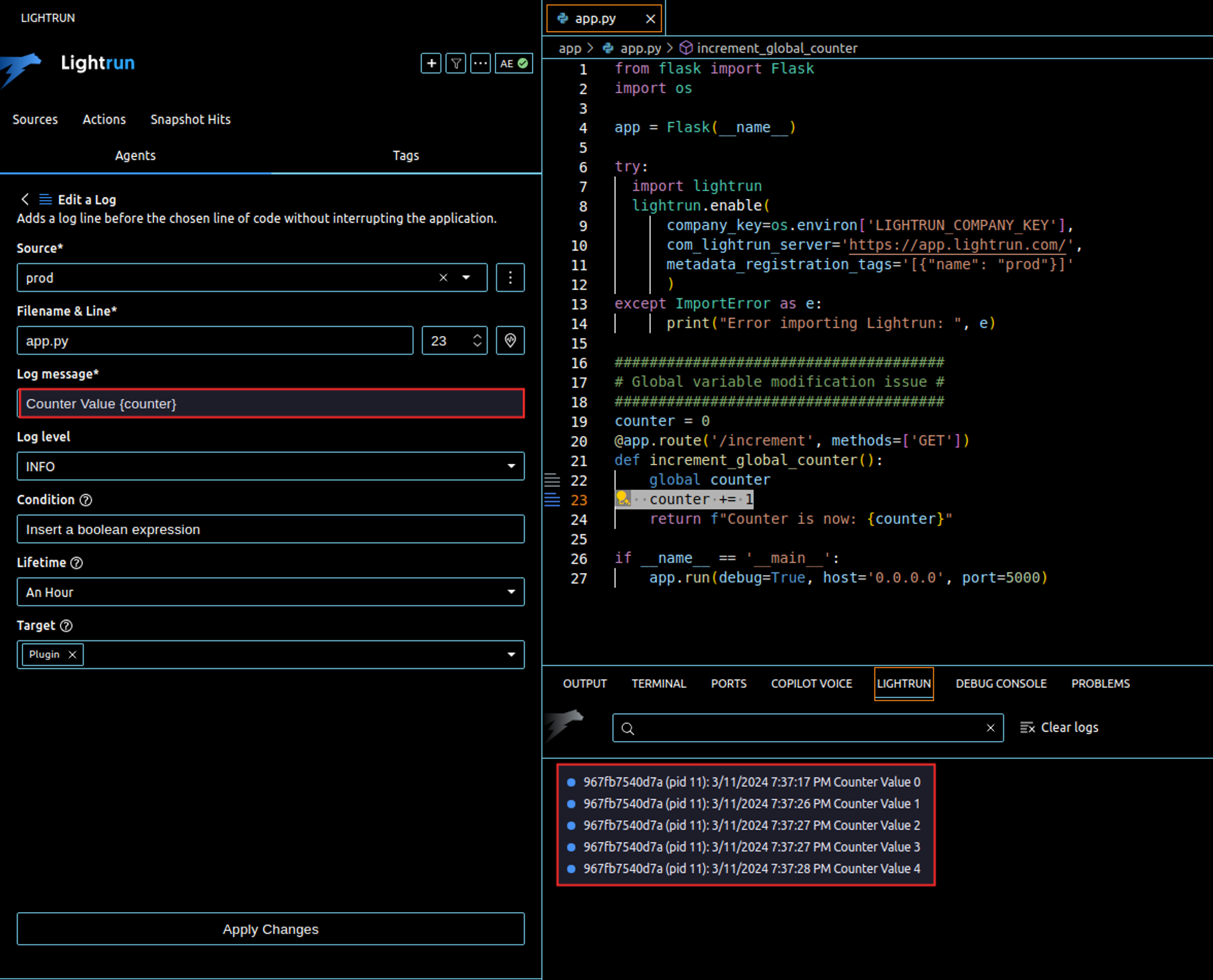
With Lightrun Runtime Sensor, you don’t need to open the IDE plugin and configure anything manually. Ask your AI coding agent, “Get the runtime value of counter across the next few hits to /increment,” and it calls Lightrun’s get_runtime_expression_values tool directly, capturing the variable’s value across concurrent requests in the live environment without a code change or redeploy.
2. Errors Are Only Visible at Runtime
Type mismatches between dynamically typed variables only surface when the specific line executes. They don’t show up when you write or deploy the code.
######################################
# Type error only visible at runtime #
######################################
@app.route('/add', methods=['GET'])
def add():
    a = 10
    b = "20"
    c = a + b
    return c
Adding an integer to a string raises a TypeError the moment this line runs. Nothing in the code itself flags the mismatch before that.
A Lightrun snapshot captures the exact state of every variable at a specific line, in any environment, without stopping the application.
While you can add these from your IDE by right-clicking the line to add one, you can ask an AI coding agent connected to Lightrun MCP. Try, “Get the runtime values of a and b at the c = a + b line in production.”
The agent calls get_runtime_expression_values and return that snapshot directly.
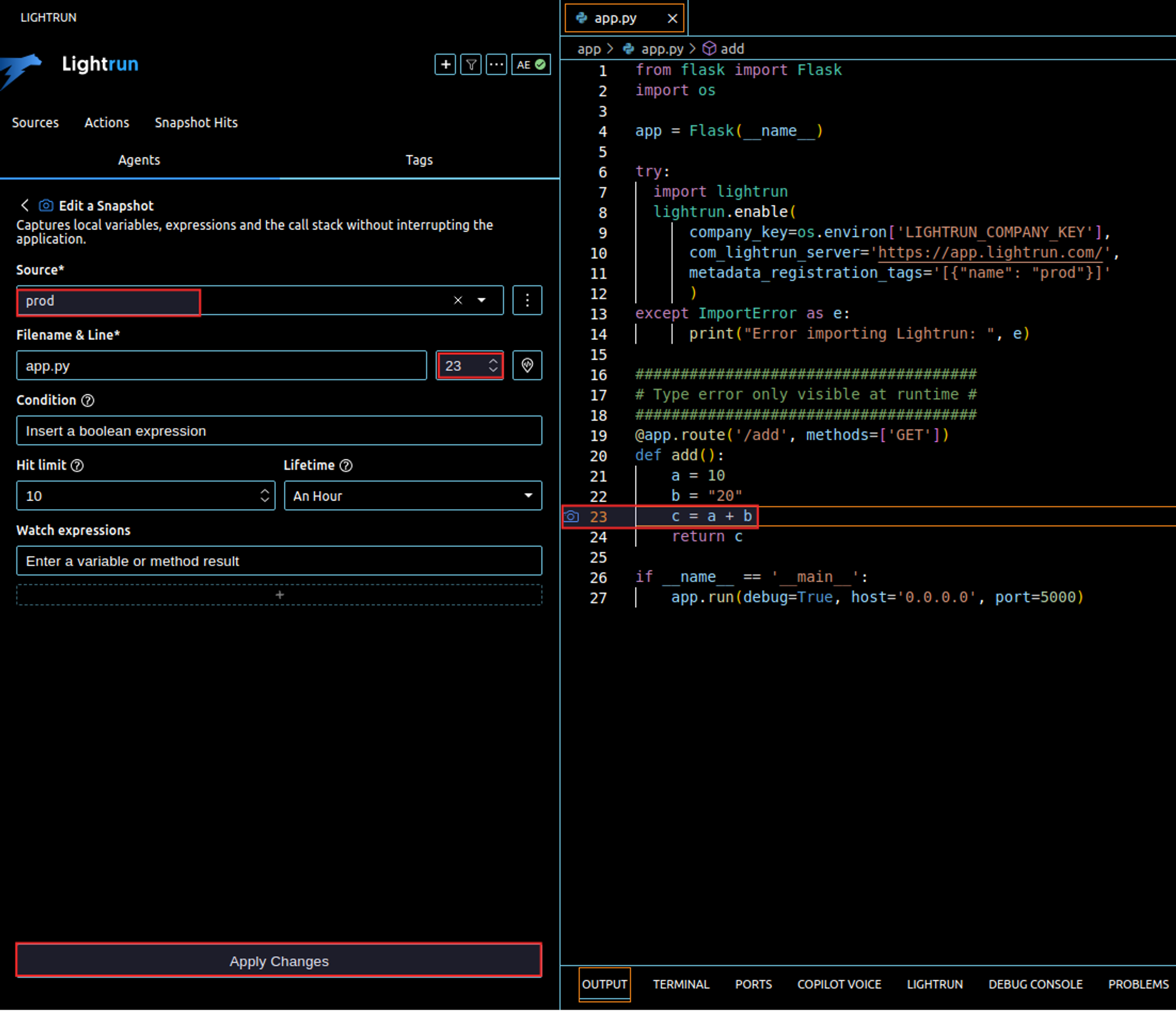
Each hit on the /add route triggers a new capture. The result shows a as an integer and b as a string, right at the failure line. The agent returns it directly in its response.
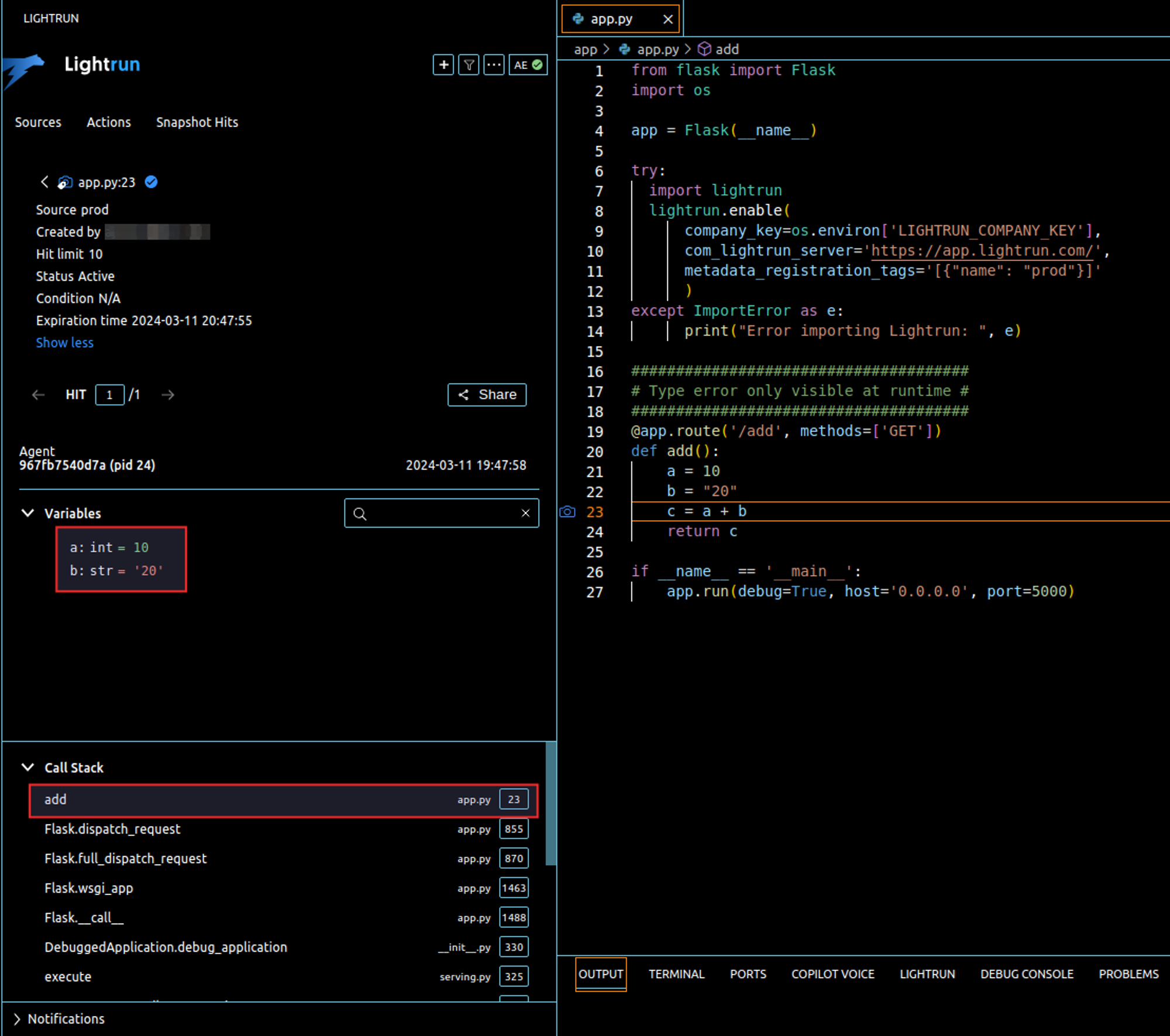
This doesn’t block execution the way a traditional breakpoint would. A breakpoint pauses every thread. get_runtime_expression_values just records the state (local variables, function arguments, object attributes) at that instant and lets execution continue.
If you also need to see how execution reached that line, ask the agent to capture the call stack. It calls get_runtime_callstack as a separate tool, returning the invocation path alongside the variable state.
You can also ask the agent to add a condition, so it only captures when a specific condition holds. This is useful for isolating a bug that only reproduces for specific users or specific input shapes.
The same approach applies well beyond a simple type mismatch. Maybe a function expects a list but gets a dictionary, or the request data is more complex. Inspecting the live state at the exact failure line is what makes an unfamiliar bug tractable. File-handling scripts have their own quirks; debugging file-parsing scripts like a python-docx reader shows what that looks like in practice.
3. Unhandled Exceptions
Unhandled exceptions crash a request when an error path in the code has no try/except around it. They’re hard to predict and reproduce, since they only appear for the specific input that triggers them. That’s why solid error handling and logging matter as much as the fix itself.
########################
# Unhandled exceptions #
########################
@app.route('/divide', methods=['GET'])
def divide():
    numerator = request.args.get('numerator', default=1, type=int)
    denominator = request.args.get('denominator', default=0, type=int)
    # Potential ZeroDivisionError
    result = numerator / denominator
    return f"Result: {result}"
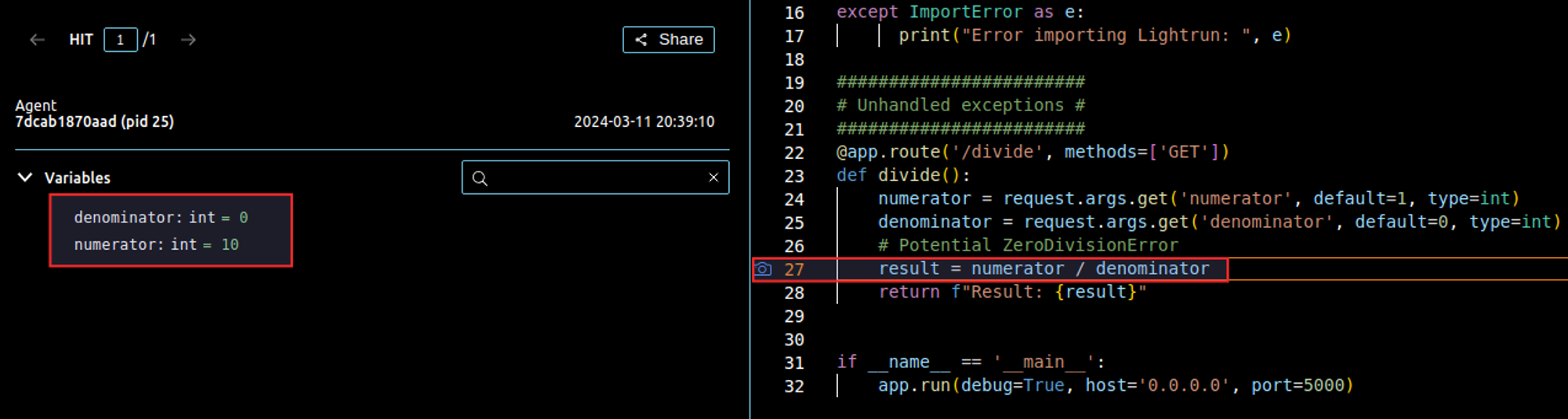
A ZeroDivisionError here returns a 500 and a broken user experience. It’s hard to predict which request will trigger it. This specific example illustrates dividing by zero, a common mathematical error the code never explicitly handles.
Ask an AI coding agent connected to Lightrun MCP to capture the request parameters right before the risky line. For example: “Get the runtime values of numerator and denominator at this line in the /divide route.” The agent calls get_runtime_expression_values and returns the exact inputs that triggered the failure. In this case, that’s a request that only sends numerator and lets denominator default to 0, without a redeploy.
4. Mutable Default Arguments in Python
Python evaluates a mutable default argument (a list or dict) once, at function definition time, not on every call.
####################################
# Mutable default argument problem #
####################################
@app.route('/append', methods=['GET'])
def append_to(to=[]):
    element = request.args.get('element')
    to.append(element)
    return t
Because Python creates the default list once, it’s shared across calls. Every call to append_to() that skips its own to argument appends to that same list. It never starts fresh. Some call this “the source of all evil” in Python.
5. Deadlocks in Concurrent Applications
A deadlock happens when two code paths acquire the same two locks in opposite order.
######################
# Deadlock condition #
######################
from threading import Lock
import time

lock_a = Lock()
lock_b = Lock()

resource_a = {"value": 0}
resource_b = {"value": 0}

@app.route('/deadlock1', methods=['GET'])
def update_resources_deadlock1():
    with lock_a:
        # Simulated operation on resource_a
        resource_a["value"] += 1
        time.sleep(1)  # Simulate operation delay
        with lock_b:
            # Simulated operation on resource_b
            resource_b["value"] += 1
    return "Resources updated successfully in deadlock1"

@app.route('/deadlock2', methods=['GET'])
def update_resources_deadlock2():
    with lock_b:
        # Simulated operation on resource_b
        resource_b["value"] += 1
        time.sleep(1)  # Simulate operation delay
        with lock_a:
            # Simulated operation on resource_a
            resource_a["value"] += 1
    return "Resources updated successfully in deadlock2
If /deadlock1 and /deadlock2 run concurrently, each can hold one lock while waiting on the other, and neither releases.
Confirming the lock order in a live process is a call-stack question. Ask an AI coding agent connected to Lightrun MCP. Try: “Capture the call stack when resource_b is updated inside /deadlock1.” The agent calls get_runtime_callstack. It shows exactly which locks execution already held when it reached that line, confirming the acquisition order without attaching a debugger.
Three fixes prevent this. Always acquire locks in the same order across the codebase. Use a timeout on lock acquisition. Or attempt a non-blocking acquire and retry after releasing whatever locks you already hold.
6. Race Conditions in Database Operations
A read-modify-write pattern on a database row is unsafe in one specific case. Two requests can read the same value before either writes back.
##############################################
# Race Conditions in Concurrent Environments #
##############################################

from sqlalchemy.exc import SQLAlchemyError
from mydatabase import db_session, User

@app.route('/update_balance/<user_id>', methods=['POST'])
def update_balance(user_id):
    new_transaction_amount = request.json['amount']
    try:
        user = db_session.query(User).filter(User.id == user_id).first()
        if user:
            user.balance += new_transaction_amount  # Potential race condition
            db_session.commit()
            return {"status": "Balance updated successfully"}, 200
        else:
            return {"error": "User not found"}, 404
    except SQLAlchemyError as e:
        db_session.rollback()
        return {"error": str(e)}, 500
Picture two requests arriving almost simultaneously, each intending to add 100 to the same user’s balance of 500. Both requests read the balance first, and since they overlap, both read the same starting value: 500.
Each request then adds 100 in memory, independently and unaware of the other. Both now hold a modified balance of 600.
Finally, both write their result back to the database. The last write wins, so the balance ends up at 600, not 700. The database silently loses one entire update.
Row-level locking closes the gap:
Here’s an updated version of our code that includes row-level locking:
from flask import Flask, request, jsonify
from sqlalchemy.exc import SQLAlchemyError
from mydatabase import db_session, User

@app.route('/update_balance/<user_id>', methods=['POST'])
def update_balance(user_id):
    new_transaction_amount = request.json['amount']
    try:
        # Lock the user row during the transaction to prevent race conditions
        user = db_session.query(User).filter(User.id == user_id).with_for_update().first()
        if user:
            user.balance += new_transaction_amount
            db_session.commit()
            return jsonify({"status": "Balance updated successfully"}), 200
        else:
            return jsonify({"error": "User not found"}), 404
    except SQLAlchemyError as e:
        db_session.rollback()
        return jsonify({"error": str(e)}), 500
Wrapping the operation in a database transaction is the other common fix. SQLAlchemy rolls back the whole transaction if any step fails:
Session = sessionmaker(bind=engine)

session = Session()
try:
    # Perform database operations
    user = session.query(User).filter(User.id == user_id).one()
    user.balance += transaction_amount
    # The commit will attempt to write changes to the database
    session.commit()
except:
    # If an error occurs, roll back the changes
    session.rollback()
    raise
finally:
    # Ensure that the session is closed
    session.close()
7. Incorrect Usage of Async Functions
Async functions, defined with async def, run inside an asynchronous context. The await keyword pauses execution at that point, lets other work run, and resumes once the awaited task completes.
Calling one without await doesn’t raise an error. It silently returns a coroutine object instead of the value you expect.
Most functions aren’t async and don’t need await, so it’s an easy detail to miss. That’s what makes this bug hard to catch. The code looks correct and runs without crashing, but doesn’t behave the way you’d expect.
#####################################
# Incorrect usage of async function #
#####################################

from fastapi import FastAPI
import asyncio

app = FastAPI()

async def fetch_data():
    # Simulate a network operation using asyncio.sleep
    await asyncio.sleep(1)  # Simulates a network call delay
    return "Data fetched"

@app.get("/fetch")
async def fetch():
    # Incorrect usage: missing await keyword when calling an async function
    data = fetch_data()
    return data
The fix is a one-word change, but the bug is easy to miss precisely because it doesn’t crash:
@app.get("/fetch")
async def fetch():
    # Correct usage: await the result of the async function
    data = await fetch_data()
    return data
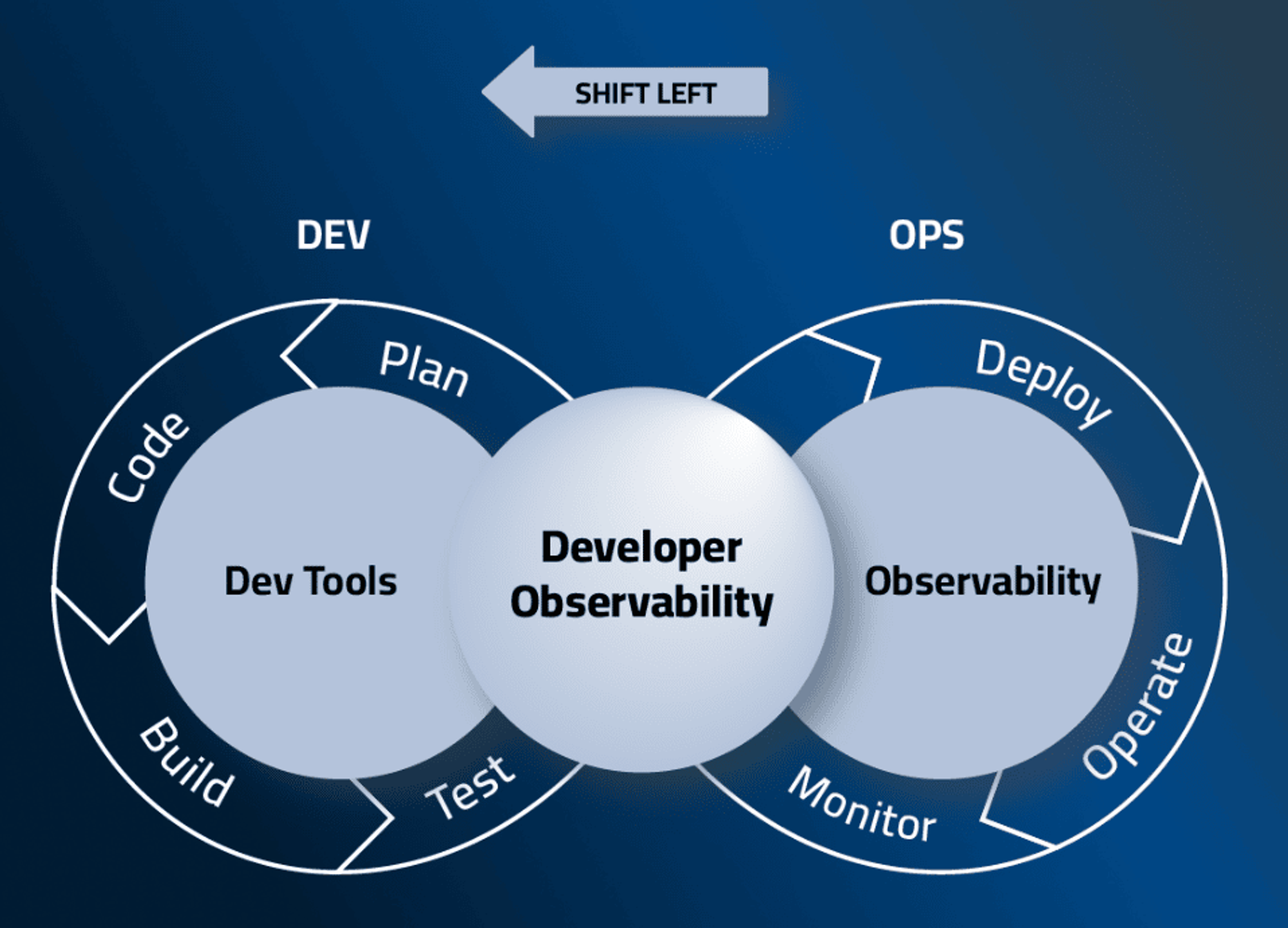
Embrace Shifting Developer Observability Left
All seven of these challenges share one root cause: Python surfaces the failure only when that exact code path executes, and there’s no compile-time check to catch it earlier.
Lightrun Runtime Sensor puts runtime inspection directly in the hands of an AI coding agent. That’s Cursor, Claude Code, GitHub Copilot, or Gemini, connecting over the Model Context Protocol. You describe the investigation in natural language; the agent calls the right tool itself.
For Python, that means three tools:
get_runtime_sourcesto discover which live services are availableget_runtime_expression_valuesto inspect variables and expressions at a specific lineget_runtime_callstackto capture the call path leading to that line
No IDE right-clicks, no manually configuring actions ahead of time.
A typical investigation follows a fixed pattern. The agent runs get_runtime_sources as a preflight check, then picks a tool based on the hypothesis you’re testing. It asks you to reproduce the issue while it’s watching. Then it reports back with the evidence and what it confirms or rules out.
This is especially relevant for Python’s dynamic typing and runtime-evaluated behavior. So many of the bugs above (type mismatches, mutable defaults, missed await calls) only reveal themselves in a running process. They don’t show up in a code review or a static type check.
Your organization’s PII redaction rules still apply to every result. Access requires authentication (OAuth or an API key with the Dev scope). So this works the same way whether a developer is signed into their IDE or an unattended agent is running in CI.
Lightrun supports Django, Flask, Apache Airflow, Celery, Gunicorn, and serverless Python functions.
To try this yourself, see the Lightrun MCP quickstart. Or book a demo to see it running against a live application.