What Is Hypercare? A Guide to the Post-Go-Live Phase
Nov 08, 2026 / Updated: Nov 08, 2026

Hypercare is the period of intensive support that follows an SAP or ERP go-live, when the project team stays on to stabilize the new system and keep the business running. How you plan this phase decides how fast orders, invoices, and payments run normally again, and how cleanly support passes to your AMS team when it ends.
Key Takeaways
- Hypercare is the heightened-support phase between go-live and steady-state support, focused on fast incident response and stabilization.
- A typical hypercare period runs two to twelve weeks, and large rollouts often run longer.
- The strongest hypercare plans end on exit criteria, such as falling incident volume and severity, rather than on a fixed date.
- Many hypercare incidents start where systems meet: interfaces, master data, custom code, batch jobs, and authorizations.
- At the end of hypercare, an AMS team formally takes over the landscape, along with everything learned since go-live.
What Is Hypercare?
Hypercare is the heightened-support phase that runs immediately after a migration, an upgrade, or a new system goes live.
In SAP and ERP programs, it is the bridge between the implementation project and steady-state operations: the weeks when teams keep the business running while the new system settles.
During this period, consultants, Basis, and key users check live postings and data against what the business expects, fix defects as they surface, and coach each department through its first weeks on the new system. The goal is to keep orders shipping, invoices going out, and suppliers paid while the landscape absorbs a major change.
The term is written as one word, “hypercare,” though “hyper care” also appears in project plans. Customer support teams use it for the extra attention given to new customers after onboarding. This guide covers the enterprise systems meaning: the stabilization phase after an SAP go-live, an S/4HANA migration, or a major upgrade.
Where Does the Hypercare Phase Sit in an SAP Project?
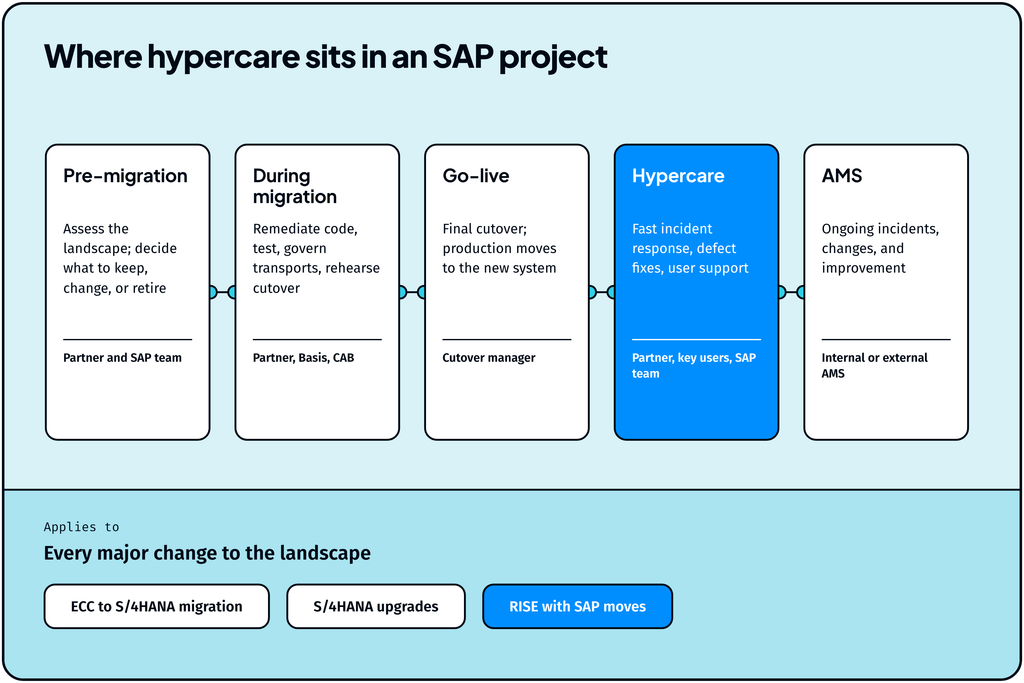
The hypercare phase starts the moment the new system goes live and ends when support formally passes to the AMS team that will run the landscape long term. In SAP Activate, SAP’s implementation methodology, hypercare runs in the Deploy phase once the system goes live, before the Run phase takes over ongoing support.
Phase
What happens
Who leads
Pre-migration
Landscape assessment, fit-to-standard, and keep, change, or retire decisions on custom code
Implementation partner and internal SAP team
During migration
Code remediation, testing, transport governance, and cutover rehearsals
Implementation partner, Basis, and CAB
Go-live
Final cutover; production switches to the new system
Cutover manager
Hypercare
Fast incident response, defect fixes, user support, and stabilization
Implementation partner with key users and the internal SAP team
AMS (steady state)
Ongoing incident management, changes, and continuous improvement
AMS team, internal or outsourced
How Long Does a Hypercare Period Last?
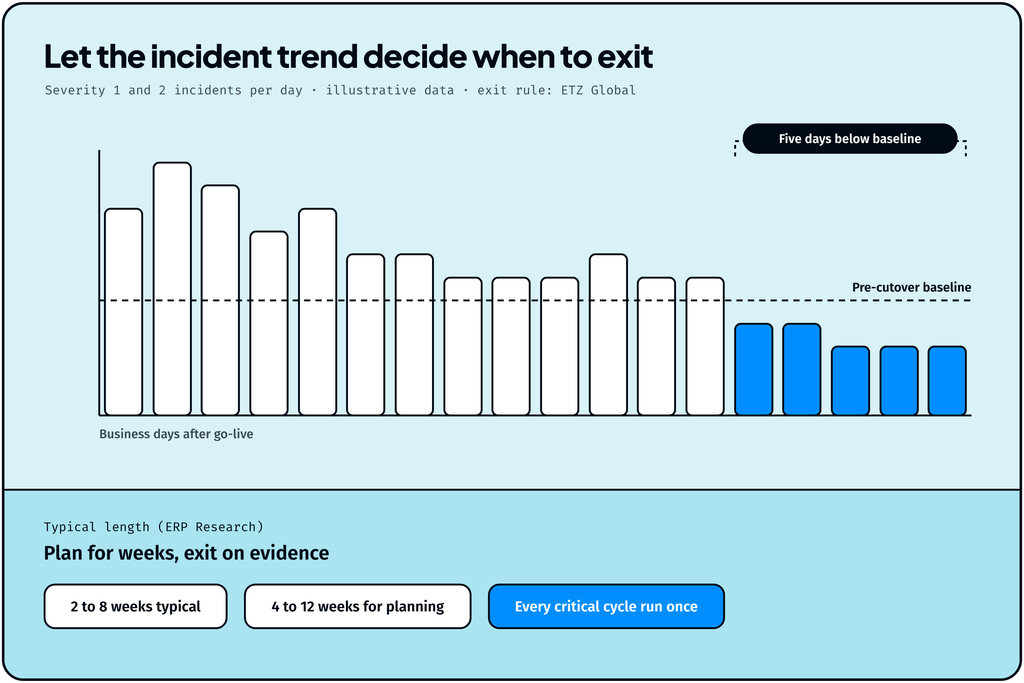
A hypercare period typically lasts two to eight weeks, according to ERP Research, and complex or large rollouts often extend it. Its implementation timeline guide plans for four to twelve weeks, so treat both ranges as planning estimates. The best practice is to end hypercare when agreed exit criteria are met, treating the date in the project plan as a target. ETZ Global, an SAP consultancy, offers a concrete rule: exit only once Severity 1 and 2 incidents have stayed below the 30-day pre-cutover baseline for five consecutive business days.
Four factors decide where a program lands in that range:
- Scope of the change. A global, multi-company S/4HANA migration needs a longer hypercare than a single-country rollout or a minor upgrade.
- Landscape complexity. Every connected system (middleware, warehouse, CRM, banking, EDI partners) adds interfaces that can fail under real production volume, and each failure extends stabilization.
- Volume of custom code. Z objects and enhancements that behaved in test can meet data and usage patterns in production that testing never covered, and those defects surface in the first weeks live.
- Pre-go-live insight. When every step from first assessment to go-live is grounded in how the landscape runs today, teams know which processes, integrations, and custom objects carry the most risk and route the first incidents to the right people on day one, which keeps resolution times short.
What Does Hypercare Support Cover?
Hypercare support covers five kinds of work: resolving incidents fast, fixing defects, answering users, watching the business processes that matter most, and confirming they produce the right results. Most programs run it from a command center or a daily triage call, where every issue is logged, prioritized by severity, and assigned an owner.
- Incident triage and resolution. Failed postings, stuck orders, interface errors, and missing outputs get root-caused and fixed against severity-based response times.
- Defect fixes. Configuration and custom code issues found in production, plus the backlog deferred during testing, move through transports under change control.
- User support. Key users act as the first line for their departments, answering how-to questions and escalating only what they cannot resolve. A how-to agent can answer routine questions before they become tickets, which keeps volume down while people learn the new system.
- Process monitoring. The team watches critical flows such as order-to-cash, procure-to-pay, and month-end close, along with integration queues and batch jobs.
- Business-process reconciliation. Teams compare inputs with outputs, such as orders received versus shipped, invoices created versus sent, and payment files produced versus acknowledged, to confirm each process delivers the right business result.
The hypercare team usually combines the implementation partner’s consultants, the internal SAP team, Basis, and key users from each business area. Everyone works on the same goal: keep invoices, shipments, and payments moving while the organization learns the new system.
What Breaks During Hypercare in an Enterprise Landscape?
Many incidents after go-live occur where systems meet. They emerge when an interface, master data record, custom program, or job fails where work passes from one system to the next. When that happens, the business sees a late shipment or an unpaid supplier, while the cause sits several systems upstream.
Failure class
What the business sees
Where it usually starts
Interfaces and IDocs
Orders never reach the warehouse; invoices never reach the customer
Mapping changes, middleware queues, and partner profiles after cutover
Master data
Wrong prices, blocked deliveries, and failed postings
Records migrated with gaps, duplicates, or values the new system validates differently
Custom code
Reports, forms, or postings that fail or return different results
Z objects and enhancements running against S/4HANA data models for the first time
Batch jobs and job chains
Overnight processing finishes late or skips steps
Changed job definitions, variants, and dependencies across systems
Authorizations
Users locked out of the transactions they need
New roles and Fiori apps that differ from the ECC access model
Performance
Slow transactions and timeouts at month-end
Custom code and queries meeting full production volume
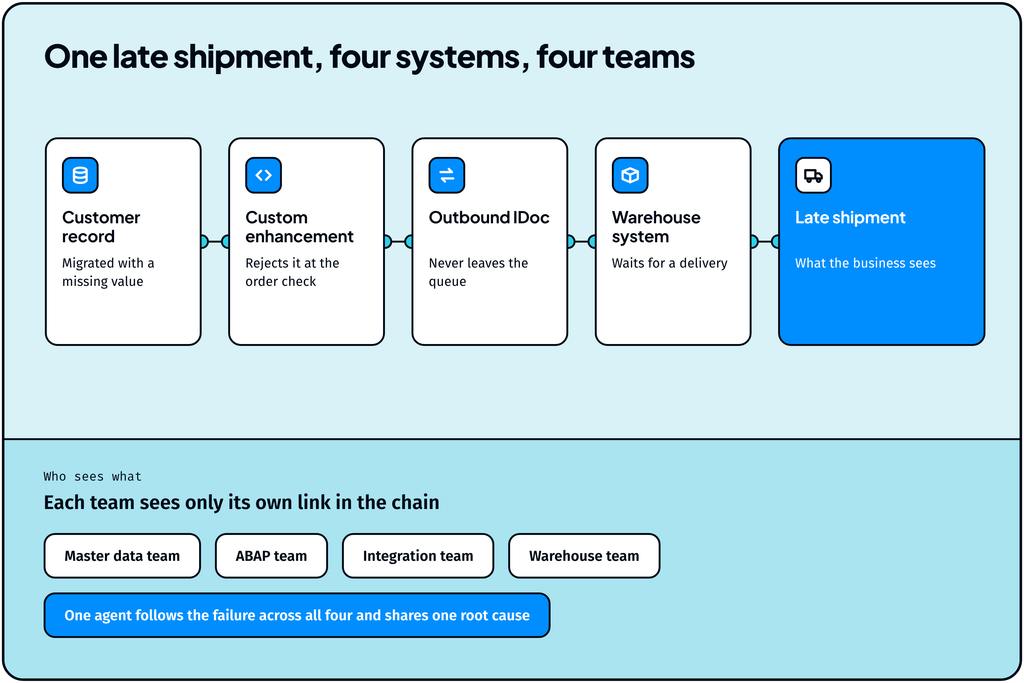
The hardest incidents cross several of these rows at once. A shipment stalls because a migrated customer record fails a check in a custom enhancement, which stops an IDoc that the warehouse system is waiting for. Each team sees its own link in the chain, and assembling the full root cause falls to whoever has time to chase it across systems while the customer waits for the order.
How Do You Measure Hypercare and Know When to Exit?
Hypercare is measured by the trend in incidents: how many arrive, how severe they are, how often they repeat, and how fast they close. That trend tells you whether the landscape is ready to run on a smaller steady-state team. Salesforce lists case volume, time to resolution, repeat issue rates, and system performance indicators as the common hypercare metrics.
A hypercare plan sets exit criteria before go-live, so the decision to exit rests on evidence everyone agreed to in advance. ERP Research recommends tying them to falling incident volume and severity. A strong set of criteria includes:
- Critical incidents have stayed at zero, and high-severity incidents below the agreed baseline, for an agreed number of days
- New incident volume has fallen to a level the steady-state team can absorb.
- Repeat incidents have a known root cause and a permanent fix in place or scheduled.
- Critical business processes, including period-end close, have completed at least one full cycle on the new system.
- Open defects and workarounds are documented and assigned to the AMS backlog.
A quiet week can also mean a critical process has yet to run, so keep hypercare open until month-end close, payroll, and payment runs have each completed once.
What Happens After Hypercare? The Handover to AMS
When hypercare ends, responsibility for the landscape passes to either an internal or external application management services (AMS) team. From that point, AMS owns incidents, changes, and continuous improvement under steady-state service levels.
The handover works best when AMS inherits three things:
- A clean backlog. Every open defect, workaround, and deferred enhancement has an owner, a priority, and a documented cause.
- Process knowledge. Runbooks that show how each critical process moves through SAP and the systems around it, including which interfaces and jobs it depends on.
- Incident history. The fixes made during hypercare, and the reasons behind them, stay available to the people who will see similar issues next quarter.
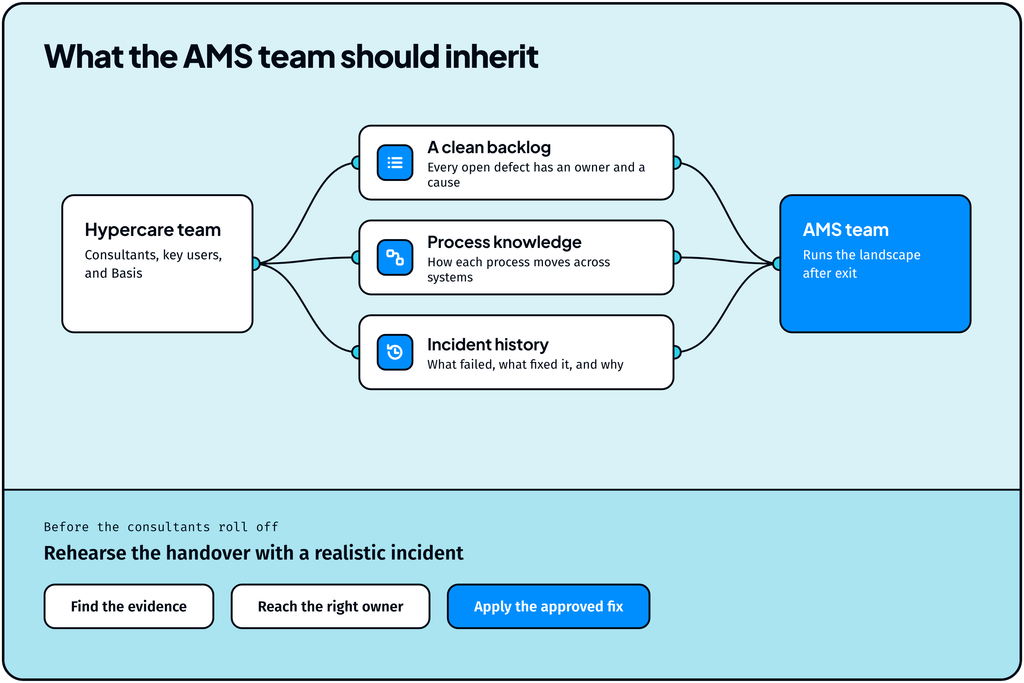
Incident history carries the most long-term value, because that knowledge usually leaves with the consultants. Before they roll off, rehearse the handover: give the AMS team a realistic incident and check that they can resolve it on their own.
These three components form part of the landscape’s operational context: the code, configurations, usage, and dependencies behind each process, who owns each part, and what resolved each incident.
For what AMS covers once it takes over, see SAP AMS Through 2030: What It Covers and Where AI Fits.
How Should AMS Teams Prepare for Hypercare?
AMS teams prepare best by joining at go-live, settling the commercial terms early, and owning the tools, queues, and staffing they will run after exit. Five steps make the handover smoother:
- Shadow from go-live. Join the daily triage call from day one, so the team learns the new landscape while the project experts are still there to explain it.
- Agree when AMS service levels start. Set the date or the exit criteria that switch the landscape to steady-state SLAs, and confirm who fixes defects found after exit. These are often covered by the implementation partner’s warranty.
- Set up access and monitoring before day one. Confirm AMS has the authorizations and transactions it will rely on: SM37 for jobs, ST22 for short dumps, SLG1 for application logs, WE02 and BD87 for IDocs, and SU53 for authorization checks, plus SAP Cloud ALM or Solution Manager for alerts.
- Move the ticket queue. Plan when ITSM routing switches from the hypercare team to AMS, and test that each ticket category reaches the right resolver group.
- Prepare for a post-exit spike. Incidents can rise again once the project team leaves. Customized reliability agents can absorb that spike: they investigate incidents and failed transactions, take on repetitive support work, and carry approved fixes through across SAP and connected systems. Keep an escalation path back to the implementation partner for the first weeks as well.
How Agents Keep Business Processes Running Through Hypercare
Agents shorten the path from a business symptom to its root cause, which is the time the business spends waiting on a shipment, an invoice, or a payment run, and Lightrun’s agents do it across SAP and every system connected to it.
Say a customer’s shipment stalls in the first week after go-live, and nobody can see why. The ticket opens in ServiceNow. The Incident Resolver picks it up, traces the failure from the warehouse system back through the waiting IDoc to the customer record that failed a check in a custom enhancement, and proposes a fix that goes to the right owner for approval.
Three more agents cover the rest of the hypercare load:
- How-to Assistant answers routine user questions as people learn the new system, so key users and the support desk spend their time on real incidents. See the Knowledge Agents.
- Performance Analyst finds the code, queries, and bottlenecks that slow SAP down under full production volume, ahead of the first month-end close, when slow postings would hold up the books.
- Ask the System explains how any process moves across SAP and connected systems, so the AMS team still gets answers about a process after the consultants roll off.
The same agents work before go-live. The Solution Design Assistant and the Migration & Clean Core Agent map the landscape and decide which customization to keep, change, or retire based on real production usage. The Change Risk Analyzer risk-scores every transport, and the Middleware Monitor watches integration flows and queues through cutover. By the time hypercare begins, the agents already hold the operational context the team needs, and they carry it into AMS and every S/4HANA upgrade that follows.
What Makes Hypercare Succeed?
Hypercare succeeds when teams plan it before go-live and treat it as a measured phase with a clear end. Set exit criteria in advance, track the incident trend against a pre-cutover baseline, and keep hypercare open until every critical cycle has run at least once on the new system. Bring the AMS team in from go-live, so the backlog, process knowledge, and incident history built during hypercare stay with the landscape when the consultants roll off. Customized reliability agents make that plan easier to sustain: they trace incidents across SAP and connected systems, answer routine user questions, absorb the post-exit spike, and record what resolved each incident, so people and agents work from the same operational context from go-live through AMS.
Get this right, and the business keeps what matters most: orders that ship, invoices that go out, and suppliers paid on time. Every S/4HANA upgrade brings its own hypercare phase, so the operational context your team and its agents build now carries into each change that follows.
Ready to agentify your hypercare operations?
Hypercare in SAP is the intensive support period after an SAP go-live, such as an S/4HANA migration or rollout. The project team, key users, and Basis stay on with faster response times to resolve incidents and stabilize the landscape. It ends with a formal handover to the AMS team.
Go-live is the moment production switches to the new system, usually at the end of cutover. Hypercare is the stabilization period that follows, typically two to twelve weeks. Go-live is a milestone; hypercare is the phase that makes it stick.
Hypercare support is usually led by the implementation partner, working with the internal SAP team, Basis, and key users from each business area. The AMS team works best when it shadows hypercare from go-live, so it is ready to take over at exit.
Yes. Every S/4HANA version upgrade changes code, configuration, and integrations, so each one can interrupt the same processes a migration can, and each can warrant its own hypercare period. The scope of the upgrade sets how long that phase runs, and the same exit criteria approach applies.