RISE with SAP: What SAP Covers and What You Still Own
Nov 24, 2026 / Updated: Nov 24, 2026

RISE with SAP (often called SAP RISE) moves infrastructure, Basis operations, and hyperscaler management to SAP under one subscription. The tasks that decide whether invoices post and orders ship stay with your team unless you contract them separately, and this guide maps them task by task using SAP’s own roles and responsibilities document.
Key Takeaways
- SAP’s roles and responsibilities document sorts every task into five categories: Standard, Optional, Additional, Packaged Services (formerly Cloud Application Services), and Excluded. The category sets who acts and who pays.
- SAP runs infrastructure, Basis operations, and database administration as Standard Services, and its standard monitoring covers technical availability and capacity of system components.
- Support for customer-built applications, identity provider integration, and validation of restored data are Excluded Tasks, so only the customer can perform them.
- User administration and monitoring of critical business transactions stay with the customer unless they are bought from SAP as Packaged Services.
- Technical availability and business process outcome are two separate signals, so business process recovery needs its own monitor and a named owner.
- A task-by-task owner map with one recovery signal for each critical process closes most of the gap.
What Is RISE with SAP (SAP RISE)?
RISE with SAP is SAP’s program for moving SAP ERP customers to the cloud. Its private cloud offer combines the ERP software, hyperscaler infrastructure, and SAP-managed technical operations in one subscription, which SAP describes as full-stack managed cloud services.
The naming has shifted along the way: in 2025 SAP began marketing S/4HANA Cloud, private edition as SAP Cloud ERP Private, while contracts and licensed product names stay the same, and SAP still uses “RISE with SAP” for the program and in customer announcements. You will often see both names in the same proposal.
The RISE with SAP services inside the offer:
- ERP software: SAP S/4HANA Cloud, private edition, now marketed as SAP Cloud ERP Private.
- Infrastructure: the landscape runs on the hyperscaler the customer chooses, with SAP holding the contract.
- Technical operations: SAP Enterprise Cloud Services (SAP ECS) runs the infrastructure, operating system, database, and Basis layer.
- Methodology and tools: SAP’s transformation guidance and migration tooling for the move itself.
One subscription gives you one commercial counterpart for the platform. The roles and responsibilities schedule inside the contract decides who performs each task, and it assigns most of the application layer to you.
What Do the Five SAP Task Categories Mean?
Standard Services are included in the service fee and performed by SAP. Optional and Additional Services are performed only by SAP for an extra fee, Packaged Services are tasks you can perform yourself or pay SAP to deliver, and Excluded Tasks can only be performed by the customer.
The definitions come from SAP’s roles and responsibilities document for S/4HANA Cloud, private edition (v3-2026), which applies to RISE with SAP and SAP Cloud ERP Private. Each row in the table includes a task taken from that document.
| Category | Who acts and who pays | Example task from the document |
| Standard Services | SAP acts, covered by the service fee | Monitor the database for technical issues and resolve technical database failures (HANA_1.1.06) |
| Optional Services | SAP only, for an extra fee itemized in the contract | Problem management for regulated industries (SM_1.6.08) |
| Additional Service | SAP only, one-off, for an extra fee | Data handover to the customer during an active contract (BASIC_1.8.13) |
| Packaged Services (formerly Cloud Application Services) | Your team, or SAP for a fee if you buy the package | Administer users (BASIC_1.2.18) |
| Excluded Tasks | Your team only | Integrate your Active Directory or identity provider (INFRA_1.9.02) |
Packaged Services deserve the closest reading. The document says such a task “needs to be performed by customer if applicable and if a Packaged Service is not used”, so any package you decline becomes work for your team or your AMS partner.
- The signed contract schedule is the source of truth for each landscape, since a sales deck summarizes scope and the schedule lists every task.
- The document’s package column shows which Packaged Service covers each task, which tells you what to ask for if you want SAP to take it.
What Does SAP Run in a RISE Landscape?
SAP runs the infrastructure layer as Standard Services: data centers, hyperscaler management, operating system and database administration, backup and restore execution, and technical monitoring of availability and capacity. For a team that used to patch databases and manage backup schedules, this is a real reduction in operational load.
- Technical operations sit with SAP ECS, including Basis operations, backups, and restores after technical failures.
- Standard monitoring covers critical operating parameters of the computing environment, disk, server, and network capacity (INFRA_1.4.05 to 1.4.08), database technical health (HANA_1.1.06), and SAP system availability and critical system states (BASIC_1.8.17).
- Incident processing for that scope is Standard as well (BASIC_1.16.02), from qualifying and prioritizing an incident to implementing the solution or workaround.
The limit is written into the document itself. Enabling system monitoring (BASIC_1.8.04) covers “technical monitoring of system components only”, and the same row excludes monitoring of solutions, customer configuration, interfaces, connections, and jobs, which can be covered with additional services.
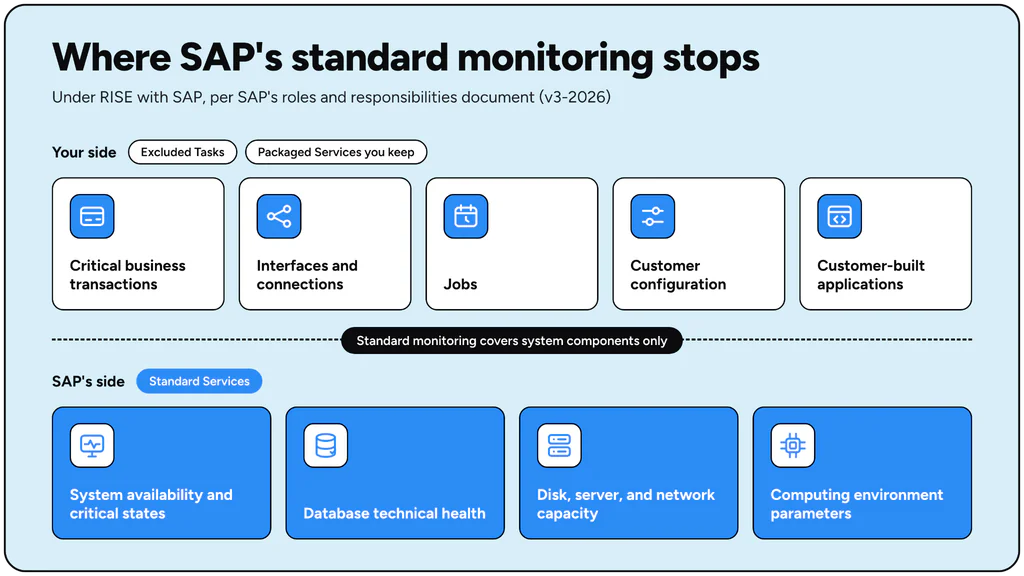
Everything above that line is where an invoice run, a payroll posting, or a shipment release either completes or fails quietly. The guide to SAP AMS covers the day-to-day work at each of those layers.
What Does Your Team Still Own After a RISE with SAP Go-Live?
You own customer-built applications, identity provider integration, and validation of restored data as Excluded Tasks, plus every Packaged Services task you keep in-house, such as user administration and business process monitoring. These are the tasks that tend to surprise teams after go-live, and each one maps to a row in the document.
- Customer-built applications: supporting them and monitoring their availability are Excluded Tasks (HANA_1.9.13 and 1.9.14), so custom code is your responsibility from the first incident.
- Users and security design: administering users is a Packaged Service (BASIC_1.2.18), while defining the application security concept (BASIC_1.2.22) and implementing single sign-on (BASIC_1.2.24) are Excluded Tasks.
- Identity provider integration: connecting your Active Directory or another identity provider is Excluded (INFRA_1.9.02).
- Restored data: SAP executes the restore, while validating the logical integrity and consistency of restored information is Excluded (INFRA_1.8.06).
- Business transactions: monitoring critical business transactions is a Packaged Service, and the document describes it as manual monitoring that is effort based per execution (BASIC_1.7.07).
- Incident sign-off: even for incidents SAP processes, signing off the solution and confirming incident resolution is an Excluded Task (BASIC_1.16.03).
PwC’s analysis of the RISE shared responsibility gap names the same areas, from authorization management and interface monitoring to in-depth application support and data-backup validation. Application management in the sense of incidents, changes, and enhancements stays with your in-house team or partner too. The guide to RISE with SAP managed services covers this from the contract side, and the guide to application management services covers it from the delivery side.
Where Do the Ownership Gaps Show Up First?
Gaps show up wherever a technical check passes while a business process fails: interfaces, authorizations, backups, release testing, and custom code. The table maps each area to what SAP covers and what stays with your team, along with the way each gap usually announces itself.
| Area | What SAP covers | What stays with you, and how it fails quietly |
| Application support | Infrastructure and Basis | Application-level incidents, unless bought as Packaged Services. A ticket waits while the process stays down. |
| Interfaces | Technical connectivity | Interface monitoring and IDoc queues, unless bought as Packaged Services. A queue grows while availability reads green. |
| Authorizations | Technical users and platform access | User and role administration. An access backlog delays the close. |
| Release and regression testing | Platform patching | Testing of custom code and transports. A transport breaks a custom job. |
| Backup validation | Backup and restore execution | Logical integrity of restored data. A restore completes with inconsistent data. |
Each row has the same shape: the layer SAP is accountable for reports healthy, while the outcome the business depends on sits one layer up, in a task the contract assigns to you.
Why Can the Dashboard Stay Green While the Business Process Fails?
Standard monitoring measures system availability. Business process monitoring measures outcomes, such as whether a posting run completed and an invoice reached the ledger. These are two separate signals with two separate owners.
Here is an illustrative example of how the two signals drift apart. Suppose supplier invoices sent through Nipendo, an e-invoicing platform, show as “Sent to customer system” on the supplier side but never appear in SAP S/4HANA, so the AP team raises an incident.
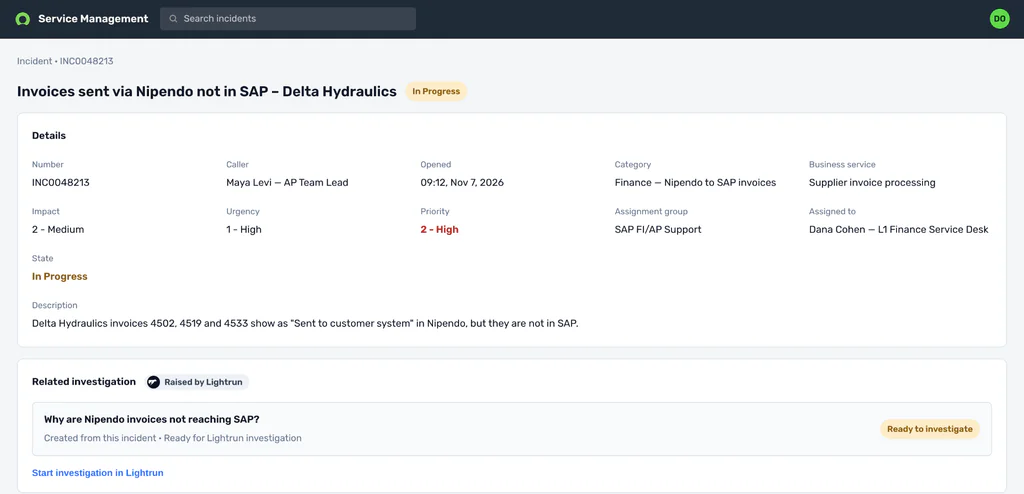
The incident as AP raised it: invoices marked as sent in Nipendo are not in SAP, and the supplier is threatening to hold its next delivery.
Every technical layer between the two systems reported success. The investigation traced each hand-off and found the break sitting in a custom configuration change on the SAP side, as the evidence shows:
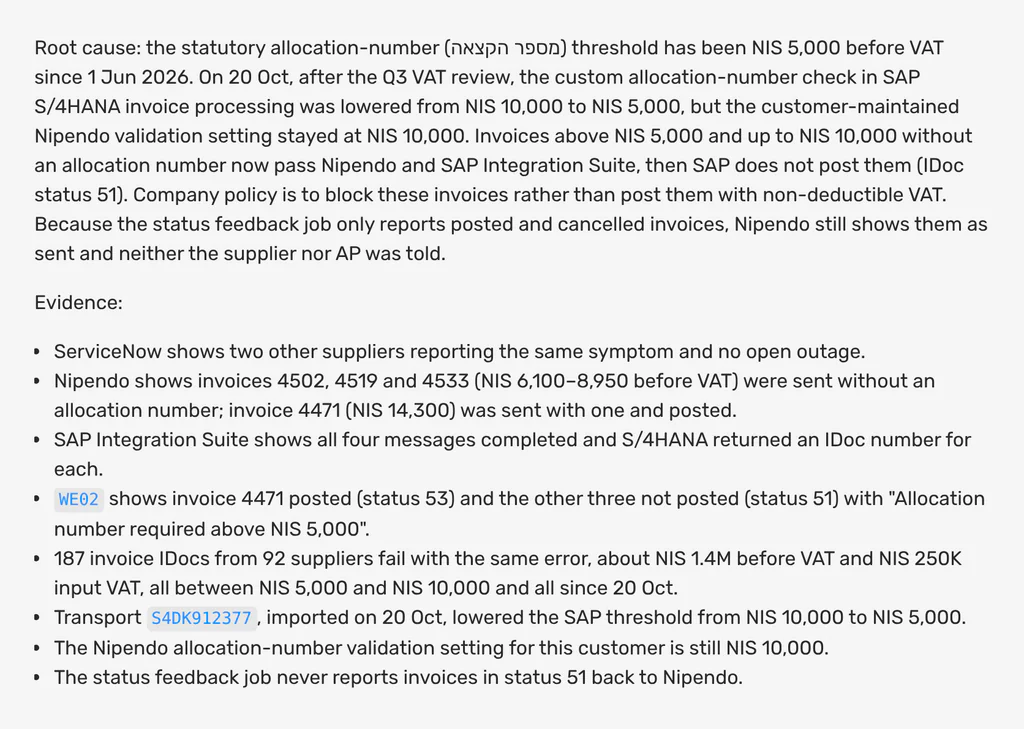
The root cause and evidence from the investigation, with the invoices traced through Nipendo, SAP Integration Suite, and IDoc status in WE02.
The investigation found 187 invoices from 92 suppliers stuck since a transport lowered an allocation-number threshold in SAP, while the matching setting in Nipendo stayed unchanged. The infographic below lays the same failure out layer by layer:
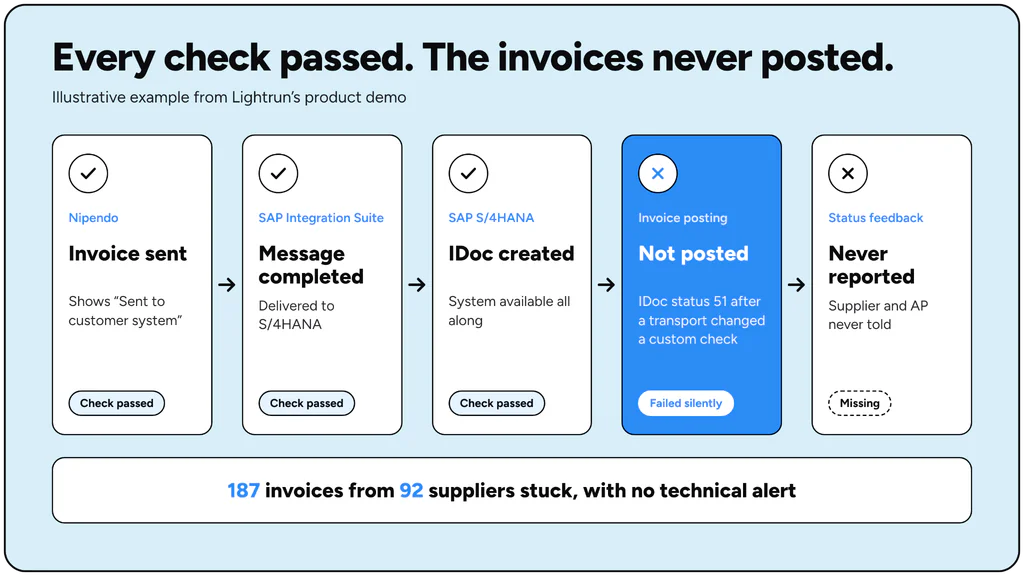
Nipendo, the middleware, and SAP availability were all working, which is why no technical alert fired. Under RISE, every piece of the real cause sits on the customer side: the custom invoice check, the transport, the interface feedback job, and the monitoring of the posting outcome.
- Technical availability answers whether the system is running.
- Business process outcome answers whether the work the business depends on finished.
- RISE covers the first by default, and the second needs its own monitor and an owner.
Lightrun’s business process agents treat the process as the unit of operations, from order-to-cash to record-to-report.
How Do You Map Ownership for Every RISE Task?
List each task by its SAP category, name one owner for every Packaged Services and Excluded task, and attach a recovery signal to each critical process. Kept current, the map keeps the gap from reopening after each contract change.
- List the tasks. Pull every application-layer task from the roles and responsibilities document with its category.
- Name one owner for each. Assign a person or a team in your organization or at your AMS partner to every Packaged Services and Excluded task, and write it beside the task.
- Define a recovery signal. For each critical process, such as invoice posting or payment runs, decide what evidence confirms it ran.
- Review the map. Revisit it every quarter and after any change to the contract or the landscape.
The recovery signal is the step teams most often skip. A signal such as “the posting run produced documents that reached the ledger” can be checked, while “the job completed” only reports that the job ended, which is exactly the check that passed in the invoice example above.
What Should You Check Before Signing or Renewing a RISE Contract?
Check what is monitored, at which layer, who is paged, and what evidence confirms that a business process has recovered. The table turns those questions into a checklist you can take into the contract review.
| What to check | Why it helps |
| The category of every application-layer task (Standard, Optional, Additional, Packaged Services, Excluded) | Keeps you from paying twice and surfaces uncovered tasks before an incident |
| Who monitors business process outcomes | Shows whether recovery is measured or assumed |
| Ownership of custom code and interfaces | Shows who answers when a job fails |
| Evidence required to close a P1 | Confirms that closure means the process ran |
| Consumption and capacity reporting | Shows how you will see and control RISE spend |
| Governance on any automation | Shows how much of the routine queue is offloaded, and how safely |
How Do Lightrun’s Reliability Agents Fit a RISE Landscape?
Lightrun works alongside SAP, your AMS provider, or your in-house team, and adds customizable Reliability agents that prevent and resolve failures in the layers a RISE contract leaves with you. Each agent maps to one of the gaps above.
- Incident Resolver (application support): classifies tickets, traces failures to root cause across SAP and connected systems, and carries incidents through to an approved resolution. As Hood Munaim, SVP, Head of Product Engineering, puts it: “When it comes to priority-one tickets, customers can’t wait days for a fix. Lightrun helps us reduce that to hours.”
- Middleware Monitor (interfaces): monitors integration flows, queues, and interface health across the SAP landscape.
- Change Risk Analyzer (release and regression testing): analyzes transports and dependencies to produce a risk-scored change advisory board briefing before every change.
- Permissions Manager (authorizations): evaluates access requests against policy and live context, then routes least-privilege access to the right owner for approval.
- SAP FinOps Analyst (contract and spend): turns RISE consumption and capacity data into measurable savings, including HANA growth and FUE usage.
The authorization gap shows how this works in practice. Say an engineer needs access to a production SAP Integration Suite tenant to investigate an active incident. The Permissions Manager checks the request before anyone grants anything:
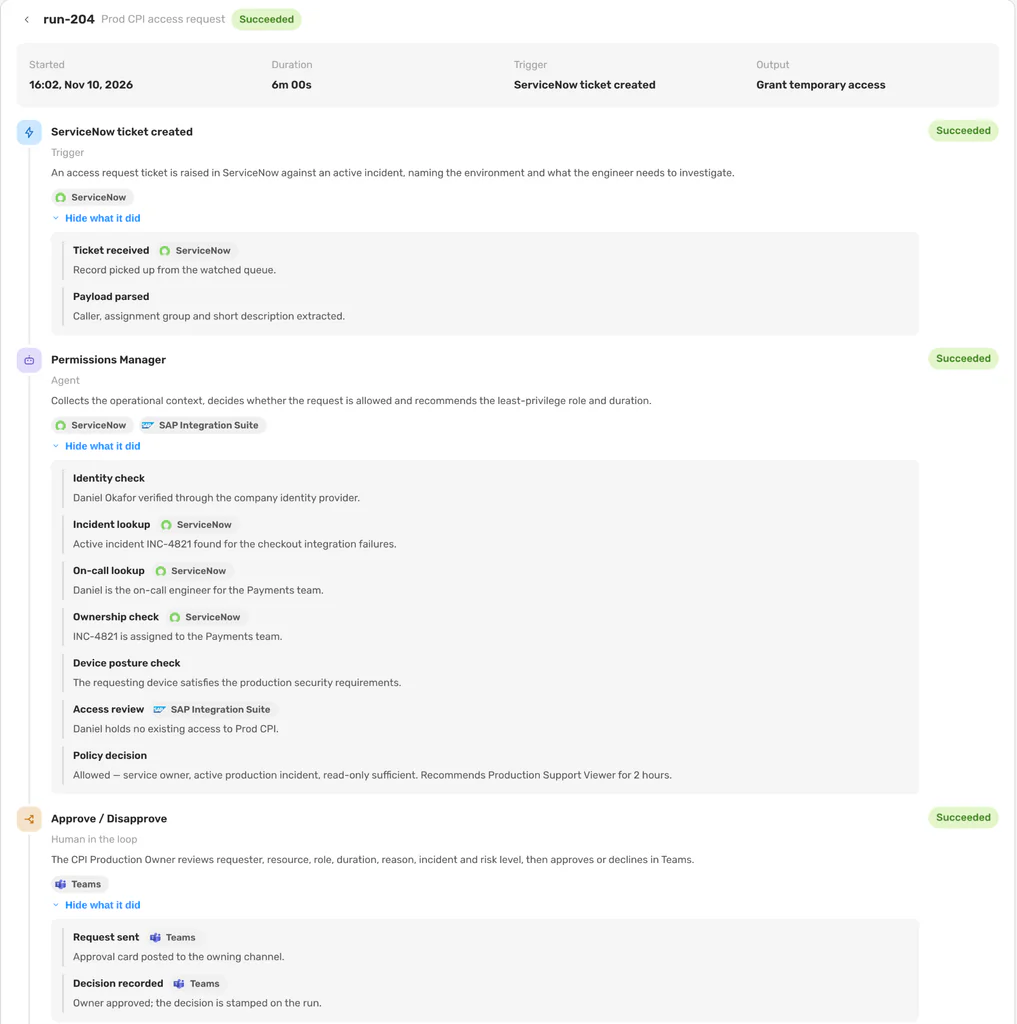
The Permissions Manager run: identity, incident, on-call, and ownership checks lead to a recommended read-only role for two hours, which the system owner then approves.
The owner approves the request in Teams, access is granted for two hours, and its revocation is scheduled in the same run.
Agents are read-only by default; write actions need explicit approval, and permission settings, role-based access control, and audit logs keep your team in control. Lightrun’s Forward Deployed Engineers tailor the agents to each landscape, including legacy systems, legacy code, and non-API platforms.
Why Is Business Process Recovery a Better Yardstick Than Infrastructure Uptime?
Infrastructure uptime tells you SAP’s side of the contract is running, while business process recovery tells you whether your side is running. The second is the number finance, supply chain, and operations teams feel, so ask your AMS provider and your RISE contract owner for both.
The owner map gives you the list of tasks to start from, and the recovery signals give you the evidence to ask for.
See which RISE tasks are still uncovered in your landscape
RISE with SAP is SAP’s program for moving SAP ERP customers to the cloud, combining the ERP software, hyperscaler infrastructure, and SAP-managed technical operations in one subscription. SAP Enterprise Cloud Services runs the infrastructure and Basis layer, while application-layer tasks follow the categories in SAP’s roles and responsibilities document.
RISE with SAP is still the name of SAP’s program. In 2025 SAP began marketing the product inside it, S/4HANA Cloud, private edition, as SAP Cloud ERP Private, while contracts and licensed product names stay the same, so proposals often use both names.
RISE with SAP is sold as a subscription like SaaS, but its private cloud offer runs each customer’s ERP in an SAP-managed private cloud environment separate from the shared public cloud edition. That gives customers more room for customization, along with more application-layer tasks to own.
Application management stays with the customer or their AMS partner unless specific tasks are bought from SAP as Packaged Services. Support for customer-built applications is an Excluded Task, which only the customer can perform.
The customer monitors custom code, because SAP’s roles and responsibilities document lists support for customer-built applications and availability monitoring of customer-built applications as Excluded Tasks, and SAP’s standard system monitoring covers technical components only.
Your team or your AMS partner handles them unless you buy the relevant Packaged Services from SAP. SAP’s standard monitoring setup excludes interfaces, connections, and jobs, so a failing IDoc queue can grow while system availability still reads green.
Excluded Tasks can only be performed by the customer and sit outside Standard, Optional, Additional, and Packaged Services. Examples include integrating a customer identity provider, implementing single sign-on, validating the logical integrity of restored data, and confirming incident resolution.