L1, L2, L3 Support Is Breaking Under Migration and AI Ticket Volume
Nov 11, 2026 / Updated: Nov 11, 2026

L1, L2, and L3 support describe the tiered model most SAP teams use to route tickets by complexity. The definitions are simple, but what’s breaking is the assumption behind them: that each tier has dedicated capacity and a clean handoff to the next. As S/4HANA migrations and new AI tools push more tickets through the same three tiers, that assumption is what gives first.
Picture a distributor three weeks after its S/4HANA go-live. The support rota is still staffed for normal demand, a new AI assistant now looks up stock and prices all day, and at 06:40 on a Monday the overnight invoices have stopped posting. Nobody on the rota is careless. The model they work in simply was not built for this week. We will follow that one ticket through the article, first as it travels through five teams, then as it would run with Lightrun’s agents in the loop.
Key Takeaways
- L1 covers routine, well-documented requests such as how-to questions, access resets, and ticket triage, and it should need little SAP depth even though many of these requests still end up with specialists.
- L2 covers functional and technical troubleshooting in modules such as SD, MM, and FI/CO, along with integration failures that need module-level knowledge.
- L3 covers Basis, custom ABAP, and infrastructure-level root cause analysis, and it is usually the smallest and most expensive pool of people.
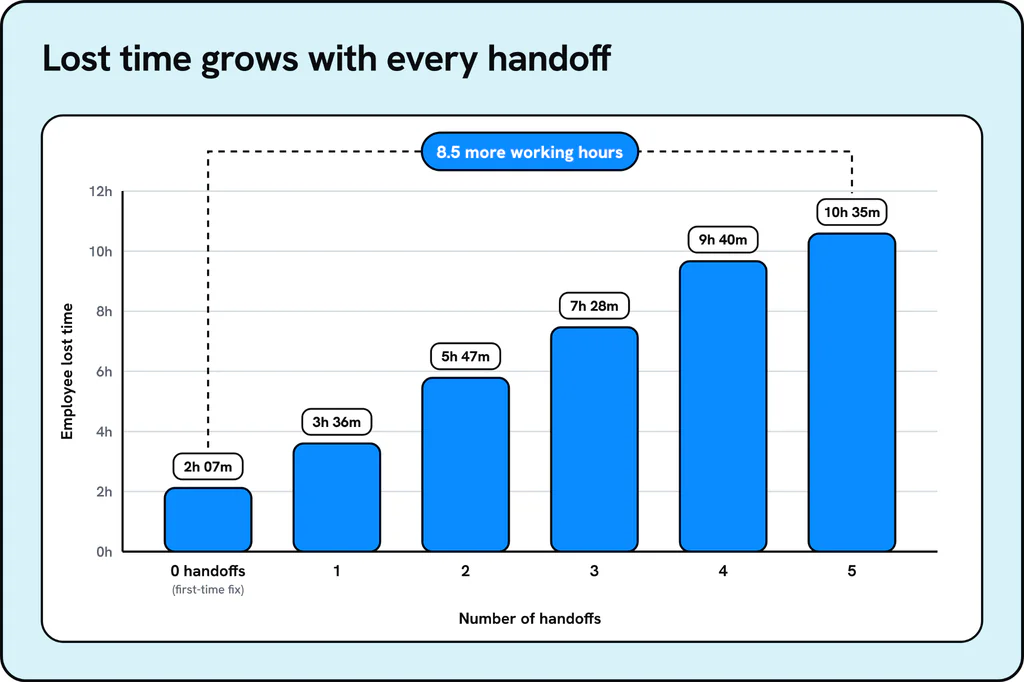
- The cost shows up in the overlap between tiers: according to the HappySignals and ISG Global IT Experience Benchmark Report 2026, a ticket handled by five teams costs the employee 8.5 more working hours than one resolved on first contact.
- Migrations and AI tools that read and write SAP data push tickets through all three tiers at once, and keeping routine work at L1 is what protects L2 and L3 capacity for real investigation.
What Is L1, L2, L3 Support in an SAP Landscape?
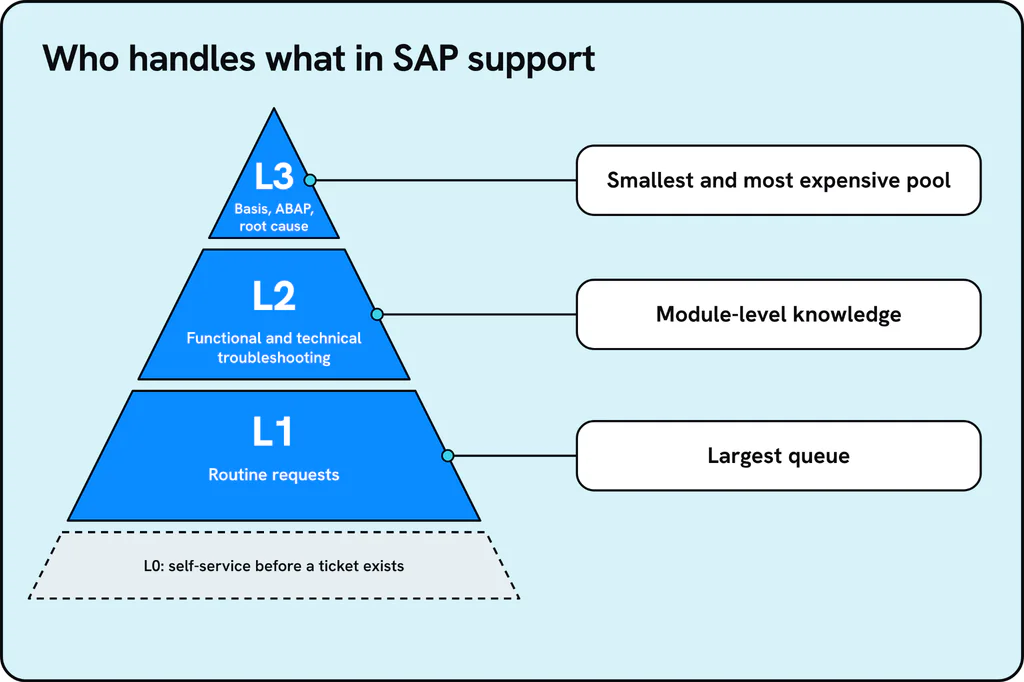
L1, L2, and L3 support is a tiered escalation model that routes each ticket to the level of skill it needs, so routine requests are handled quickly and the scarcest experts are reserved for the hardest problems. In SAP environments, and in application management services more broadly, the tiers usually map to the following kinds of work.
| Tier | What it handles | Typical SAP examples |
| L1 | First point of contact for routine, scripted issues | Password or access resets, “how do I run this report” questions, basic ticket logging |
| L2 | Specialist functional or technical support | Pricing errors, posting failures, master data issues, module configuration |
| L3 | Deepest technical tier covering root cause and infrastructure | Basis failures, custom ABAP short dumps, performance tuning, integration root cause |
Some teams also define L0, which is self-service or deflection before a ticket is ever logged, and it is worth checking how your AMS contract scopes it because providers define it differently.
In our distributor, the Monday ticket sounds like an L1 item: “invoices stopped posting.” On the table above it is really an L2 posting failure with a possible L3 cause, and nothing in the ticket says so.
Why Is the L1, L2, L3 Model Breaking Under Migration and AI Ticket Volume?
The L1, L2, L3 model assumes each tier has dedicated capacity and a clean handoff to the next. That assumption held when ticket volume was steady, and two things are now pushing volume up at the same time, neither of which was in the picture when most support contracts were signed.
S/4HANA migrations multiply tickets at every tier:
- Elevated hypercare volume after an ERP go-live is well documented, and one hypercare guide puts it at as much as 3x baseline ticket volume by day two, often while the support rota is still staffed for normal demand.
- A migration sends transports through quality and production systems in volume.
- Retrofits between ECC and S/4HANA keep generating tickets long after the project itself is marked complete.
- None of that work respects tier boundaries, since a single retrofit can touch functional configuration, custom code, and Basis in the same incident.
- An issue that starts in one system increasingly surfaces as a symptom in another, which is what AI usage, migrations, and upgrades expose across connected systems.
- Lightrun’s guide to SAP AMS covers how these deadlines reshape the support workload.
For the distributor, this is the transport queue. Many changes move to production in the weeks around go-live, and any one of them can cause something to fail on a Monday morning.
New AI tools take the system down paths nobody has exercised before, at a scale nobody has tested:
- When an AI agent reads or writes SAP data, it doesn’t necessarily follow the sequence a trained user would.
- It can hit a configuration edge case, a validation rule, or a code path that’s existed in the system for years without ever running, because no human ever used it that way.
- Those failures don’t have a known fix, a runbook, or a precedent to search for, so they skip past L1 entirely and land straight at L2 or L3.
- An agent can call the same interface, job, or lookup far more often than any human workflow did, so a path that held up fine under human-paced traffic can start timing out or hitting lock contention once something is calling it continuously.
The result: the model that was supposed to protect senior capacity is what’s draining it:
- How-to questions and access requests, which should stay at L1, routinely get escalated because requesters don’t know who else to ask.
- The senior person who ends up answering them is usually the same one needed for genuine L2 and L3 work.
- Tickets bounce between L1, L2, Basis, developers, and contractors because no one owns the investigation end to end.
Where Does Each Tier Get Stuck Before the Ticket Reaches Its Fix?
Each tier has its own bottleneck, and none of them is the one the org chart implies, because tickets keep moving until someone owns the investigation.
| Tier | Where it gets stuck | Why |
| L1 | Flooded with questions that should never become tickets | How-to questions and T-code lookups can be answered from documentation or system knowledge if the requester could find it |
| L2 | Inherits investigation that belongs to several owners | A functional issue that is really a code or integration problem is not caught until L2 has already spent time on it |
| L3 | Becomes a bottleneck of a handful of people | Basis and senior ABAP capacity is the smallest pool, and every hard escalation eventually reaches it whether or not the fix lives there |
The pattern repeats whichever tier a ticket starts at, with the ticket traveling toward the smallest pool of senior people regardless of where the actual fix lives.
What Does a Ticket Cost When It Crosses Tiers?
Every reassignment has a measurable cost, and the HappySignals and ISG Global IT Experience Benchmark Report 2026 puts numbers on it using 889,164 resolved incident responses:
- Lost time rises from 2 hours 7 minutes on a ticket fixed on first contact to 10 hours 35 minutes when it passes through five teams, which the report states as 8.5 more working hours.
- Employees lose an average of 3 hours 18 minutes of productive time per IT incident.
- 13.3% of tickets involve two or more reassignments, so the long tail is a minority of volume that carries a disproportionate share of lost time.
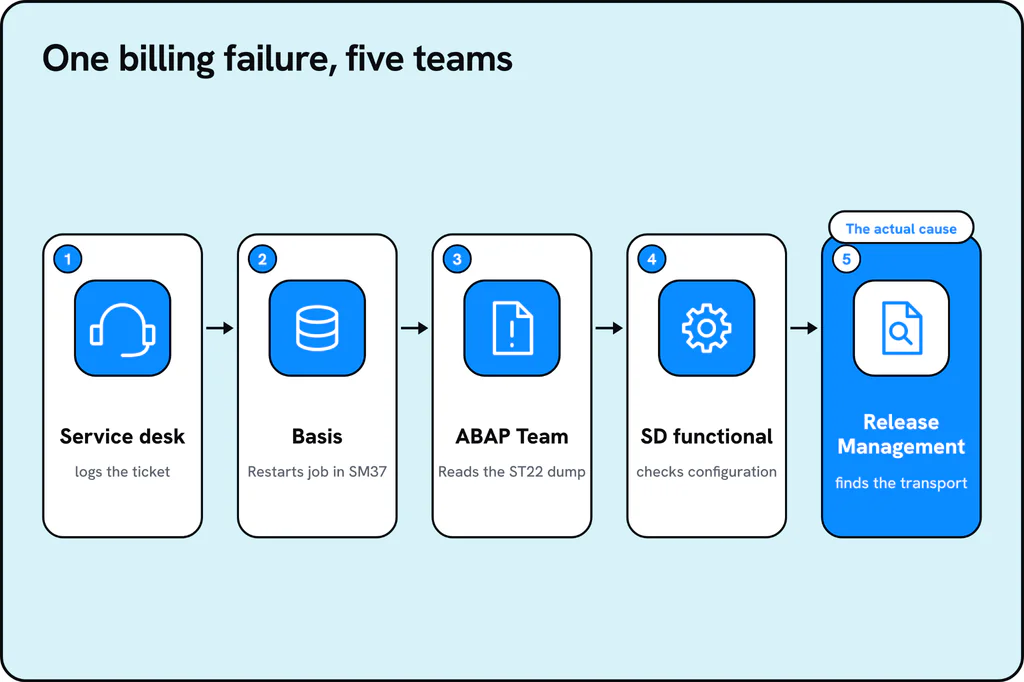
Here is how that looks on our distributor’s Monday ticket, shown as an illustrative example in which invoices stop posting one morning:
- The overnight billing job ZSD_BILLING_POST shows as canceled in SM37, so the service desk logs the ticket and Basis restarts the job.
- The job fails again, and ST22 shows a CONVT_NO_NUMBER short dump in the custom billing program, so the ticket moves to the ABAP team.
- The developer finds the code unchanged and passes the ticket to SD functional to check the configuration.
- Only when someone lists the recent transports does the team find last week’s change, which altered the field the program reads.
The ticket has now passed through the service desk, Basis, ABAP, SD functional, and release management, which is the five-team case the benchmark measures:
- Nobody in the chain did anything wrong, since “invoices stopped posting” gives L1 no sign that a transport review is needed.
- SLA penalties accrue while the ticket moves between teams.
- Revenue-critical processes such as a billing run, a payment cutoff, or a shipment release stall in the meantime.
By the time the distributor’s finance lead gets an answer, the morning is gone, and the restarts that came first did nothing except add to the queue.
What Reduces L2 and L3 Load Without Adding Headcount?
Reducing load on the upper tiers doesn’t require redrawing the tiers; it comes down to three moves that change where senior people spend their time, not how many tickets arrive.
- Deflect genuine L1 volume before it becomes a ticket by answering routine how-to and access questions directly from the live system instead of from documentation that goes stale.
- Give L2 and L3 one investigation in place of three, so tracing a failure across Basis, custom code, configuration, and integrations happens in a single pass instead of restarting at every handoff, as the billing example did at each handoff.
- Keep senior people on approvals, decisions, and anything outside documented policy, while routine resolution happens inside approved guardrails and the Basis specialist gets back the morning once spent on a password reset.
What Does Operational Context Give an Agent That a Ticket Classifier Lacks?
Operational context lets an agent resolve a ticket instead of only classifying or routing it. It combines live evidence from SAP, ITSM, telemetry, code, and infrastructure with business context, ownership, and past outcomes, so the ticket receives a confirmed answer rather than a routed guess.
- Evidence sources: Read-only access to SAP and connected systems, plus the landscape’s code, data, and architecture, so the agent reads what is happening instead of what’s documented.
- Live operational knowledge: That evidence mapped to business context, dependencies, ownership, and past outcomes, rather than raw logs handed to a person to interpret.
- Governance: Read-only access by default, with approval gates and confidence thresholds on top, so that write actions require explicit approval wherever policy says they should.
Operational context extends runtime context from a single application to the whole landscape. Without it, an agent can classify or route a ticket but cannot resolve one, because it lacks the cross-system picture that a senior consultant builds by hand.
A classifier would have read “invoices stopped posting,” labeled it a billing incident, and routed it to the service desk queue, which is where the ticket started anyway. What the distributor needed was something that could read the job failure, the short dump, and the transport history in one pass.
How Do Lightrun’s Agents Map to L1, L2, and L3?
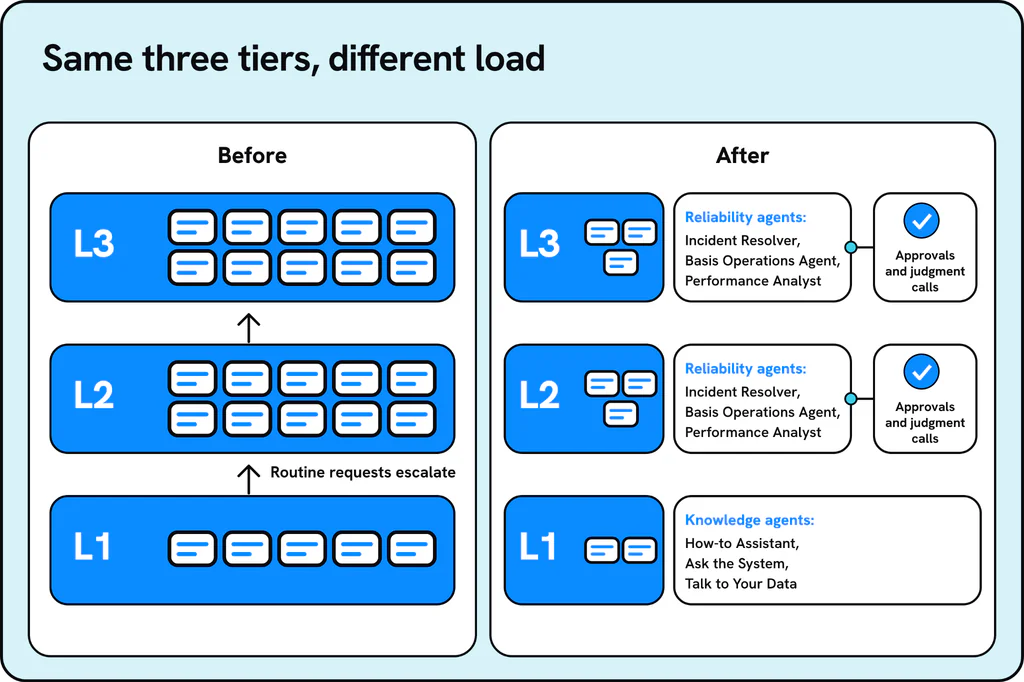
Lightrun’s enterprise system solutions split the work along the same lines as the tiers. Its Knowledge agents answer routine questions directly from live system data, and its Reliability agents handle L2 and L3 investigation and resolution within approved governance policy.
At L1, the Knowledge agents are:
- How-to Assistant: answers routine L0 and L1 business questions before they become support tickets, and points staff to the right transaction, report, or procedure.
- Ask the System: explains how a business process moves through SAP and connected systems, including the handoffs and approvals between them.
- Talk to Your Data: answers questions about business records using live data from SAP and connected systems.
At L2 and L3, the Reliability agents include:
- Incident Resolver: classifies tickets, traces failures to root cause, and carries incidents through to an approved resolution, starting from evidence such as Cloud ALM alerts, logs, ST22 short dumps, and job failures.
- Basis Operations Agent: monitors jobs, work processes, and capacity, and resolves failures and restarts approved services within the customer’s governance policy.
- Performance Analyst: finds the code, query, and resource bottlenecks slowing SAP down and recommends tuning actions.
The Incident Resolver starts from the same ST22 dump and job failure evidence that the billing example above followed manually. Lightrun’s product demo shows the support flow in the product, starting with the short workflow that runs the Incident Resolver:
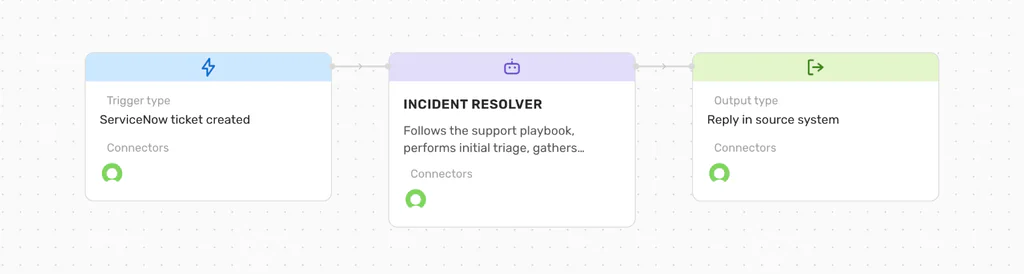
The Incident Resolver workflow in Lightrun’s demo: a ServiceNow ticket triggers the agent, which triages it and replies in the source system.
The workflow is short on purpose: a ticket arrives, the agent works through it, and the answer goes back to the same ticket. For our distributor, the same flow would run like this, step by step:
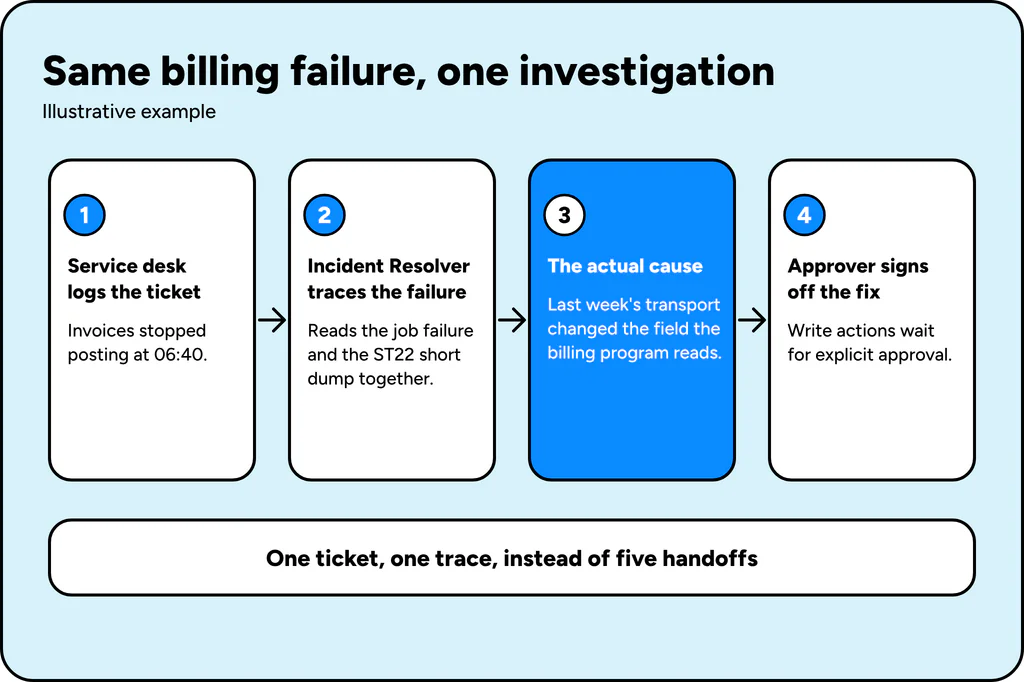
- The service desk logs the ticket as before, and the Incident Resolver picks it up with the ZSD_BILLING_POST job failure and the CONVT_NO_NUMBER dump already in view, instead of waiting for Basis to restart the job.
- It follows the dump into the custom billing program, sees the code is unchanged, and checks the recent transports, which surfaces last week’s change to the field the program reads.
- It hands that finding to a named approver with the evidence attached, and any write action, such as moving a correction transport, waits for explicit sign-off.
- The same afternoon, the How-to Assistant answers the finance team’s questions about which invoices are affected, so those questions never become tickets of their own.
The distributor’s tiers did not change. What changed is what each tier received, and that one investigation, not five, produced the answer. The timing in this replay is an illustration of the flow, not a measured result.
The demo then runs a different incident through the same workflow, which shows the ticket side. A ServiceNow incident arrives as a symptom, here a production order API returning intermittent errors for some requests:
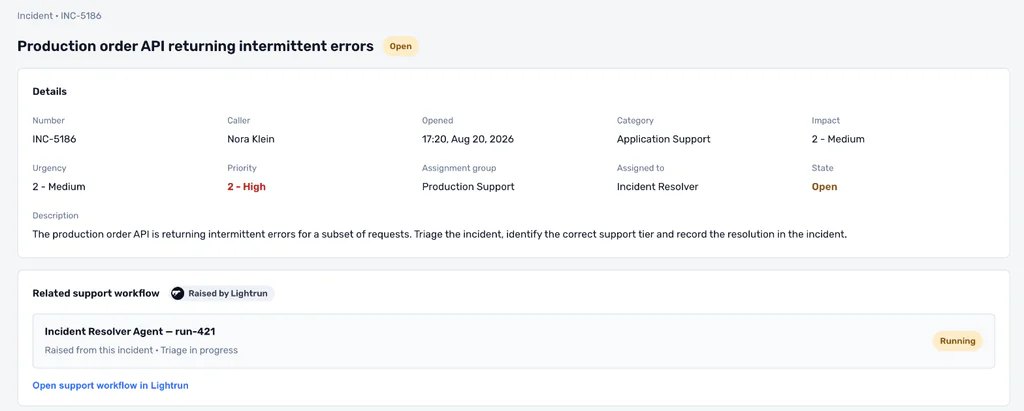
The ServiceNow incident as raised, with the Incident Resolver run in progress.
The Incident Resolver follows the support playbook from L1 triage, gathers the diagnostic evidence, and finds that the incident matches a documented L2 configuration issue, as the run record shows:
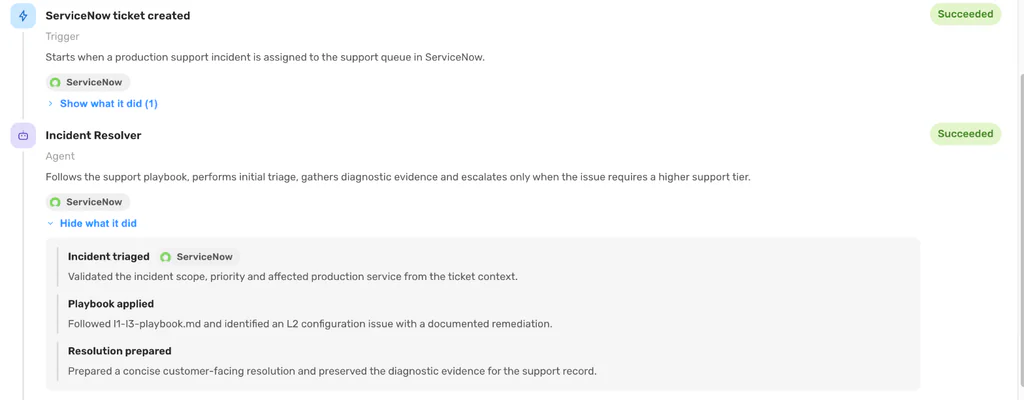
The run record: the incident is triaged, the playbook is applied, and a resolution is prepared while preserving the diagnostic evidence.
It then writes the result back to the same ticket, so the next person starts from the answer:
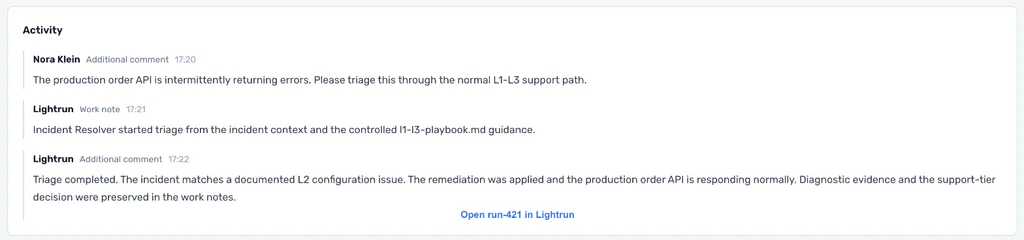
The resolution and diagnostic evidence are written back to the same incident, which then moves to Resolved.
The tier structure stays as it is while the share of each queue that reaches a person shrinks, and Lightrun lists these controls behind its Reliability agents:
- Read-only access by default, with explicit approval for write actions.
- Role-based access control, audit logs, and SSO.
- ISO 27001 and SOC 2 Type II certification.
- No source code storage and zero AI provider data retention.
How L1, L2, and L3 Support Challenges Map to a Resolution
| Support challenge | How it shows up | What resolves it |
| L1 overload | How-to and access questions are escalated unnecessarily | Knowledge agents answer directly, sourced from live systems |
| L2 and L3 handoff cost | Tickets bounce between Basis, ABAP, and functional teams | One investigation traces the full cross-layer evidence |
| Senior capacity bottleneck | The same few people answer every escalation, whatever the tier | Routine work is resolved within policy while decisions stay with people |
What Reaches Each Tier Decides How Much Senior Capacity Is Left
L1, L2, and L3 make a clean model on paper, and the gap between that model and daily reality is where senior SAP capacity leaks into work that was never meant to reach it.
- Migrations and new AI tools widen that gap faster than most support contracts were built to absorb.
- The benchmark data shows the cost compounding, since each added team adds hours for the employee and for whoever bills for the work.
- Redrawing the tiers leaves the constraint in place, because it sits in what each tier receives and in whether anyone can see the full cross-system evidence before a ticket starts to move.
- A ticket that begins as “invoices stopped posting” keeps climbing toward the smallest pool of experts until something supplies the evidence that shows where the fix lives.
Keeping each tier’s routine share at that tier lets L2 and L3 spend their time on the decisions that need them, and Lightrun builds its agents to do this inside a governed, read-only-by-default model. Teams that want to test the approach can begin with one process and one queue, such as the billing run in our example, measure how many tickets reach L2 and L3 after the routine share is deflected, and widen scope as the evidence supports it.
L1 handles first-contact, routine requests such as access resets and how-to questions, L2 covers specialist functional or technical troubleshooting such as configuration issues and integration failures; and L3 is the deepest tier, reserved for infrastructure-level root cause analysis and usually staffed by the smallest and most expensive group of specialists.
L1 support in SAP typically handles password and access resets, basic ticket logging and triage, and how-to questions that documentation can answer, such as which transaction code to use for a routine task.
Tickets bounce because the L1, L2, L3 model assumes clean handoffs and dedicated capacity at each level, while a single incident can touch functional configuration, custom code, and Basis at once. A ticket that starts at L1 therefore often passes through several teams before anyone finds the actual cause, and the HappySignals and ISG benchmark measures 8.5 more working hours lost when a ticket is handled by five teams.
L0 support is self-service or deflection that happens before a ticket is logged, including knowledge articles, how-to guidance, and automated requests that resolve an issue without a person on either end, and it is worth checking how your AMS contract defines it because providers scope L0 differently.
Teams can reduce L2 and L3 load by deflecting genuine L1 volume before it becomes a ticket, by giving L2 and L3 one cross-layer investigation in place of several handoffs, and by keeping senior staff on approvals and decisions instead of routine resolution.