AI Agent Design Patterns: How to Choose the Right One
Oct 07, 2026 / Updated: Oct 07, 2026
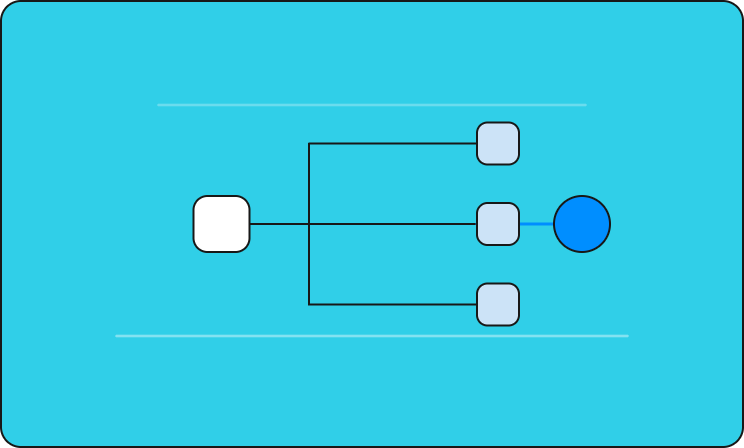

Agentic design patterns decide how an AI agent reasons, acts, and hands off work. The right one is the pattern that still holds after it meets your customer’s real data, legacy systems, and traffic. This guide covers the eight core AI agent design patterns, where each one fits, how each one breaks in production, and how to verify your choice before the business feels the failure.
Key Takeaways
- Most AI agent design pattern guides skip the conditions that actually break a pattern in the field: legacy infrastructure, one shot at a working demo, and no slow iteration cycle to recover from a wrong choice. Forward deployed engineers, who deploy AI agents directly inside customer environments, run into this constantly.
- Every core pattern trades flexibility for predictability, or the reverse. Chaining and routing are workflows your code controls. Reflection and tool use give the model more control. Knowing which side of that line a customer’s problem actually sits on is the real skill.
- The demo environment lies about which pattern will hold up. A pattern chosen against clean sample data can look production-ready and still break the first time it meets a customer’s actual legacy system, inconsistent data, or access constraints.
- Multi-agent orchestration deserves its own deep dive, since coordination failures between agents are a distinct problem from picking a single-agent pattern. This post covers where orchestration fits among the core patterns and Lightrun’s guide to AI agent orchestration covers the handoff-specific failure modes in full.
- The pattern is only half the job. Verifying that a pattern still behaves correctly against the customer’s actual live system, not just the sample data used to build the POC, is what separates a demo that ships from one that quietly breaks in week two.
What Are Agentic Design Patterns, and Why Does the Choice Matter?
Agentic design patterns are reusable architectures for structuring how an AI agent reasons, calls tools, and coordinates with other agents or people. The choice matters because each pattern decides where control sits, and that decides how the system behaves when production hands it something the demo never did.
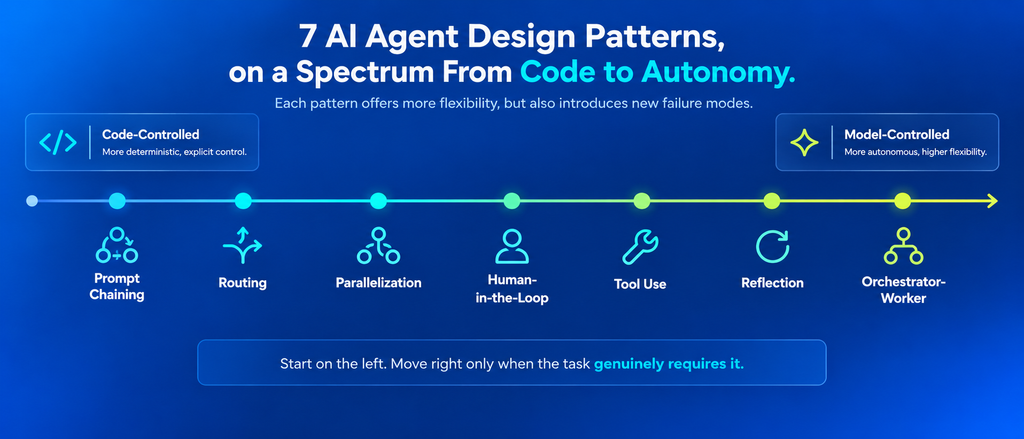
The patterns sit on a spectrum. At one end, workflows run along paths your code defines. At the other, agents let the model decide its own next step. Moving along that spectrum buys flexibility and spends predictability.
Why the stakes are higher for a forward deployed engineer
A forward deployed engineer (FDE) embeds inside a customer’s organization to scope, build, and ship an AI system end to end. For an internal tool, a team can swap a pattern quietly next sprint. An FDE usually gets one meaningful shot: the pattern chosen for the pilot has to survive the customer’s real data, legacy infrastructure, and governance constraints, on a compressed timeline, with the customer’s engineers watching.
When it doesn’t, the cost lands on the business: a missed SLA, a stalled order flow, a budget overrun nobody approved. That makes the FDE’s situation a useful stress test for any team. A production-ready pattern is one that holds up the first time it meets the real environment.
Each pattern below gets the same breakdown: what it is, when to use it, when to choose something else, an example, how it breaks in production, and the fix.
Workflow Patterns: Prompt Chaining, Routing, and Parallelization
Workflow patterns keep control in your code: the model fills in each step, and the path between steps is fixed in advance. They are the most predictable agentic design patterns and the easiest to audit.
Prompt Chaining
Prompt chaining breaks a task into a fixed sequence of steps, where each step’s output feeds directly into the next. Your code defines the order, and the model completes each step along the way.
When to use it
- The workflow is repeatable and well-defined, with the same sequence applying regardless of the input
- Each step’s task is narrow enough that a single model call can handle it reliably
- You need predictable, auditable output at every stage, not just at the end
When to choose something else
- Inputs genuinely vary in structure or intent, not just in detail
- The “right” next step depends on what a previous step actually found
Example: A contract review pipeline extracts every obligation from the contract, flags anything that looks like a risk, then drafts a plain-language summary for the reviewer. Every contract takes the same three steps, and that consistency is what makes chaining reliable here.
Where it breaks in the field: Chaining assumes every input takes the same path, and customer data rarely cooperates. A chain built and validated against a customer’s sample contracts can break the moment it hits a contract format the sample set didn’t include, because the pipeline has no way to detect that this input needed a different sequence of steps. This is the failure a forward-deployed engineer runs into constantly: the demo contracts all followed one shape, and the customer’s real archive doesn’t.
The fix: Add a validation step between links in the chain that checks the output actually matches what the next step expects, instead of assuming it always will.
Routing
Routing uses a model to classify an incoming request and sends it to the right specialized handler, whether that’s a different prompt, a different tool, or a different downstream agent entirely.
When to use it
- Inputs differ in kind, and each kind benefits from its own handler
- A specialist per category outperforms one generalist covering everything
- The categories themselves are well-defined and don’t overlap much in practice
When to choose something else
- Most real inputs fall into ambiguous or overlapping categories
- Misrouting an input has a high cost, since routing failures are often silent
Example: A support ticket router sends billing questions to a billing specialist and technical issues to a technical one.
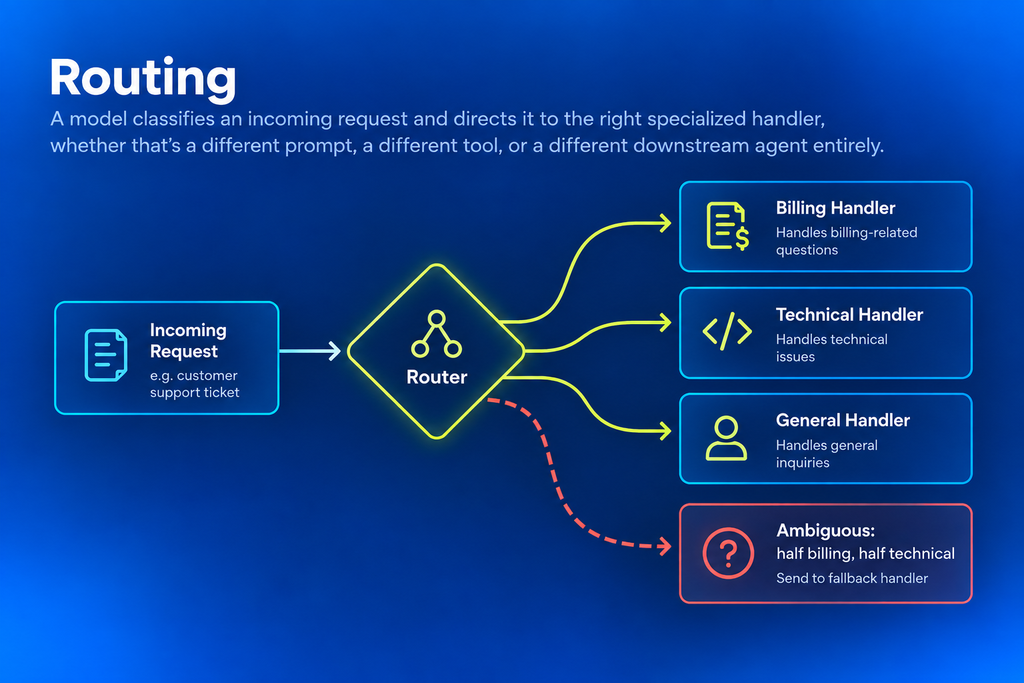
Where it breaks in the field: A router is only ever as good as the categories it was designed against. Once real traffic flows, a ticket that’s half billing, half technical, is routine. Routing logic validated only against tidy categories validated against tidy categories sends those tickets down the wrong path quietly, and the first signal is a customer complaining twice.
The fix: Give the router a defined fallback path for low-confidence inputs, so ambiguous requests reach a generalist or a human.
Parallelization
Parallelization runs independent subtasks simultaneously instead of sequentially, then combines the results into one output. Every branch is its own model call, so the pattern trades cost for speed: N calls in place of one, in a fraction of the wall-clock time.
When to use it
- The subtasks are genuinely independent, meaning none of them needs another branch’s output to run
- Latency matters more than the marginal cost of extra model calls
- The workload is bounded enough that N calls stays predictable
When to choose something else
- Subtasks depend on each other’s output, which forces a sequence whether the pattern acknowledges it or not
- Cost sensitivity is high and hasn’t been tested against real request volume yet
Example: A research agent fans out across five independent knowledge bases at once and merges the results. No branch depends on another, so running them in sequence would only add latency.
Where it breaks in the field: On a demo dataset, cost and latency differences barely register. At the customer’s real volume, N parallel calls per request can blow past the budget assumed during the pilot, and the first signal is the invoice.
The fix: Run a cost projection against the customer’s actual expected production volume before the pilot ships. That number tells you whether parallelization still earns its price at scale.
Agent Patterns: Reflection, Tool Use, Planning, and Orchestrator-Worker
Agent patterns hand control to the model: it decides what to check, which tool to call, or which agent to delegate to. They handle open-ended work that fixed paths can’t, and they depend on the model’s picture of the environment being accurate.
Reflection
Reflection has the agent critique and revise its own output before returning a final answer, adding a self-evaluation step after generation instead of trusting the first pass outright.
When to use it
- A single-pass output isn’t reliable enough to ship as-is
- The kind of errors you’re worried about are ones the model can plausibly catch by re-examining its own reasoning
- Output quality matters more than latency
When to choose something else
- The errors that matter are rooted in facts about the specific environment the model was never given
- Speed is a hard constraint and a second pass isn’t affordable
Example: A code generation agent writes a function, then reviews it for logic errors, missed edge cases, and style violations before presenting it.
Where it breaks in the field: Reflection catches the errors the model already knows how to recognize. Errors rooted in the customer’s environment, such as a config value, a schema, or a business rule unique to that deployment, pass straight through. The agent reflects on a wrong answer, checks it against what it knows, and confirms it with confidence.
The fix: Feed the reflection step real environment facts to check against, such as the live config value or the current schema, alongside the model’s own reasoning.
Tool Use
Tool use has the agent call external tools, APIs, or functions as part of its reasoning loop, grounding its decisions in live data beyond its training.
When to use it
- The task requires current, live information the model wasn’t trained on
- The agent needs to actually act on the world, not just describe what it would do
- A reliable API or function exists for the data or action the agent needs
When to choose something else
- The tool’s response shape isn’t well-documented or is likely to change without notice
- There’s no way to verify what the tool actually returns before the agent reasons over it
Example: A support agent that queries a live billing API before answering a subscription question, so the answer reflects the customer’s actual plan.
Where it breaks in the field: Tool use is as trustworthy as what the tool returns right now. A customer’s internal API can drift from the schema the integration was built on: a renamed field, a changed type, a null where the demo data always had a value. Nothing in the pattern checks that the returned data still means what it used to.
Here’s that failure in code. The billing API now returns the customer’s plan under tier, and the documented planTier field comes back as an empty string. The integration’s fallback hides the change:
| // SupportTriageAgent.java, checkSubscriptionTier() (before) JsonNode account = billingApi.getAccount(customerId); // BUG: the plan now arrives under “tier”. |
Every enterprise customer now resolves to the standard tier. Nothing errors, and the agent answers subscription questions with confidence.
The fix: Verify the tool’s current response shape against the live system, and fail loudly when an expected value is missing. Operational context exists for exactly this: knowing what a tool is returning right now.
Catching the drifted field on the live system
Using Lightrun’s inline runtime context, the engineer asks the running service directly.
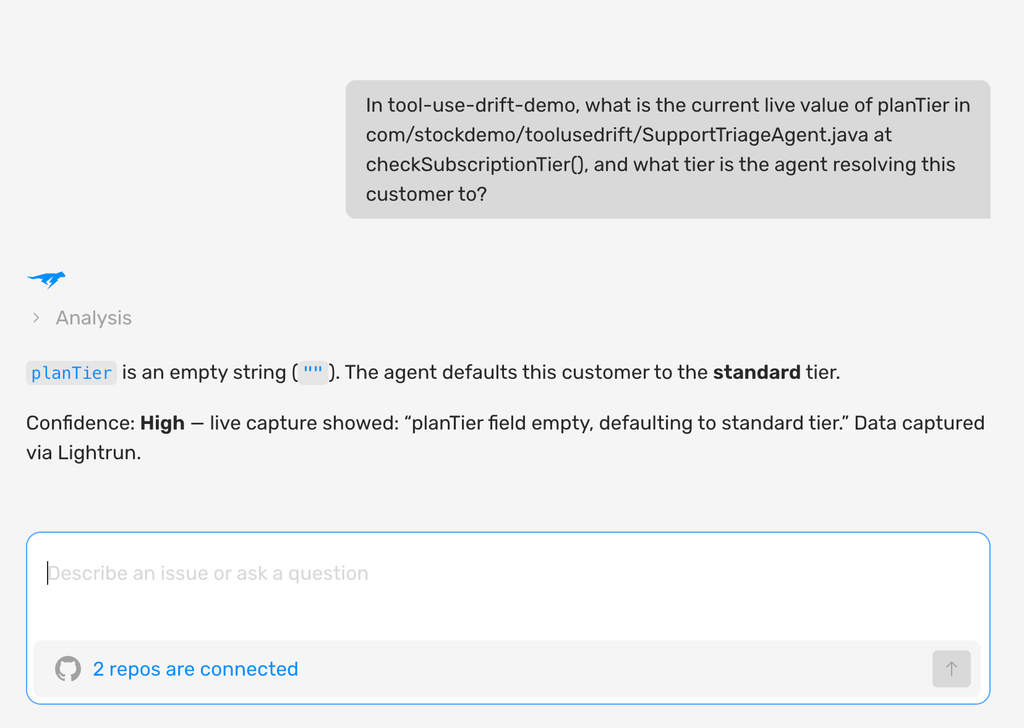
The first capture shows the agent reading the documented planTier field, finding it empty, and confidently defaulting an enterprise customer to the standard tier, exactly the kind of silently wrong answer a renamed field produces.
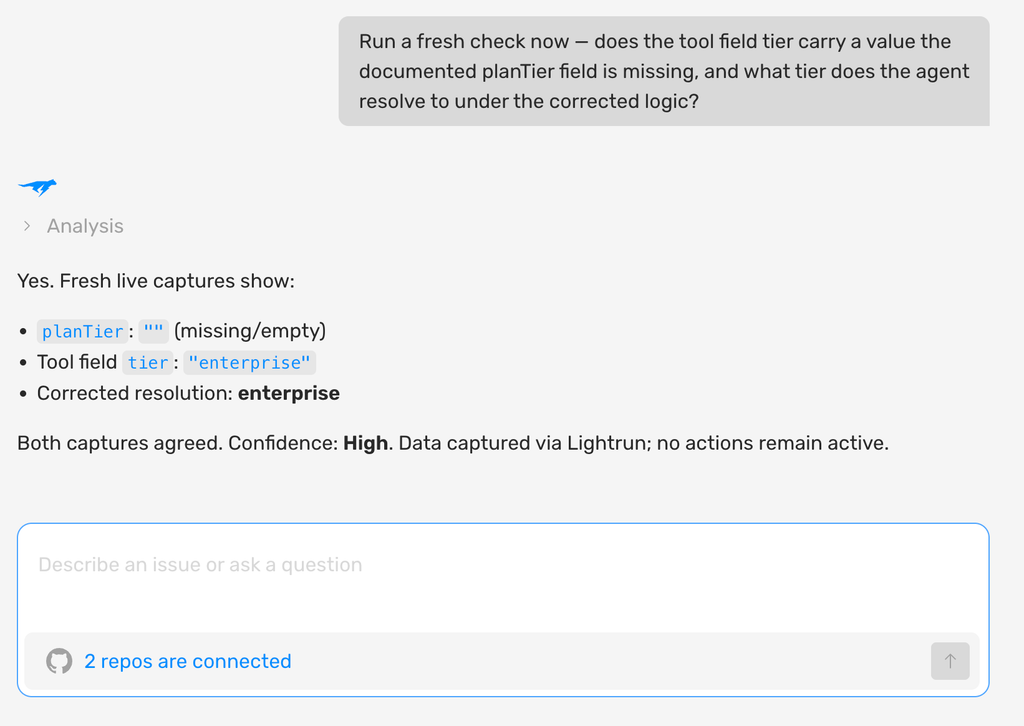
The second capture runs a fresh check against the same live tool call. The documented planTier field is still empty, the tier field carries “enterprise”, and the corrected logic resolves the customer to enterprise. Both captures agree, and no instrumentation stays active once the check completes.
Neither capture needed a new log line, an integration test, or a guess about what the billing API returns now. The documented schema is exactly what stopped being true, so the evidence had to come from the live response.
Orchestrator-Worker (Multi-Agent)
The orchestrator-worker pattern has a central orchestrator agent that delegates subtasks to specialized worker agents, then combines their outputs into a final result. Instead of one agent trying to hold every piece of context, every tool, and every decision at once, the task gets split across multiple narrower, more reliable reasoning loops.
When to use it
- The task is complex enough that one agent holding all the context, tools, and decision logic at once becomes unreliable
- Subtasks benefit from a specialized agent each
- You can define how the orchestrator combines worker outputs into one result
When to choose something else
- The task is simple enough that a single agent or a chain handles it without added coordination risk
- You don’t yet have a way to verify what actually survives the handoff between agents
Example: In incident response, an orchestrator receives an alert, delegates log analysis to one worker, and a dependency check to another, then combines both findings into one diagnosis.
Where it breaks in the field: Every agent can reason correctly while the system can still reach the wrong conclusion, because the risk moves to what survives the handoff. That failure mode deserves a full treatment, and Lightrun’s guide to AI agent orchestration covers how information gets lost between agents and how to close that gap.
Human-in-the-Loop
Human-in-the-loop has the agent pause at a defined point and route a decision to a human for approval before it proceeds. It combines with any workflow or agent pattern, which is why it sits between the two ends of the spectrum.
When to use it
- The action is high-stakes or irreversible, and the cost of an autonomous mistake clearly outweighs the cost of a brief pause
- You can define a clear, specific trigger condition for when the gate should fire
- A human reviewer genuinely has time to evaluate what’s routed to them
When to choose something else
- The volume of requests is high enough that a human reviewer will inevitably start rubber-stamping without reading
- The trigger condition can’t be calibrated against real transaction volume yet
Example: A financial transaction agent that auto-approves purchases under a set threshold but routes anything larger to a human reviewer, so the agent still does the work of assembling the request while a person makes the final call on anything consequential.
Where it breaks in the field: The gate is only as good as its trigger. A threshold calibrated on demo-scale numbers either never fires at the customer’s real volumes, letting large transactions through, or fires on nearly everything, until reviewers rubber-stamp requests and the gate stops doing its job.
The fix: Recalibrate the threshold against the customer’s actual transaction volume and value distribution, not the numbers used to build the pilot.
Agentic Design Patterns Compared
Each pattern earns its place on a specific kind of task and breaks on a specific kind of production reality:
| Pattern | Control Style | Best For | Where It Breaks in the Field |
| Prompt Chaining | Code-controlled | Repeatable, well-defined workflows | Inputs that don’t follow the sequence the chain was built for |
| Routing | Code-controlled | Inputs that genuinely differ in kind | Edge cases that don’t fit any category cleanly |
| Parallelization | Code-controlled | Genuinely independent subtasks | Cost and latency that don’t show up until real data volume hits |
| Human-in-the-Loop | Mixed | High-stakes, irreversible actions | A trigger threshold calibrated against demo-scale numbers |
| Tool Use | Model-controlled | Grounding decisions in live data | A tool response shape that changes without warning |
| Reflection | Model-controlled | Output quality over speed | Confidently wrong answers rooted in missing environment facts |
| Orchestrator-Worker | Model-controlled | Tasks too complex for one agent | Information lost in the handoff between agents |
How to Choose the Right AI Agent Design Pattern
Start with the simplest pattern that solves the problem, and move toward model-controlled patterns only when the task needs the flexibility. Chaining and routing come first; tool use, planning, and orchestrator-worker come in as the task demands them.
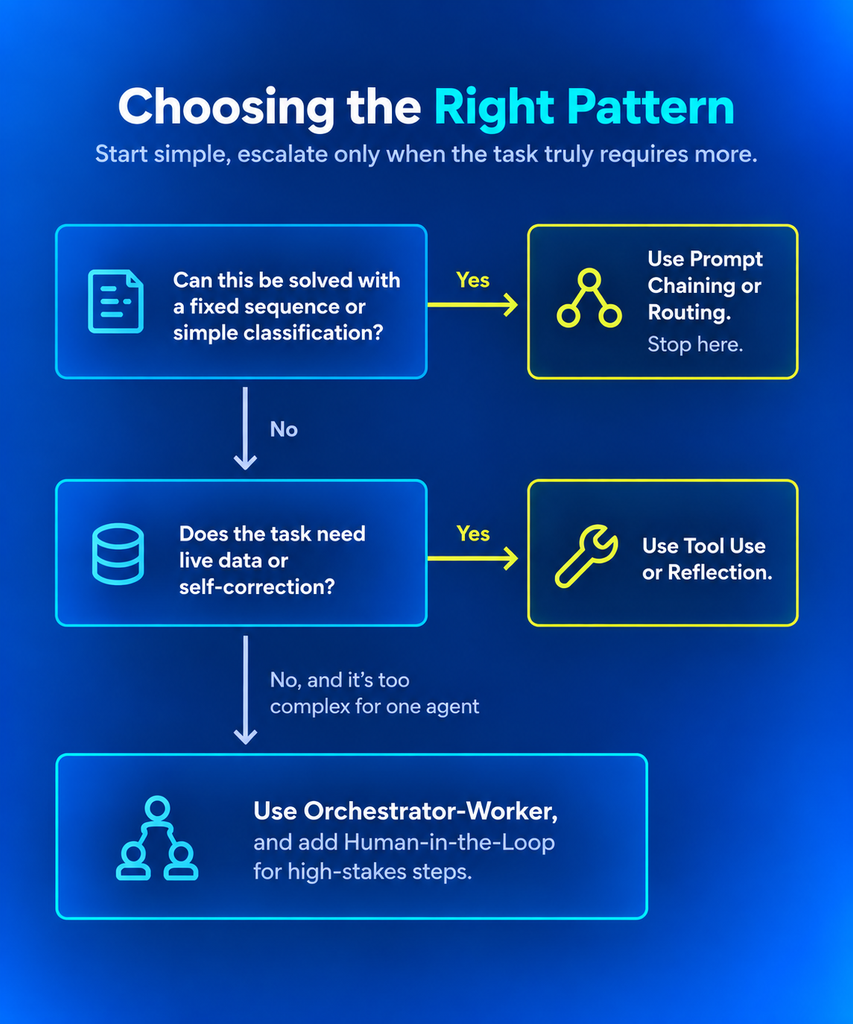
Three questions settle most choices:
- Is the sequence the same for every input? If yes, prompt chaining. If the input type decides the path, routing.
- Does the agent need live data or to act on a system? If yes, add tool use, and plan how you’ll verify what the tool returns.
- Is the task too broad for one reasoning loop? If yes, planning or orchestrator-worker, with a check on every handoff.
Add human-in-the-loop wherever an action is irreversible or expensive, at any point on the spectrum.
For an FDE specifically, that discipline matters more, not less. A customer’s engineering team will own this system after the deployment is handed off, and a needlessly complex pattern chosen to make the pilot look sophisticated becomes their maintenance burden, not the FDE’s.
How to Combine Agentic Design Patterns Safely
Production systems combine two or three patterns, each handling the part it does best, and the risk concentrates at the seams between them.
Example: A support automation system. Routing sits at the front, classifying an incoming ticket as billing, technical, or general before anything else happens. Inside the technical path, tool use takes over, querying the customer’s actual account and system state instead of guessing from the ticket text alone. For anything the system flags as high-risk, a refund above a threshold, an account-level change, human-in-the-loop gates the action before it executes. Three patterns, three distinct jobs, combined into one workflow.
Where combining patterns breaks in the field
Each pattern is usually built and validated on its own, against its own sample data, and the seams go untested:
- A routing misfire feeds a bad input straight into a tool call, and the tool call has no way to know the input was already wrong
- A tool use failure never reaches the human-in-the-loop gate, because the gate was built to catch a different kind of error
- Each pattern passes its own validation, so the combined system shows no failure at all
Every added pattern adds handoffs where one pattern’s assumption can break another’s. Multi-agent systems face the same class of problem, covered in the Lightrun’s AI agent orchestration guide.
Worked example: The router above misclassifies a ticket as general instead of billing. The router’s own logic shows nothing wrong. Two steps later, the tool call pulls account data that doesn’t match the question being asked. Operational context catches it: a record of what happened at each handoff, including the router’s classification and the exact data the tool call returned, in the order they occurred.
The fix: Validate each handoff against what the running system actually does. The same principle behind every “fix” in this post applies here too, just one layer up.
Verify the Pattern Before the Business Feels the Failure
Choosing a pattern is the first job; verifying it holds against the customer’s live system is the second, and the second decides whether a deployment survives its first month.
The eight agentic design patterns above each work cleanly in a demo. Each one also breaks in a specific, predictable way once it meets real data, real scale, and real edge cases, because it was validated against a sample.
The fix is an accurate, current picture of how the system behaves in production. Lightrun calls that operational context. Runtime Context is its code-level layer: a live, on-demand view of a specific variable, config value, or tool response, captured at the moment it matters.
With that picture in place, teams prevent pattern failures before they reach customers, and resolve the ones that slip through with evidence from the live system.
Learn more about Lightrun’s customizable AI SRE agents
FAQ
What are agentic design patterns?
Agentic design patterns are reusable architectures for structuring how an AI agent reasons, uses tools, and coordinates with other agents or people. They range from code-controlled workflows like prompt chaining and routing to model-controlled patterns like reflection, tool use, planning, and multi-agent orchestration.
What are the main AI agent design patterns?
The core agentic design patterns are prompt chaining, routing, parallelization, reflection, tool use, planning, orchestrator-worker, and human-in-the-loop. The first three keep control in code, the next four hand control to the model, and human-in-the-loop gates high-stakes actions in either kind of system.
What is the difference between an AI workflow and an AI agent?
In a workflow, your code defines the path, and the model completes each step along it. In an agent, the model decides its own next step, which tool to call, or which agent to delegate to. Workflows are more predictable; agents handle more open-ended tasks.
Which AI agent design pattern should I start with?
Start with the simplest pattern that solves the problem: prompt chaining or routing for a well-defined, repeatable workflow. Move to tool use, planning, or orchestrator-worker only when the task needs that flexibility, since each step along the spectrum adds complexity and maintenance cost.
What does a forward deployed engineer do?
A forward deployed engineer (FDE) embeds inside a customer’s organization to scope, build, and deploy an AI system end to end. The role blends software engineering, solutions architecture, and direct customer work. It exists because AI systems that perform well in a vendor’s demo often need on-site work to hold up against a customer’s real infrastructure and data.
Why do AI agent design patterns that work in a demo fail in production?
Most patterns are validated against clean sample data that stands in for the customer’s environment. In production, they meet inputs, data shapes, and volumes the sample never included, such as a renamed API field, a request that spans two routing categories, or a data volume that changes the cost of parallelization.
How is multi-agent orchestration different from other design patterns?
Multi-agent orchestration coordinates several specialized agents toward one goal, where other patterns work inside a single agent’s reasoning loop. Coordination adds a distinct failure surface: each handoff is a point where one agent trusts that the previous one passed along everything it needed, so every agent can reason correctly while the system reaches the wrong conclusion.