SAP AMS Through 2030: What It Covers and Where AI Fits
Oct 08, 2026 / Updated: Oct 08, 2026

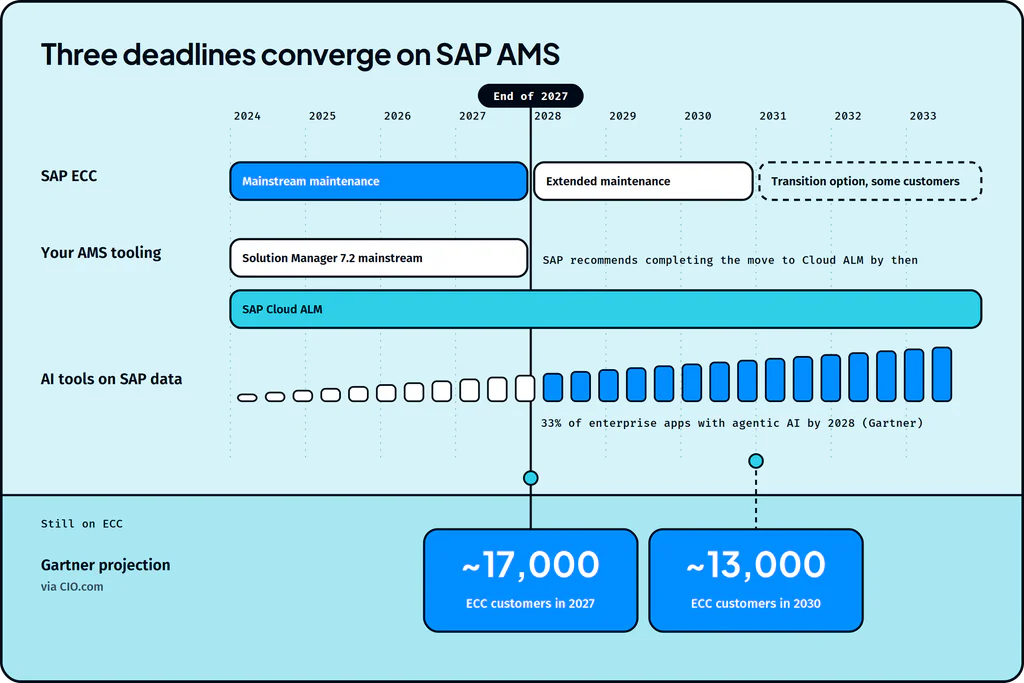
SAP AMS is the daily work of keeping an SAP landscape running: morning job checks, a ticket queue ranked by SLA, a weekly change window and the month-end close. Through 2030 that rhythm also has to absorb more change than ever. ECC and SAP Solution Manager both reach the end of mainstream maintenance in 2027, migrations run alongside live ECC systems, and new AI tools connect to SAP data every quarter.
Key Takeaways
- SAP AMS (SAP application management services) is the ongoing support, maintenance and improvement of an SAP landscape after go-live, across Basis, functional modules, custom ABAP, integrations and security.
- Day to day, SAP AMS runs on daily system and interface checks, a ticket queue ranked by SLA, a regular change cycle and month-end close support.
- Mainstream maintenance for both SAP ECC and SAP Solution Manager 7.2 ends in 2027, and Gartner projects about 17,000 ECC customers still on ECC that year, so many teams will support ECC and S/4HANA side by side.
- Under RISE with SAP, SAP runs the technical platform, and application management stays with the customer or their AMS partner.
- AI agents with full operational context help SAP AMS teams focus on the work that needs them: they take repeat and simple tickets off the queue, investigate across systems and score change risk before CAB, with people approving every change.
What is SAP AMS?
SAP AMS (SAP application management services) is the ongoing support, maintenance and improvement of an SAP landscape after go-live. It covers Basis administration, functional module support, custom ABAP, integrations and security, delivered by an in-house team, an SAP partner, or a mix of both.
SAP’s own terms for its AMS services describe the same core: incident, problem and change management, plus request fullfilment. They define incident management as “the procedure used to restore the business process”, which is a useful test for any AMS team: a closed ticket matters less than a process that works again.
It’s the broader discipline of application management services applied to SAP’s architecture: a layered technical stack, a module for each business function, changes that move through transports, and fixes that often arrive as SAP Notes.
An SAP AMS project starts where the implementation project ends
An AMS project in SAP is the long-running support engagement that follows an implementation or migration. Most move through four phases:
- Transition: knowledge transfer from the implementation team, including runbooks, open defects and the custom code inventory.
- Stabilization: hypercare after go-live, when early defects get fixed and jobs and interfaces get tuned.
- Steady state: SLA-based ticket resolution, monitoring and minor enhancements.
- Continuous improvement: removing the root causes of recurring incidents and automating repetitive work.
What layers does SAP AMS span?
Every SAP AMS scope covers the same five layers, each with its own specialists, tools and typical tickets.
Layer
What SAP AMS covers
Typical tickets
Tools and transactions
Basis
System health, background jobs, transports, SAP Notes, system copies
Failed jobs, slow response times, lock entries
SM37, ST22, SM50, STMS, SNOTE
Functional modules
Configuration and process support for FI/CO, SD, MM, PP, HCM and other modules
Posting failures, pricing errors, master data problems
SPRO and module transactions
Custom code
ABAP enhancements, custom reports, retrofits between landscapes
Short dumps in custom programs, report changes
SE80, ST22
Integration
IDocs, middleware and links to Ariba, SuccessFactors and non-SAP systems
Failed IDocs, stuck queues, mapping errors
WE02, BD87, SAP Integration Suite
Security and access
Roles, access requests, emergency access
Missing authorizations, role changes
SU01, PFCG
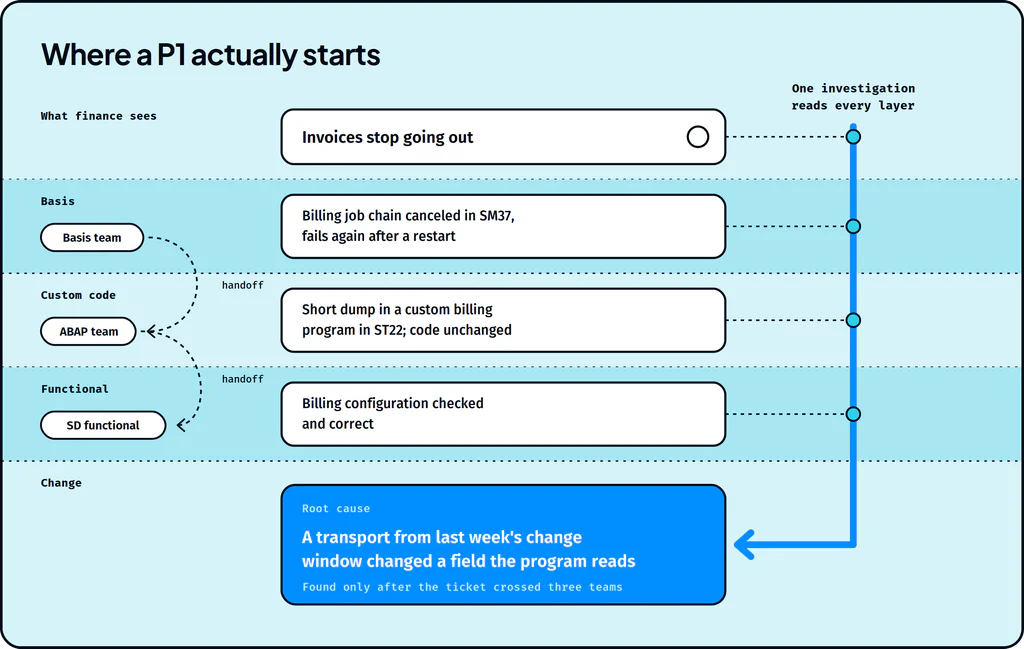
Serious incidents often cross two or more of these layers. A short dump can start in custom code, surface as a failed job in Basis, and land in front of the business as an invoice that never went out. That crossing point is where handoffs begin, and section 6 comes back to it.
What does day-to-day SAP AMS work look like?
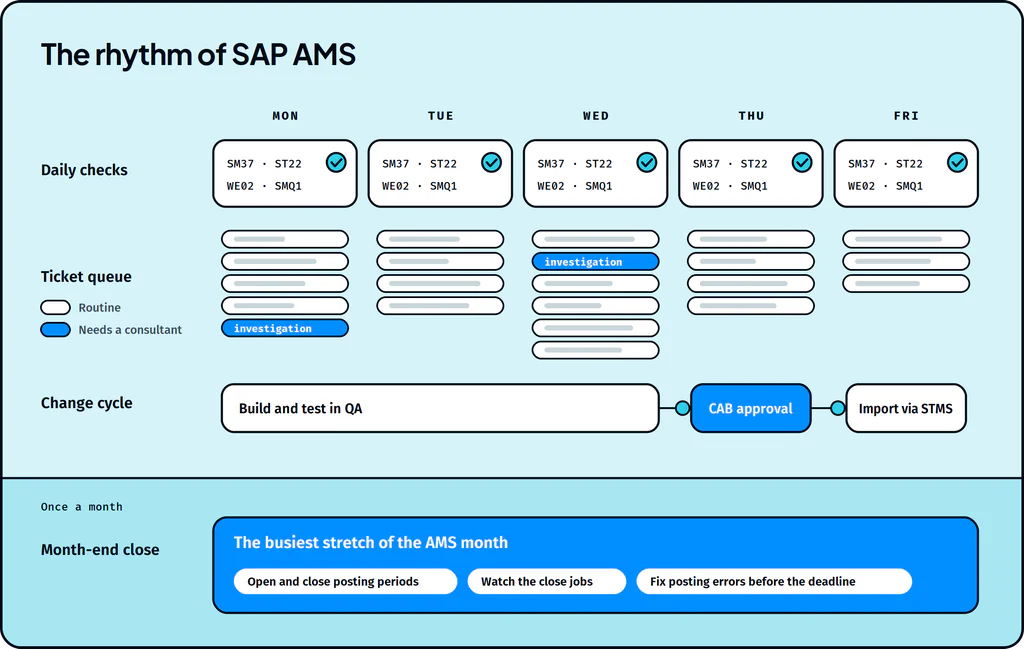
Most SAP AMS work follows a predictable cadence: daily checks, a ticket queue ranked by SLA, a weekly change cycle and a monthly calendar built around the close. Everything else in this article lands on top of that rhythm.
Every day starts with system and interface checks
Before most users log on, the Basis team works through a standard checklist:
- Failed or long-running background jobs in SM37
- Short dumps in ST22 and errors in the system log (SM21)
- Old lock entries in SM12 and failed updates in SM13
- Spool problems in SP01 and work process load in SM50
- Database and file system space
The integration team checks the overnight interface traffic at the same time: IDocs in error in WE02 (status 51 marks documents that failed to post), stuck qRFC queues in SMQ1 and SMQ2, and failed tRFC calls in SM58.
The ticket queue runs on priorities and SLAs
Tickets arrive from users, monitoring alerts and the business. Each one gets a priority, from P1 for a stopped business process down to P4 for a minor request, and the AMS contract sets response and resolution targets for each level. Much of the daily volume is routine: access requests, master data corrections, how-to questions and report errors. The smaller share that needs real investigation takes the most time.
Behind every ticket is a business process to restore. A report like “invoice won’t post” or “production order not transferred” turns into a specific failure point through the same sequence:
- Identify the user, document, transaction and time involved.
- Establish what should have happened in the business process.
- Trace the document or message through SAP and the connected systems.
- Locate the failed validation, job, code path, configuration or handoff.
- Recover the transaction or data where it’s safe and authorized.
- Confirm the process completed, and record the cause and the fix.
The outcome that matters is a working process, plus an answer to whether the issue is likely to come back.
Changes move through a regular release cycle
Fixes and enhancements follow a set path: development, testing in QA, approval at the change advisory board, and import into production through STMS. SAP Notes take the same route once they’re assessed as relevant, and role changes run alongside it through SU01 and PFCG.
Month-end close and periodic work set the calendar
Month-end close is the busiest stretch of the AMS month. The team opens and closes posting periods, watches the close jobs, and fixes posting errors before finance’s deadline. Around it sit the periodic tasks: support package updates, system refreshes from production to QA, performance reviews, and problem management reviews of recurring incidents.
What deadlines are converging on SAP AMS by the end of 2027?
Three changes land on SAP AMS teams in the same window, and each one adds work on top of the existing ticket load.
ECC mainstream maintenance ends in 2027, and dual landscapes become the norm
SAP’s mainstream maintenance for ECC and the other core Business Suite 7 applications runs to the end of 2027, with optional extended maintenance to 2030. Plenty of customers will still be on ECC when that date arrives. Gartner data reported by CIO.com shows 39% of roughly 35,000 ECC customers had migrated by the end of 2024, and projects about 17,000 still on ECC in 2027 and 13,000 in 2030. Migrations themselves take three to seven years.
For an AMS team, that means running two landscapes at once: ECC in production while an S/4HANA migration moves through development and testing. Fixes made in one landscape need retrofitting into the other, and every retrofit is another transport to test.
SAP Solution Manager gives way to SAP Cloud ALM
The AMS team’s own tools are changing too. SAP Solution Manager 7.2 mainstream maintenance ends at the end of 2027, and SAP recommends completing the move to SAP Cloud ALM before then. Many teams run their ITSM, change control and monitoring through Solution Manager today, so the transition lands mid-migration, on the same people.
The move also brings capabilities AMS teams will use every day. Job & Automation Monitoring rates every job on execution status, application status, start delay and run time. Integration & Exception Monitoring correlates single messages into end-to-end message flows across services and systems, and Business Process Monitoring shows disruptions at the process level. What each one shows depends on the systems and use cases the team connects and sets up.
New AI tools connect to SAP data
Gartner expects 33% of enterprise software applications to include agentic AI by 2028, up from less than 1% in 2024. Each AI assistant or agent that reads from or writes to SAP brings another interface to monitor, another set of authorizations to manage, and another place an incident can start.
How does RISE with SAP change who runs the platform?
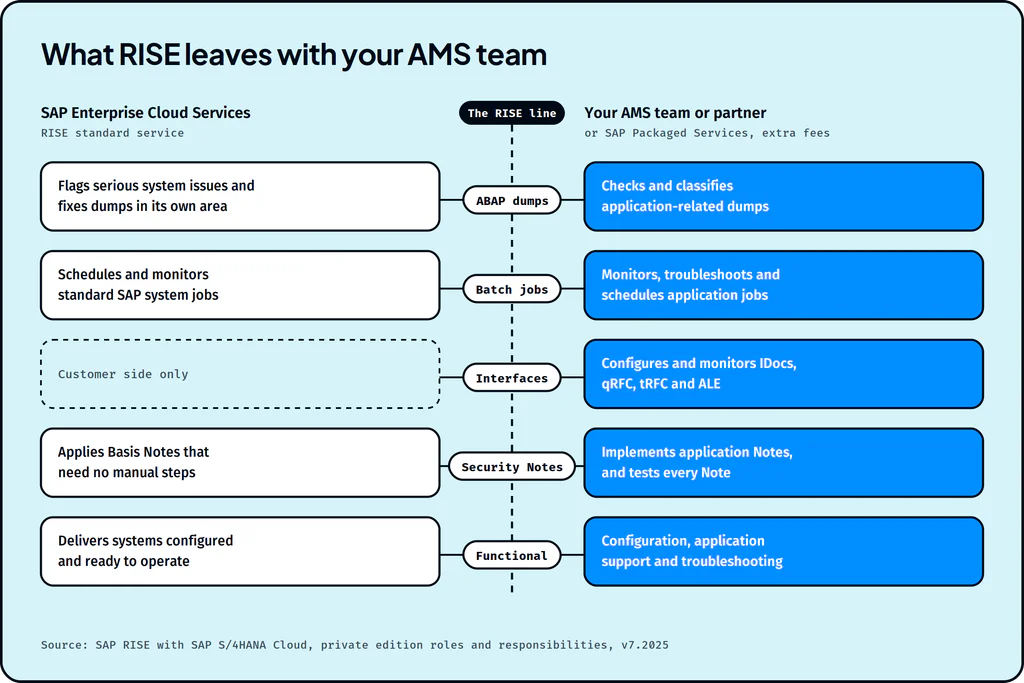
RISE with SAP moves infrastructure and technical operations to SAP Enterprise Cloud Services. Application management stays with the customer or their AMS partner, unless the customer buys SAP’s Packaged Services (formerly Cloud Application Services) at additional fees. SAP sets out the split task by task in its RISE roles and responsibilities document (version 7.2025). Here’s how it lands on the layers SAP AMS covers:
Area
RISE standard service
Customer, AMS partner, or SAP Packaged Services
ABAP dumps
Checks for dumps that signal serious system issues, informs the customer of serious application issues to resolve, and resolves dumps within SAP’s own responsibility
Regular dump check and classification, including application-related dumps
Batch jobs
Schedules standard jobs and monitors SAP system batch jobs per SAP Notes 2190119 (S/4HANA) and 16083 (ECC)
Administering application batch jobs: monitoring, troubleshooting, and scheduling or changing jobs to customer requirements
Interfaces
Listed as a customer or Packaged Services task
Configuring interface functions such as IDocs, qRFC, tRFC and ALE, and monitoring interfaces
Security Notes
Identifies critical ABAP-stack security Notes and applies Basis security Notes without manual steps
Application-related security Notes; testing of implemented Notes stays with the customer
Functional configuration and support
Delivers systems technically configured at platform level and ready to operate
Customizing, configuring and maintaining the application, plus application support and troubleshooting
RISE shifts the scope of SAP AMS. The application-level work, including the interfaces and custom jobs behind most business-critical incidents, stays with your team. It’s worth checking what your AMS contract assumes RISE covers before go-live. The delivery models and pricing behind SAP AMS contracts are covered in how AMS is delivered and priced.
Where do cross-layer incidents take up SAP AMS time?
When an incident crosses layers, the ticket crosses teams, and each team starts its own investigation from the beginning. Here’s a pattern most SAP teams will recognize:
- Invoices stop going out one morning, and finance raises a P1.
- The overnight billing job chain shows as canceled in SM37, and Basis restarts it. It fails again.
- ST22 shows a short dump in a custom billing program, so the ticket moves to the ABAP team.
- The developer finds the code unchanged and passes the ticket to SD functional to check the billing configuration.
- When someone finally lists recent transports, they find a transport from the previous week’s change window that changed a field the custom program reads.
Each handoff in that chain has a cost. HappySignals’ benchmark data shows each ticket reassignment costs the end user about 1 hour 46 minutes of work time. And this kind of failure is common: in the Splunk and Oxford Economics study of Global 2000 companies, human error such as misconfiguring software was the top cause of downtime, with a mean time to resolve of 67 to 76 hours.
How do AI agents give SAP AMS teams an investigation layer across the landscape?
AI agents take on the investigation that used to move between teams. One agent follows the evidence across Basis, custom code, functional configuration and integrations, then hands the team a proposed fix to approve. Specialists keep the decisions, and the investigation stops restarting at every handoff.
Agents need operational context from across the estate
An agent can only investigate what it can see. A short dump means little without the transport that came before it, the interface it feeds and the ticket history behind it. Lightrun gives its agents full operational context from six sources around the SAP landscape, the same picture a senior AMS consultant would otherwise assemble by hand.
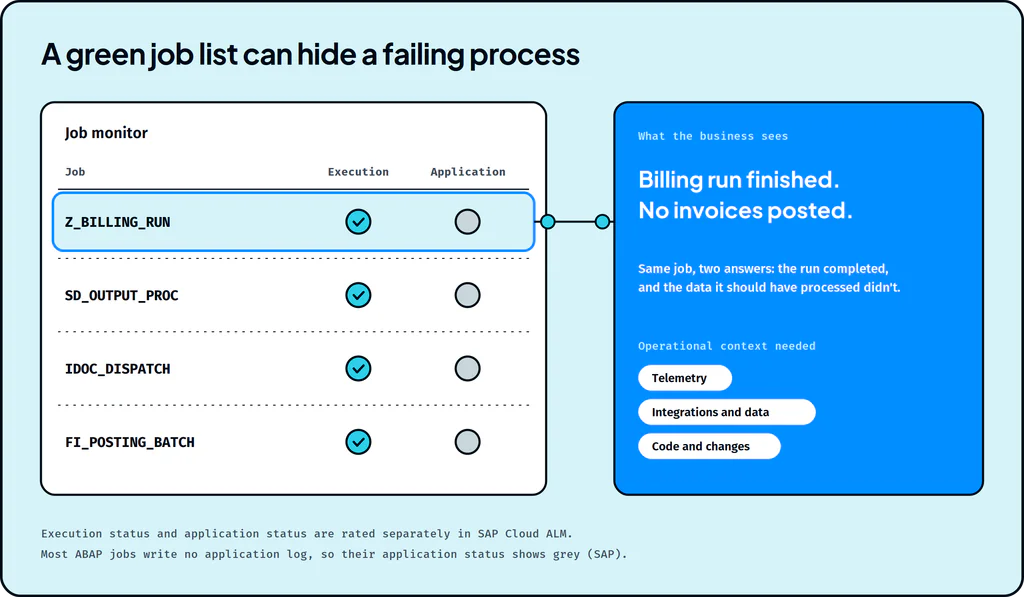
Monitoring alone leaves gaps, and a green system can still hide a failing process. SAP Cloud ALM’s Job & Automation Monitoring rates execution status and application status separately, because a job can complete and still fail to process its data. SAP’s own setup notes add that most ABAP jobs don’t write application log messages, so their application status shows grey. A list of completed jobs can sit on top of a billing run that never finished its work.
Context source
What it includes
What it adds to an SAP AMS investigation
Telemetry
Logs, metrics, traces, jobs, queues, dumps, alerts and other operational signals
The SM37 cancellation, the ST22 dump, the stuck queue
Enterprise systems
SAP, Oracle, Salesforce, ServiceNow and other mission-critical enterprise platforms
The configuration and business documents involved
IT operations
Tickets, incidents, CMDB, changes, ownership and operational workflows from systems like ServiceNow, Jira and Azure DevOps
Who owns the system, and whether this has happened before
Code and changes
Repositories, transports, deployments, customizations, configuration changes and version history
The transport from last week’s change window
Infrastructure
Cloud, hosts, databases, containers, networks and infrastructure state
Whether the database or host played a part
Integrations and data
APIs, middleware, queues, files, third-party dependencies, transactional data and master data moving across the estate
The IDoc that failed downstream, and the data it carried
In the billing example, that’s the difference between three teams each checking their own sources and one investigation that reads all six.
Agents take repeat and simple tickets off the queue
Much of the daily queue is routine. Recurring job failures, known errors with documented fixes and standard requests follow patterns the team has resolved many times before. With operational context showing what changed, what the ticket history says and who owns the system, agents can be trusted to resolve that work within approved policies. The team reviews the outcomes, and the queue that reaches consultants is the work that needs a consultant.
Agents triage SM37, ST22, spool and ITSM queues by business impact
Lightrun’s Incident Resolver classifies tickets, traces failures to root cause, and carries incidents through to an approved resolution. Triage is where that starts: agents read failed jobs in SM37, short dumps in ST22, spool queues and incoming ITSM tickets, alongside alerts from SAP Solution Manager today or SAP Cloud ALM after the transition. They assess severity and identify the affected systems and business processes, so the team starts on the issues that cost the most.
Agents trace failures across ECC, S/4HANA and connected systems
In the billing example above, one investigation connects the canceled job, the short dump and the transport behind them. Agents trace logs, custom ABAP code, configuration and recent transports inside SAP, then follow the issue into integrations, infrastructure and downstream applications. They show the supporting evidence and prepare a proposed fix with validation steps.
Agents prepare risk-scored CAB briefings for every transport
In the migration years, preventing failures matters as much as resolving them. Before a transport reaches the change advisory board, the Change Risk Analyzer maps the changed objects, dependencies and affected systems, identifies implementation, rollback and downtime risks, and generates testing, approval and implementation checklists.
Agents assess and apply SAP Notes
The SAP Note Implementation Agent assesses SAP Note relevance and compatibility, automates eligible steps, and validates system stability after implementation. It checks relevance against your SAP version and configuration, and separates automated steps from manual prerequisites and actions.
Agents recover failed jobs and reprocess IDocs after approval
Agents work read-only by default, and every write action needs explicit approval. Once the team approves, the Basis Operations Agent resolves failed jobs, spool issues and lock problems, and the Middleware Monitor reprocesses failed messages or recovers approved flows within policy. Both check the results against recovery criteria and update the ITSM record.
SAP is heading the same way. Its plans for SAP Cloud ALM for operations describe agentic, governed auto-remediation with human oversight, clear guardrails and full auditability.
This is how Lightrun’s SAP AMS reliability agents work. Lightrun’s Forward Deployed Engineers customize the agents to each landscape, including legacy systems, legacy code and non-API platforms, and permission settings, RBAC and audit logs keep the AMS team in control.
SAP AMS task
Today
With agents
P1 triage
An analyst reads SM37, ST22 and the ticket queue by hand
Alerts and tickets ranked by business impact as they arrive
Cross-layer root cause
The ticket moves between Basis, ABAP and functional teams
One investigation follows the evidence across layers and systems
CAB preparation
Assembled by hand from transport lists
A risk-scored briefing with dependencies, rollback and checklists
SAP Notes
Manual relevance checks and implementation
Relevance assessed, eligible steps automated, stability validated
Failed IDocs
A backlog worked through in BD87
Failed messages traced and reprocessed after approval
Basis daily checks
A manual checklist each morning
Continuous monitoring of jobs, work processes and capacity
Measure SAP AMS on recovery as well as SLAs
Ticket SLAs still matter, and a few additional measures show whether the team is keeping pace with change.
KPI
What it shows
P1 mean time to resolve
Time from first signal to confirmed recovery, including every handoff
Reassignment rate
Share of tickets that change hands at least once
Transport failure rate
Share of transports that cause an incident or need a fix
IDoc backlog age
How long failed messages wait before reprocessing
Failed jobs recovered
Business-critical jobs restored without a manual hunt
SAP AMS teams that keep pace focus on the work that needs them
The rhythm of SAP AMS holds through 2030, while the change flowing through it grows: dual landscapes, the move to Cloud ALM, new AI tools, and a RISE contract that leaves the application work with you. PwC argues that traditional AMS was built for effort efficiency rather than outcomes, and that’s the pressure AMS teams feel now.
The teams that keep pace will hand agents the repeat and routine tickets, trusted to act because they carry full operational context. Consultants then spend their time on the investigations, changes and decisions that need them.
Three moves to make before 2027:
- Map your scope against RISE and confirm your AMS contract covers your side of it.
- Baseline the queue: repeat volume, reassignment rate, P1 resolution time and transport failure rate.
- Hand agents the repeat tickets first, then cross-layer work like P1 triage and CAB preparation.
See how your SAP AMS teams can benefit from agents with operational context