Context Engineering for AI Agents: Keep Context Current
Oct 24, 2026 / Updated: Oct 24, 2026
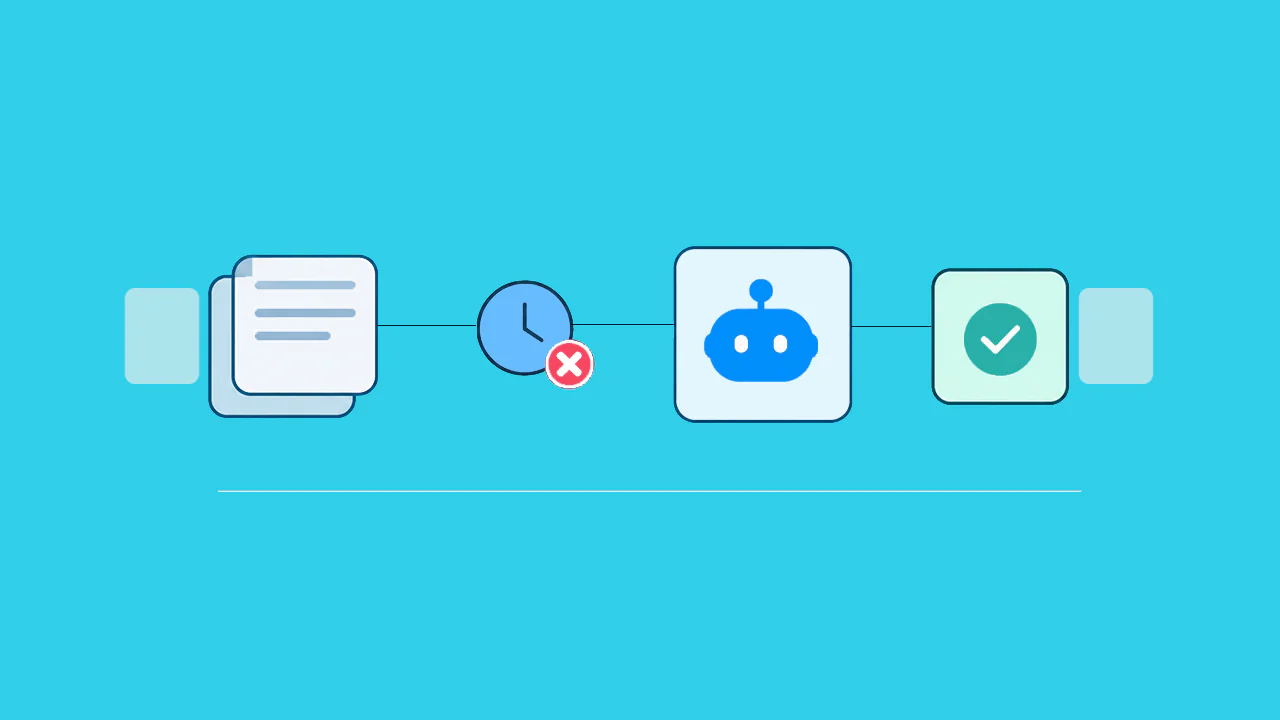

Context engineering for AI agents is the practice of curating what information an agent sees before each decision, including its instructions, tools, retrieved data, memory, and history. When that information is stale or incomplete, an agent still acts on it with full confidence. The result is costly rework such as wrong ledger postings that finance has to reverse by hand. This guide covers four ways context fails, five fixes, and a safe rollout path.
Key Takeaways
- An agent that is given stale or incomplete information makes confident mistakes, whatever model sits underneath.
- Four context failures (poisoning, distraction, confusion, and clash) each carry a business cost, and a Microsoft and Salesforce study measured a 39% performance drop from conflicting, piecemeal prompts.
- Five techniques keep an agent’s working information small and relevant: offloading, isolation, just-in-time retrieval, compaction, and caching.
- Runbooks, tickets, and telemetry describe the past, while operational context shows which code path ran, what value a field held, and what changed.
- Approval gates, audit trails, and read-only access keep agents in check, and a four-stage rollout (observe, approve, set thresholds, review) widens their scope safely.
What Happens When an Invoice Agent Acts on Stale Information?
An AI agent treats whatever is in its context as current, so when a recent change is missing, it acts on outdated information with full confidence.
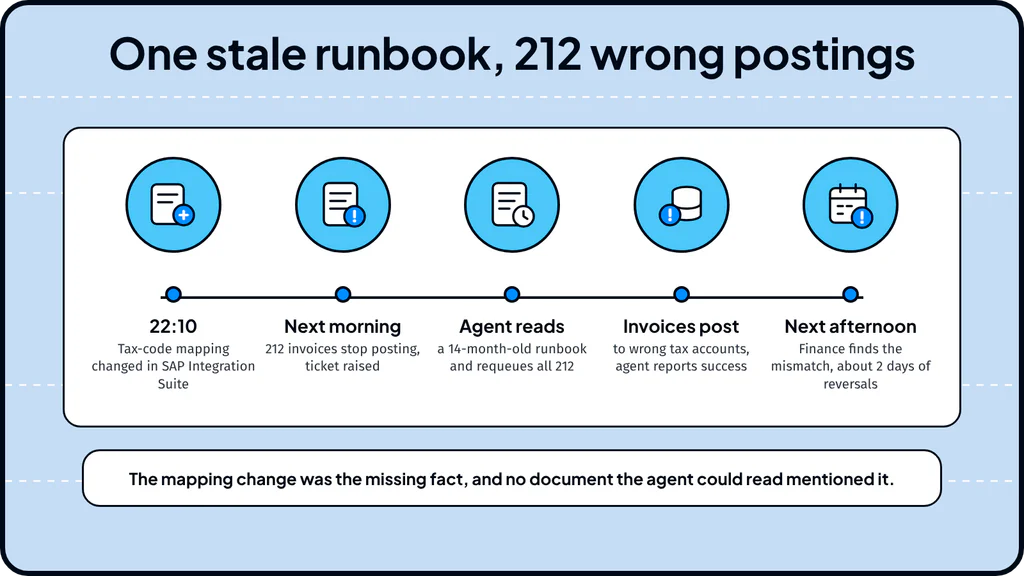
Consider a scenario at a manufacturer running SAP S/4HANA and SAP Ariba, three days before month-end close.
- Trigger: 212 supplier invoices stop posting between Ariba and S/4HANA, and a ServiceNow ticket is raised.
- What the agent sees: the ticket text, 90 days of similar tickets, and a wiki runbook that says to re-trigger the posting job after 30 minutes.
- What the agent misses: a tax-code mapping in SAP Integration Suite was changed at 22:10 the previous evening, and the runbook was last edited fourteen months earlier.
- Action: the agent requeues all 212 invoices, which post to the wrong tax accounts in the general ledger.
- Outcome: the agent reports success because every job completed, finance finds the mismatch in reconciliation the next afternoon, and two people spend about two days reversing postings.
The model did its job with the information it had, and that information was stale and lacked the one fact that decided the right action. Context engineering treats what an agent sees as a production dependency that needs the same design and governance as any other production system.
What Is Context Engineering, and How Is It Different From Prompt Engineering?
Context engineering is the practice of curating the smallest set of high-signal information an agent needs at each step and excluding everything else. Anthropic’s engineering team describes it as “the natural progression of prompt engineering”: the work moves from wording instructions to managing everything the model sees during inference, including tools, external data, and message history.
Context Engineering vs Prompt Engineering
Prompt engineering shapes the instruction, context engineering shapes everything the agent sees around it. Operational context is the holistic view including, codebase, business information, runbooks, and information about how software is behaving now.
| Layer | Question it answers | Example in the invoice scenario |
| Prompt engineering | How should the instruction be worded? | “Resolve stuck supplier invoices and report the outcome” |
| Context engineering | What information should the agent see at this step? | Which runbook, tickets, and system records are loaded |
| Operational context | What is true about our live systems right now? | Whether the tax-code mapping changed yesterday and which path the posting job took |
What Is Context Rot?
Context rot is the drop in recall accuracy a model shows as its context grows. Anthropic explains that a model has a finite attention budget, and every added token spreads that attention thinner, so a larger context window gives the model more to misread. LangChain uses Andrej Karpathy’s analogy: the model is the CPU and the context window is its RAM, so context engineering decides what gets loaded at each step. The working rule is to curate what the agent loads.
Four Ways Bad Context Breaks an Agent
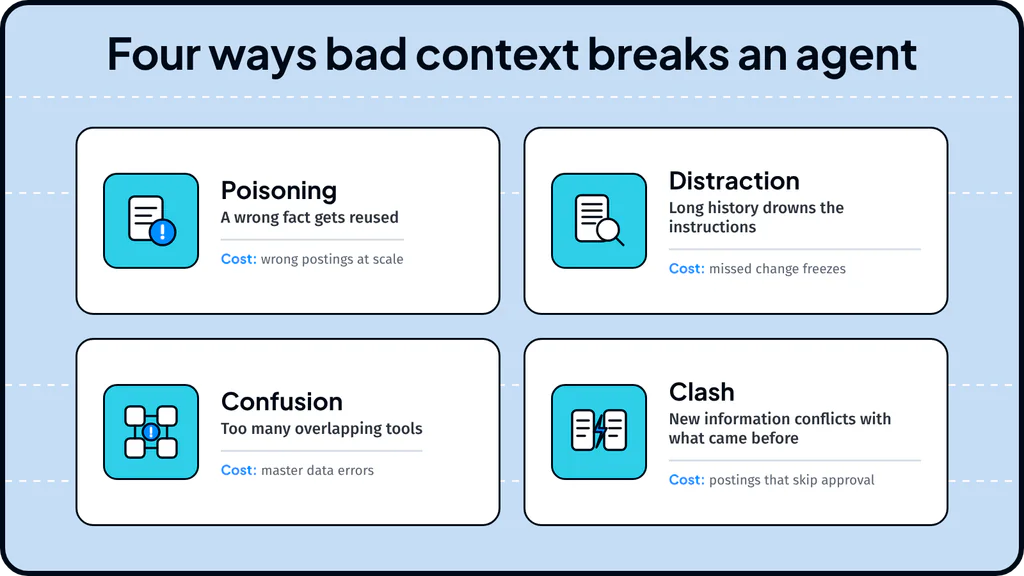
Drew Breunig’s widely cited analysis of how contexts fail names four patterns and backs each with published research, and each one shows up in everyday enterprise processes.
- Poisoning: a wrong fact gets reused. The stale runbook told the invoice agent to repost, and the agent applied that instruction to all 212 records. Google DeepMind’s Gemini 2.5 technical report shows the same pattern: a Pokémon-playing agent hallucinated game state and then fixated on impossible goals.
- Distraction: long history drowns the instructions. A change-freeze notice sits on line 400 of a ticket thread, and the agent follows the pattern of earlier tickets instead. Beyond roughly 100,000 tokens, the Gemini 2.5 agent favored repeating past actions, and a Databricks study saw correctness fall at around 32,000 tokens for Llama 3.1 405b.
- Confusion: too many overlapping tools. Two ways to update a vendor record, with different validation rules, lead the agent to pick the wrong one and create master data errors. In a study using the GeoEngine benchmark, a quantized Llama 3.1 8b failed with 46 tools and succeeded with 19.
- Clash: rules contradict each other. A policy requiring approval above a spending threshold sits beside a runbook that says to post automatically, so either choice can produce an audit finding. A Microsoft and Salesforce study measured a 39% average performance drop when instructions arrived in pieces across several turns, with OpenAI’s o3 falling from 98.1 to 64.1.
Five Context Engineering Techniques That Keep Context Small and Relevant
Five techniques keep an agent’s context small and relevant: offloading, isolation, just-in-time retrieval, compaction, and caching. LangChain groups these ideas into four buckets (write, select, compress, and isolate), and each technique has a business consequence you can ask about directly.
- Offloading: large records and logs are stored outside the agent’s working memory and fetched on demand, which Manus describes as treating the file system as context that is “unlimited in size, persistent by nature, and directly operable”.
- Isolation: work is split across specialized sub-agents that each start with a clean context and return a short summary, as Anthropic describes.
- Just-in-time retrieval: the agent keeps lightweight references such as record IDs and loads data only when needed, so it decides on current values instead of a snapshot from when the task began.
- Compaction: older history is summarized so a long task can continue in a fresh window, which keeps a multi-day process coherent but can drop a detail that turns out to be needed.
- Caching: a stable beginning to each request lets the model reuse earlier computation. Manus reports an input-to-output token ratio of about 100 to 1 and a tenfold price gap between cached and uncached input at the Claude Sonnet rates it quoted ($0.30 against $3 per million tokens), so keeping the start of each request stable lowers cost per resolved ticket. Prices change often, so treat those figures as an illustration of the ratio.
Most of the quality of an agent’s context is decided at design time, before the first ticket arrives, and Anthropic and Manus both publish guidance that carries over to enterprise runbooks:
- Write instructions at the right altitude, which Anthropic describes as specific enough to guide behavior and flexible enough to give the model strong heuristics, so a runbook explains the decision rules instead of a forty-step script.
- Keep the tool set minimal, because if a person cannot say which tool applies in a given situation, the agent will struggle in the same way.
- Keep failures visible, since Manus writes that erasing failure removes the evidence the model needs to adapt.
What Live Operational Context Adds That Documents and Logs Miss
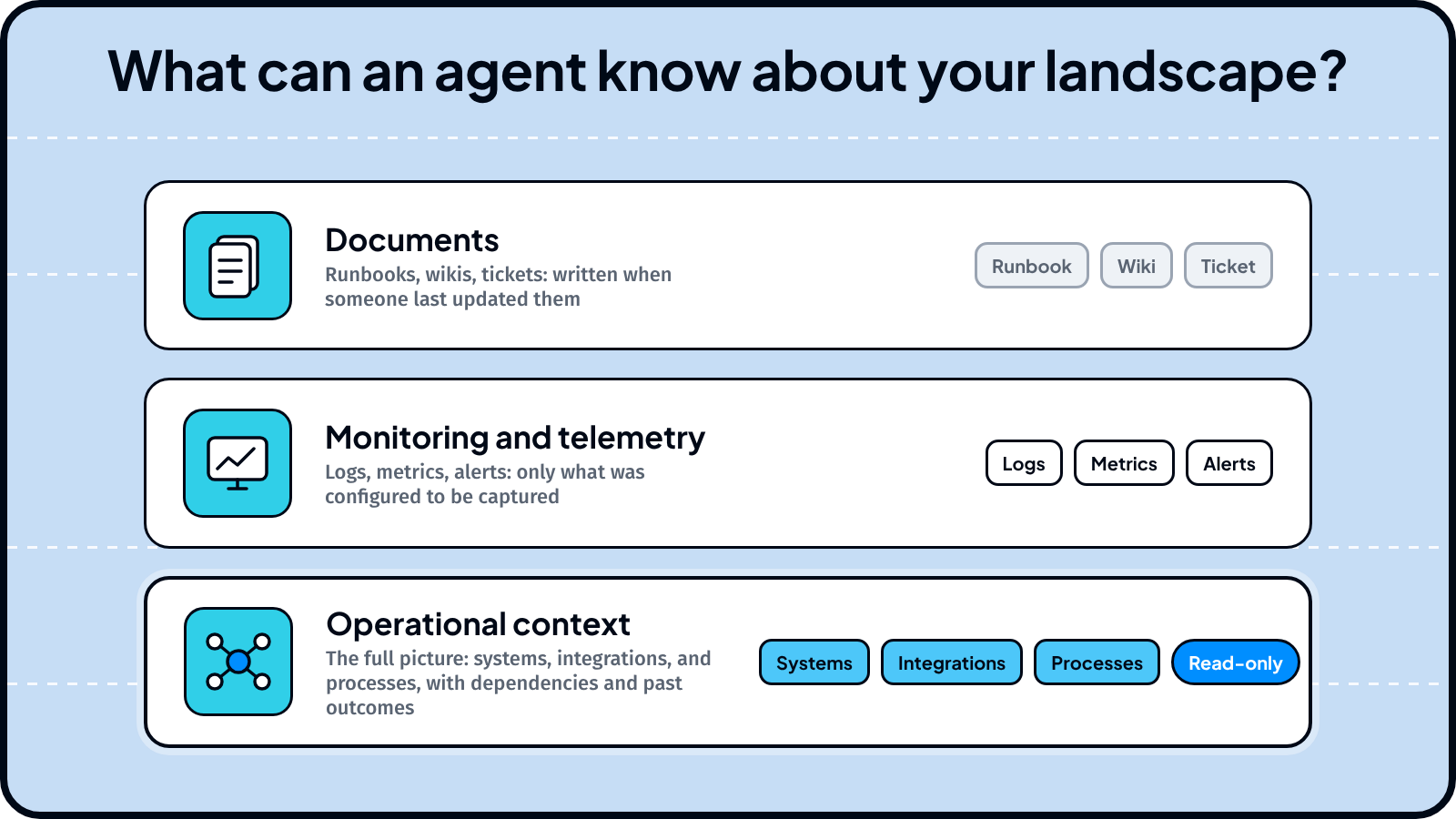
Operational context is live evidence of how code, integrations, and business processes behave right now. The table shows what each common source can and cannot tell an agent.
| Source | Example | Can answer | Cannot answer |
| Runbooks and wikis | “Re-trigger the posting job after 30 minutes” | What the procedure was when someone wrote it | Whether it still applies |
| Ticket history | 90 days of similar tickets | What happened before | What has changed since |
| Telemetry (Datadog, Grafana, ServiceNow) | Alerts, metrics, logs | What was configured to be captured | Values nobody thought to instrument |
| Operational context | Live evidence from running code | Which path ran, what value a field held, what changed | Needs safe, read-only access to running systems |
In practice the gap is wide. According to the State of AI-Powered Engineering 2026 Report by Lightrun, 97% of engineering leaders report significant visibility issues for their AI agents into live execution state in production, and none report full visibility. Lightrun’s survey data adds that in 44% of cases where AI SRE or APM tools were used to investigate production issues, the investigation failed because the execution-level data had never been captured.
Lightrun’s Agentic Platform for Enterprise Resilience supplies this layer so agents can prevent and resolve failures across critical software, systems, and business processes. That operational context combines several sources: the telemetry a company already collects, code and change records, such as SAP transports and integration flows, process data from tools such as SAP Signavio and Celonis, and code and change history. For custom code, it adds live runtime evidence from the Runtime Sensor, which instruments running applications in a read-only, sandboxed way across JVM, Node.js, .NET, and Python.
Forward Deployed Engineers tailor agents to each customer’s landscape, including legacy code.
In the invoice scenario, Lightrun’s reliability agents cover the gap at two points. Middleware Monitor watches integration flows and interface health across the SAP landscape, where the mapping change happened. Incident Resolver traces the stuck-invoice ticket to its root cause before any fix runs, so the agent flags the mapping change instead of reposting.
“When it comes to priority-one tickets, customers can’t wait days for a fix. Lightrun helps us reduce that to hours,” says Hood Munaim, SVP, Head of Product Engineering. For background, see Lightrun’s guides to what an AI SRE is and enterprise systems solutions.
Where Missing Context Hurts Most in Enterprise Processes
Missing context hurts most where an agent works across systems, such as SAP tickets, integrations, change approvals, migrations, and cross-system business processes. The table pairs each process with the context an agent needs, an illustrative failure when that context is stale, and the Lightrun agent built for it.
| Process | Context the agent needs | Illustrative failure on stale context | Agent named on Lightrun’s site |
| Priority-one SAP ticket | Recent changes, past incidents, current system state | A fix that worked last quarter is applied to a changed configuration | Incident Resolver |
| Integration monitoring | Current state of integration flows, queues, and interfaces | A changed mapping silently routes postings to the wrong accounts | Middleware Monitor |
| Change approval | What the change touches and how it behaves today | Risk is scored from documentation instead of behavior | Change Risk Analyzer |
| S/4HANA migration and clean core | Which custom code is used and what depends on it | Keep, change, or retire decisions rest on an outdated inventory | Migration and Clean Core agents |
| Supply chain disruption | Current plan data and handoffs between SAP, MES, and warehouse systems | Stale planning data breaks MRP, and nobody sees why | Supply Chain Disruption Agent |
| Procure-to-pay exceptions | State of purchase orders and invoices between Ariba and SAP | Items stay stuck or get posted twice | Procure-to-Pay Resolver |
| Master data | Current records and the rules that govern them | Conflicting updates create duplicates | Master Data Agent |
How to Give an AI Agent Production Access in Four Stages
An AI agent earns production access through guardrails first, then a staged rollout. Before an agent gets production access, a security review looks for these AI agent guardrails, which Lightrun’s enterprise system agents include:
- Read-only by default: agents investigate and correlate evidence, and write actions need explicit approval.
- Configurable gates: approval gates, confidence thresholds below which an agent escalates, and a monitor mode where the agent recommends before it acts.
- Auditability: every action is logged, with role-based access and single sign-on.
- Data protection: ISO 27001 and SOC 2 Type II certification, no source code storage, and zero AI provider data retention.
In the invoice scenario, an approval gate on bulk reposting would have sent the 212-invoice action to a finance operator, who could have caught the recent integration change. The controls fit a staged rollout that collects evidence about an agent before it changes anything:
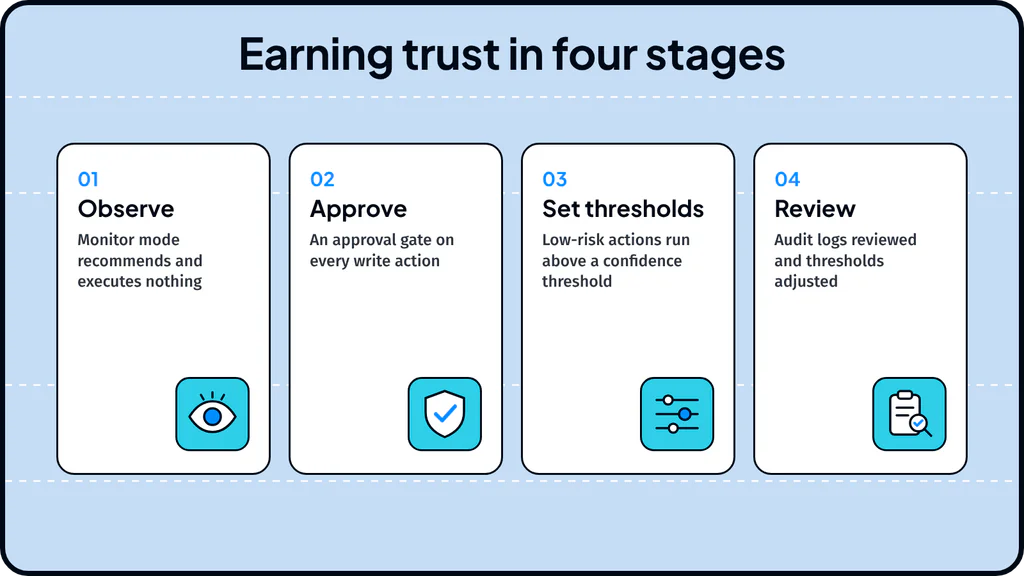
- Observe: the agent runs in monitor mode, recommends actions, and executes nothing, while a person compares its recommendations with what the team did.
- Approve: every write action goes through an approval gate, and reviewers record why they approved or rejected each one.
- Set thresholds: low-risk, reversible actions run on their own above a confidence threshold, and everything below it escalates to a person.
- Review: audit logs are reviewed on a schedule, and thresholds are adjusted based on what the logs show.
How to Test Context Engineering on One AI Agent Process Before You Scale
A pilot on a single process shows exactly where a team’s AI agents in production are exposed. Start with one process an agent already touches, such as invoice resolution, and work through these steps:
- List every source in the agent’s context, with an owner and a last-updated date for each, so stale runbooks and unowned documents show up immediately.
- Check each source against four questions: how old can it be, does the agent see live behavior beyond logs and tickets, can every action be traced back to its evidence, and is access read-only.
- Run the agent in monitor mode and compare its recommendations with what the team actually did, tracking context age at decision time, evidence coverage, and rework rate.
- Add an approval gate to one low-risk action, review the audit log with the process owner, and decide what to fix before widening the agent’s scope.
Better Evidence Beats a Bigger Context Window
Model choice and prompt wording get most of the attention when teams adopt agents, but in production the limit is the information the agent works from, since an agent can reason well over a stale runbook and still do damage at scale. The five techniques make that information smaller, but they do not verify that it describes your systems as they are today.
Better prompts and larger context windows cannot supply that verification, because documents and telemetry were written or configured before the current failure occurred.. Lightrun closes that gap by giving agents read-only, live evidence from running systems, so an agent in production can check current behavior before it acts instead of trusting a document written earlier.
The pilot described above is a practical way to find out where an agent stands, and Lightrun supports each step: operational context for the context audit, monitor mode for the comparison run, and approval gates with audit logs for the first write action. The blind spots it reveals show what to fix first, and the steps that pass show where the agent can safely take on more work.
Context engineering for AI agents is the practice of designing and managing the information an agent sees at each step of a task, including its instructions, tools, retrieved data, memory, and history.
Prompt engineering focuses on how to word and organize the instructions given to a model, usually for a single request. Context engineering covers everything the model can see across a multi-step task, including tools, retrieved documents, memory, and prior results.
An agent’s context is usually built from system instructions, the user’s request, available tools, retrieved facts, short-term working notes, long-term memory, and the accumulated conversation and tool history. In enterprise settings, operational context adds live evidence of how systems behave when the agent acts.
You connect the agent to the right sources, such as documentation, tickets, databases, and telemetry, and control how and when that information loads, using techniques such as just-in-time retrieval, offloading large records, and compaction of long histories. For agents that act on production systems, the context should also include live evidence from running systems and clear limits on which actions need human approval.
Operational context is live evidence of how software, integrations, and business processes behave right now, such as which code path executed, what value a field held, and what changed since the last deployment. Enterprise agents need it because documents and pre-configured telemetry describe the past, and Lightrun closes that gap by supplying agents with read-only, evidence-backed runtime context.