S/4HANA Migration: Keep Your SAP Landscape Stable
Nov 08, 2026 / Updated: Nov 08, 2026

Your S/4HANA migration has to happen while orders ship, invoices post, and month-end close stays on schedule. One missed dependency can stop a production line or delay supplier payments, and the fallout lands on your team during hypercare. Keeping the business running takes evidence of three things: what your custom code does in production, what depends on it, and whether critical processes still work after each change. This guide shows how to build that evidence, from ECC maintenance planning to cutover and the upgrades that follow.
Key Takeaways
- SAP ECC 6.0 mainstream maintenance ends December 31, 2027, and optional extended maintenance runs to the end of 2030 at a two-percentage-point premium.
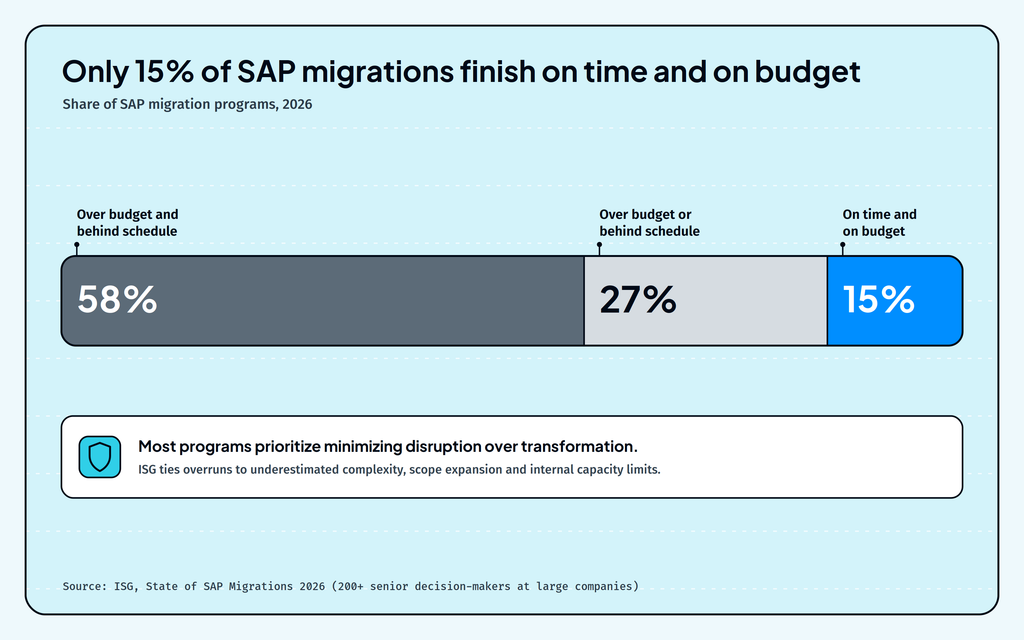
- ISG’s 2026 study found 58% of SAP migrations running over budget and behind schedule, with only 15% finishing on time and on budget.
- Stability risk concentrates in four places: custom code, integrations, and data, upgrades after go-live, and AI agents using SAP in new ways.
- Operational context brings together your enterprise systems, IT operations, telemetry, code, and change history, and integrations and data, so every keep, change or retire decision reflects how your landscape actually runs.
- Continuity tests defined before build starts protect the business through cutover, hypercare, and every upgrade that follows.
How do you run an S/4HANA migration while the business keeps running?
Treat business continuity as a primary requirement of your S/4HANA migration. Nothing pauses while you work: sales orders, goods movements, payroll, and financial close all depend on the same systems you’re changing.
ISG’s 2026 State of SAP Migrations research found that 58% of SAP migrations are over budget and behind schedule, and only 15% finish on time and on budget. Its analysts note that most programs focus on minimizing disruption rather than driving transformation, and more than half of respondents said they had over-customized their legacy ERP to the point where standardizing now feels risky to the business.
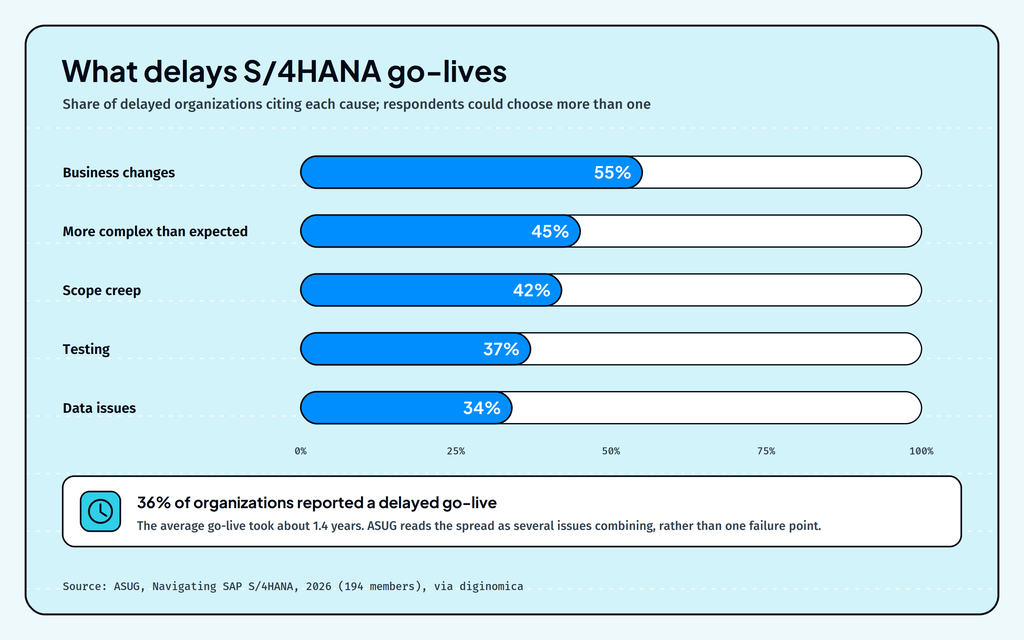
Most organizations are mid-migration or newly live. ASUG’s 2026 research, Navigating SAP S/4HANA, found 68% of 194 members are live on S/4HANA or moving there. The 36% who hit delays cited business changes (55%), unexpected complexity (45%), scope creep (42%), testing (37%), and data issues (34%).
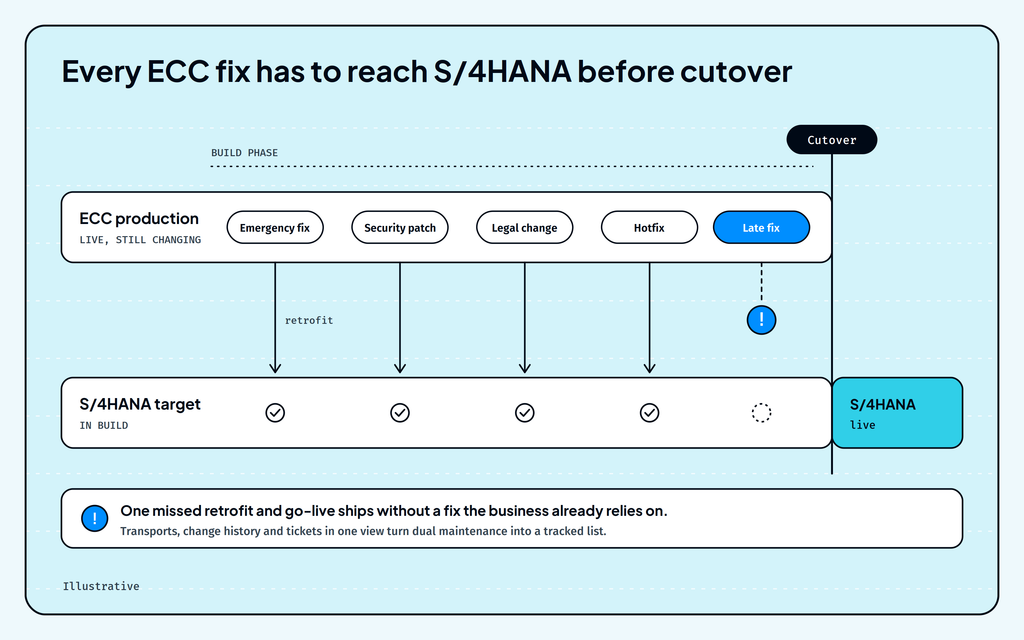
ECC still needs fixes while S/4HANA is being built
Production ECC systems are not static, and continue to change while the migration program runs.
Emergency fixes, security patches, and regulatory updates keep landing, and teams have to respond whether or not a migration is underway. Every one of those changes also has to reach the new system before cutover, and if one is missed, go-live ships without a fix the business already relies on. Teams call this dual maintenance, and it has to continue for the full length of the build.
Hypercare is the highest-risk window of the program
The weeks after go-live combine temporary elevated access to production, rapid adjustments, and urgent troubleshooting, while the project team is handing over to the teams that support SAP day to day.
This handoff, which happens under pressure, is where a missed dependency can become a stopped shipment or a blocked payment run, and where AMS teams absorb the load.
Near-zero downtime cutover approaches can keep the outage itself short, but the real test comes a few weeks later at the first month-end close, when every posting, interface, and report in the close runs on the new system for the first time.
When does SAP ECC reach end of life?
SAP ECC end of life is arriving in stages.
- Mainstream maintenance for SAP ERP 6.0 on enhancement packages 6 to 8, and other SAP Business Suite 7 core applications, ends on December 31, 2027.
- Optional extended maintenance runs from 2028 to the end of 2030, at a two-percentage-point premium.
- For ECC on a third-party database, such as Oracle, Db2, or Microsoft SQL Server, system conversion tooling is available only until the end of 2030; after that, SAP supports greenfield transitions only.
- SAP’s maintenance commitment for S/4HANA runs to at least the end of 2040.
Date
What happens
Who it applies to
December 31, 2027
Mainstream maintenance ends
SAP ERP 6.0 on EhP 6 to 8 and other Business Suite 7 core applications
2028 to 2030
Optional extended maintenance, +2 percentage points
Customers who opt in for longer conversion phases
From 2028 (or 2031 after extended maintenance)
Customer-specific maintenance, with a reduced support scope
Customers who skip extended maintenance, or whose extended maintenance has ended
2031 to 2033
SAP ERP, private edition, transition option
Select large customers who move to SAP ERP, private edition before the end of 2030
End of 2040
SAP’s maintenance commitment for S/4HANA
Customers on S/4HANA
Extended maintenance buys time for late programs
Extended maintenance keeps SAP landscapes supported when a migration that started on time finishes late. It isn’t a way to delay, though: the service comes at a two-percentage-point premium, and while it buys time, the custom code, integration, and data work still has to be done.
The 2033 transition option adds runway and a second migration
The transition option is a conditional offer for SAP’s largest and most complex customers, and eligibility requirements apply.
SAP’s announcement describes it as a cloud subscription available to purchase from 2028 and active from 2031 to 2033. Eligible systems must move to SAP ERP, private edition on SAP HANA before the end of 2030, as SAP’s October 2026 update confirms. SAP describes what follows as a transition to SAP cloud ERP, which SAPinsider’s analysis reads as a second move to SAP S/4HANA Cloud, private edition within RISE with SAP by the end of 2033. Most ECC customers should plan around the 2027 and 2030 dates.
The maintenance dates are set, but the options and eligibility vary by system and customer. ISG’s 2026 survey of more than 200 senior decision-makers at large global companies found around two-thirds of SAP ERP users still in the planning stage, a different population from ASUG’s member survey, which helps explain the gap between the two figures. Airbus told The Register its own migration may not be finished by 2030.
The same window lands on the teams that keep SAP running day to day. SAP Solution Manager 7.2 also reaches the end of mainstream maintenance in 2027, and its extended maintenance covers only seven functional areas, so tools such as Custom Code Management move to customer-specific maintenance from 2028, even for customers who buy extended maintenance. AMS teams face dual landscapes, a tooling transition, and new AI connections at once, as our guide to the deadlines converging on SAP AMS by the end of 2027 explains.
What are the biggest S/4HANA migration challenges?
The biggest S/4HANA migration challenges come from four sources of change: custom code, integrations, and data, upgrades after go-live, and AI agents using SAP in new ways. All four hit the same landscape at the same time, and the same team has to manage them.
Custom code needs a decision for every object
An ECC system can carry thousands of custom programs, enhancements, modifications, and interfaces built up over years of use, and every one of them needs a decision before cutover.
Those objects are far from equal. Some run a critical pricing step thousands of times a day, while others haven’t executed in years, and treating them the same inflates testing, cost, and risk.
Integrations, data, and partners carry hidden dependencies
Orders, payments, and production depend on SAP working with connected systems, middleware, and external partners. A technically clean conversion can still disrupt operations when an EDI partner receives a different document structure, or when master data that ECC tolerated fails S/4HANA’s stricter model.
Those gaps show up in the delay data, too: data issues and testing were each behind more than a third of delayed go-lives in ASUG’s 2026 research.
S/4HANA upgrades start soon after go-live
S/4HANA release upgrades keep arriving on a regular cycle.
Since the 2023 release, on-premise and private cloud editions get a new base release every two years, with feature package stacks arriving at six-month intervals in between. Each base release now stays in mainstream maintenance for seven years, up from five, and RISE with SAP private edition customers can request one upgrade a year from SAP. Every one of those upgrades puts custom code back under review, which makes the decisions you take during migration the baseline for all the ones that follow, so a method that works once and then gets lost costs you again at the next release.
AI agents call your systems in ways nobody tested
AI is an emerging consideration in many programs, as SAP Joule, copilots, and custom AI agents begin to read and act on SAP data while migrations are underway. Agents take paths through code and integrations that readiness checks never exercised, and they do it at scale. A custom agent that creates purchase orders through a released API, for example, can run a sequence of calls your regression tests never covered (an illustrative case). The pull toward AI is strong, too: SAPinsider’s 2026 benchmark found that 43% of respondents cite SAP’s AI announcements as a primary external factor shaping their ERP strategy, ahead of the 2027 deadline at 39%.
Each of these changes is manageable on its own, but together they leave your team deciding what to change in a system whose behavior is shifting underneath them.
Which S/4HANA migration path keeps your landscape most stable?
For an ECC to S/4HANA migration, the right path is the one your landscape can absorb while it keeps running. Each option trades speed, disruption, and long-term flexibility differently.
Path
What it means
Best when
Brownfield (system conversion)
Converts your existing ECC system to S/4HANA, carrying over history, configuration, and custom code. Triage decides which custom code stays.
Processes work well, and continuity is the priority
Greenfield (new implementation)
Builds a new S/4HANA system on standard processes and moves only the data you select. Custom code is rebuilt only where a real need remains.
Processes need redesign, and the business can absorb more change
Selective data transition (bluefield)
Combines a new or converted system with selected historical data and processes. Custom code carries over area by area.
Some areas need redesign, while others stay as they are
RISE with SAP sits alongside these paths. It is a commercial and hosting model, with SAP operating the technical platform, so a RISE contract can accompany any of the three approaches.
Your database can decide the path for you. In October 2026, SAP confirmed that its reseller and support agreements for third-party databases, and its support for SAP NetWeaver AS Java 7.5, end with 2030. Conversion tooling from SAP Business Suite 7 on a third-party database to S/4HANA or SAP Cloud ERP is available only until then; after 2030, SAP supports only greenfield transitions for those systems. If your ECC runs on Oracle, Db2, or Microsoft SQL Server and you want a brownfield conversion, it has to finish before the end of 2030.
The 2026 data shows how organizations are actually choosing. ASUG’s research found 47% chose brownfield, averaging 15.8 months, and 30% chose greenfield, averaging 20.2 months. ISG’s sample split 34% brownfield, 18% greenfield, and nearly half a hybrid of the two, with 49% doing little or no process re-engineering.
Whichever path you take, the same question decides how stable it stays: which parts of today’s landscape matter, and what depends on them. A brownfield conversion carries everything forward unless you decide otherwise, while a greenfield build needs to know which custom behavior the business still relies on. In both cases, the answer comes from an accurate picture of how your landscape runs today.
What is operational context, and why does it matter for an S/4HANA migration?
Operational context is a live, connected view of how your SAP landscape actually runs. It draws on ten sources across your systems and business processes, so each migration decision rests on how the system behaves today rather than how it was documented years ago. Five of those sources do most of the work during a migration:
Context source
The migration question it answers
Code and changes (transports, customizations, version history)
What has changed here, and which ECC fixes still need to reach S/4HANA?
Integrations and data (APIs, middleware, partner messages, master data)
Which interfaces, partners, and data flows depend on this object?
Process intelligence (workflow status and exceptions from tools like SAP Signavio and Celonis)
Which business processes run through this object, and where do they break today?
IT operations (tickets, incidents, CMDB, ownership)
Who owns this, and what broke the last time it changed?
Enterprise systems (SAP, Oracle, Salesforce, Workday, ServiceNow)
Which connected platforms will feel this change?
Dual maintenance becomes a tracked list
With transports, change history, and ticket data in one view, the ECC fixes that landed during the build stop being tribal knowledge. Your team sees which corrections are still missing from the S/4HANA target before cutover, together with the incidents that prompted them.
Solution design starts from the same context
Before teams build or replace custom functionality, they need specifications that account for existing SAP processes, custom code, and integrations, and three steps keep that design grounded:
- Complete the requirement: surface missing decisions, constraints, and policy boundaries, and agree acceptance criteria.
- Map the impact: trace how the solution touches processes, custom code, and integrations.
- Specify for clean core: favor standard SAP capabilities, and write clean-core boundaries, tests, and approval gates into the specification.
Designs built this way reach the build with their dependencies already known, so whichever path you’ve chosen carries less hidden risk.
That’s what sets operational context apart from a code scan: scans show how code is written, while operational context shows how it runs, what depends on it, and who owns it.
How do you decide which custom code to keep, change or retire?
Every custom object needs one clear outcome: keep it, change it, replace it with standard functionality, move it to a supported extension, or retire it. The quality of those decisions sets the scope, cost, and risk of the whole S/4HANA migration.
Fit-to-standard analysis shows what S/4HANA already covers
Start by comparing each customization against standard S/4HANA capabilities. Code written years ago to fill a gap in ECC may now duplicate functionality S/4HANA provides out of the box, and replacing it with standard reduces both the migration effort and every future upgrade.
Usage data separates live code from dormant code
SAP gives you the tools to measure what runs in production. The ABAP Call Monitor (transaction SCMON) and Usage and Procedure Logging (UPL) record which ABAP objects execute, SUSG aggregates the SCMON data, and the Custom Code Migration app uses the results to flag unused code for removal. SAP recommends running one of the tools for 6 to 18 months, including at least one year-end close, so rarely used but critical code is caught before anyone retires it. That window makes usage collection one of the first tasks to start.
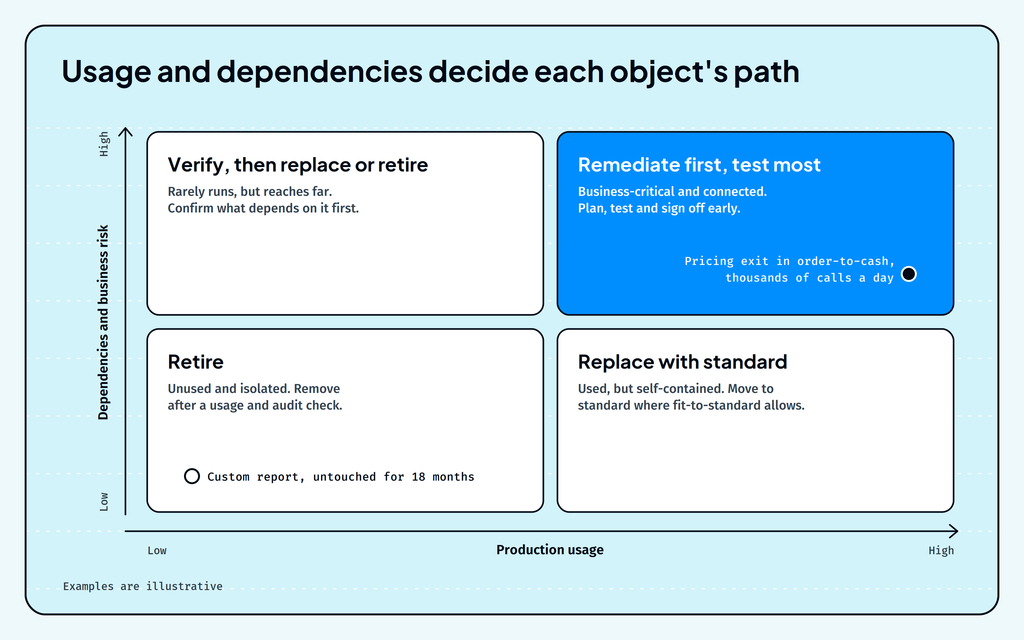
The difference is easiest to see at the extremes. A custom report untouched for 18 months can retire after a usage and audit check, while a pricing exit called thousands of times a day in order-to-cash needs a tested remediation plan and a named business owner.
Dependencies and business risk set the order of work
Usage tells you what runs; dependencies tell you what a change will reach. A single component can affect configurations, master data, integrations, and downstream partners, so rank work by what each object touches and how critical those processes are to the business. High-usage, high-dependency objects in revenue-critical processes go first, with the most testing; low-usage objects with no dependencies are where you cut scope safely.
How do you prove business continuity through go-live and hypercare?
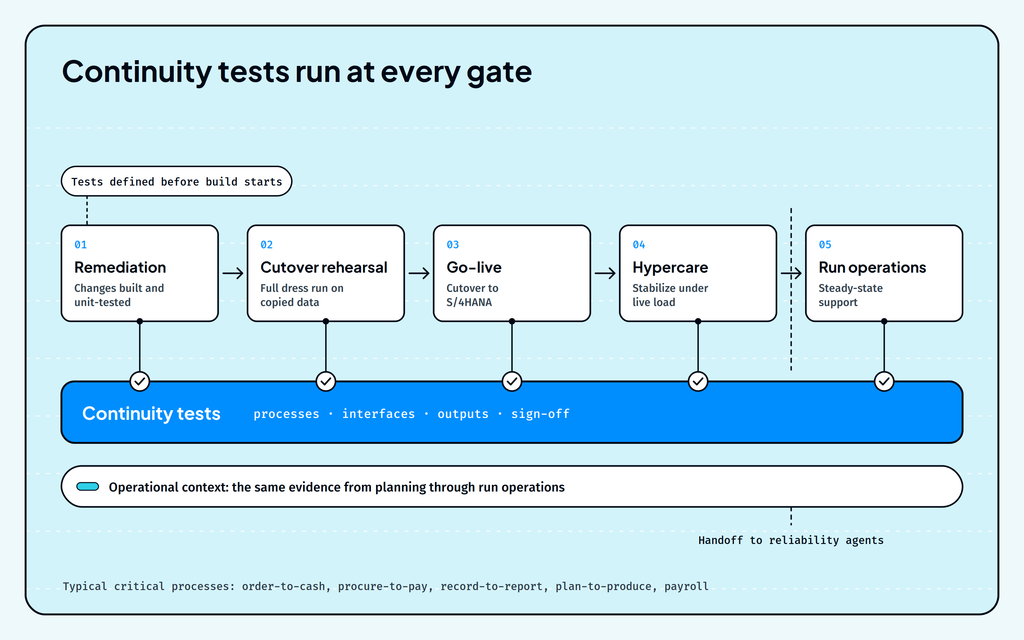
A stable S/4HANA migration defines what “still working” means before the build starts. Every critical process gets a set of tests and evidence agreed with its business owner, and those tests run at each stage: after remediation, at cutover rehearsal, at go-live, and through hypercare.
Start with your five most critical end-to-end processes, typically order-to-cash, procure-to-pay, record-to-report, plan-to-produce, and payroll.
For each one, define:
- The transactions, jobs, and interfaces it depends on, across SAP and connected systems
- The expected outputs, such as postings, documents, partner messages, and reports
- The custom objects and configuration in its path
- Who signs off, and what evidence they need to see
Cross-system validation matters most here, because many continuity risks sit at the boundaries between SAP and connected systems: a middleware mapping, a partner interface, a downstream warehouse or tax engine.
This is the work Lightrun’s AI agents for S/4HANA migration are built for. Lightrun’s transformation agents support solution design and migration, working from operational context across your landscape.
- The Solution Design Assistant turns requirements into landscape-aware specifications. It maps the impact of a proposed solution across SAP systems and integrations, then defines clean-core boundaries, tests and approval gates for review.
- The Migration & Clean Core agents guide implementation. They use production usage, integration dependencies and business risk to help teams decide what to keep, change, replace or retire. They then outline remediation plans and the tests needed to validate critical processes and integrations.
Lightrun’s Forward Deployed Engineers customize the agents to your landscape, connecting them to legacy systems, custom code and non-API platforms. Permission settings, RBAC and audit logs keep your team in control.
After hypercare, the same operational context supports the run phase. Reliability agents for incident resolution and change risk analysis pick up where the migration left off, so the evidence gathered during the program keeps protecting the business afterward.
What happens to custom code at every S/4HANA upgrade?
Custom code goes back under review at every S/4HANA upgrade, and the work follows the same pattern as the migration: find the components that are incompatible with the new release, map them to released BAdIs and APIs, define ATC checks and regression tests, and verify the critical processes afterward.
Teams that keep their migration evidence and continuity tests start each upgrade with a current map of what runs and what depends on it. Teams that let this knowledge disperse end up rebuilding it for every upgrade, often under the same deadline pressure as before.
This is also where clean core becomes a continuing discipline. Every upgrade is a chance to move another piece of custom logic to standard capabilities or a supported SAP BTP extension, and to retire enhancements that usage data shows are no longer needed. Over a few release cycles, that steadily shrinks the surface each upgrade has to test.
What should an S/4HANA migration checklist include?
An S/4HANA migration checklist should cover six steps, from contract checks through the clean core rules that keep the landscape stable after go-live.
- Confirm your enhancement package level, contract terms, and extended maintenance decision date.
- Start collecting custom code usage early (SAP recommends 6 to 18 months, including a year-end close), and connect the sources that show what depends on each object.
- Choose your path (brownfield, greenfield, or selective data transition) based on what the business can absorb.
- Record a keep, change, replace, or retire decision for every custom object.
- Run dual maintenance, and define continuity tests with sign-off owners for your critical processes.
- Plan hypercare, the handover to run operations, and your upgrade cadence after go-live.
How do you keep the business moving through every stage of the migration?
The 2027 maintenance date creates a decision point, but a stable migration comes from knowing which custom code the business still uses, which systems and processes depend on it, and what evidence will prove those processes still work after each change. Build that evidence into the migration and carry it through cutover, hypercare, and every upgrade after it, and the business keeps moving while the SAP landscape changes.
Plan your S/4HANA migration with transformation agents
An S/4HANA migration moves an organization’s ERP from SAP ECC 6.0 to SAP S/4HANA. Most of the effort and risk sits in custom code, integrations, and data.
Mainstream maintenance for SAP ERP 6.0 on enhancement packages 6 to 8 ends on December 31, 2027. Eligible customers can opt for extended maintenance through December 31, 2030, at a two-percentage-point premium.
The main approaches are system conversion, new implementation, and selective data transition. The right option depends on how much of the current system’s configuration, process design, and historical data the business needs to retain.
ISG’s 2026 research found 58% of SAP migrations over budget and behind schedule. ISG analyst Michael Dornan told The Register that overruns come down to complexity, scope, and the internal constraints organizations face.
Base each decision on how custom code runs and what depends on it, keep ECC fixes synchronized with the S/4HANA target, and define continuity tests for critical processes before the build. Then run those tests at cutover and through hypercare.
Operational context is a live, connected view of how an SAP landscape runs, built from ten sources across your systems and business processes, from enterprise systems and process intelligence to IT operations and integration data. It shows what each component does, what depends on it, and what happened the last time it changed.